EasyManua.ls Logo

Heath Zenith 4300 - User Manual

Heath Zenith 4300
20 pages
Print Icon
To Next Page IconTo Next Page
Loading...
FEATURES
• Lightcomesonwhenmotionisdetected.
• Automaticallyturnslightoff.
• HalfpowerAccentlighting.
• Photocell keeps the light off during daylight
hours.
REQUIREMENTS
• Thelightcontrolrequires120voltsAC.
• IfyouwanttouseManualMode,thecontrolmust
bewiredthroughaswitch.
• Some electrical codes require installation by
a qualified electrician.
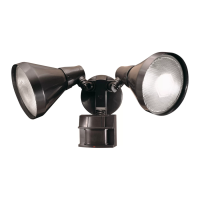
Diecast Motion
Sensing Porch Light
Thispackageincludes:
• PorchLight
• EasytouseUniversalMountingBracket
• MountingHardware
• WireNuts
• LensShield
Model4300
©2012HeathCoLLC 204062-01A
Mode: On-Time Works: Day Night
Test 5Seconds x x
Auto/ 1,5,or10minutes x
AccentOff,3,6Hr,toDawn x
Manual UntilDawn* x
OPERATION
Note: Whenrstturnedonwaitabout1
1
/
2
minutes
forthecircuitrytocalibrate.
*resetstoAutoModeatdawn.
ON-TIME
TEST 1 510MIN
TEST
SetON-TIMEswitchto
1,5,or10minutes.
AUTO
ON-TIME Switch at 1, 5, or
10 minutes
...backon.
1Second
OFFthen...
Manual mode only works at
nightbecausedaylightreturns
thesensortoAUTO.
Flipthelightswitchoffforone
secondthenbackontotoggle
betweenAUTOandMANUAL
MODE.
Manualmodeworksonlywith
theON-TIMEswitchinthe1,
5,or10position.
MODE SWITCHING SUMMARY
Flip light switch off
for one second then
back on*
*Ifyougetconfusedwhileswitchingmodes,turnthe
poweroffforoneminute,thenbackon.Afterthecali-
brationtimethecontrolwillbeintheAUTOmode.
MANUAL MODE
AUTO
TEST
MANUAL MODE
ON-TIME
TEST 1 5 10 MIN
Before installation, record the model number
listed inside the fixture. Attach receipt in case
of possible warranty issues.
Model Number:
SettheON-TIMEswitch
onthesensortoTEST.

Questions and Answers

  • T
    Trevor ShortJul 29, 2025
    How to fix Heath Zenith Outdoor Light that will not come on?
    • B
      Bryan SimsJul 29, 2025
      If your Heath Zenith Outdoor Light won't turn on, first ensure the light switch is on. Then, check for and replace any loose or burned-out bulbs. Also, verify that the fuse hasn't blown or the circuit breaker isn't turned off by resetting it or replacing the fuse. If it's daytime, the daylight turn-off feature might be active, so re-check after dark. Finally, if this is a new installation, inspect the circuit wiring.
  • B
    bassritaAug 6, 2025
    Why does my Heath Zenith Outdoor Light stay on all the time?
    • J
      Joseph PetersonAug 6, 2025
      If your Heath Zenith Outdoor Light is staying on continuously, there might be a heat source like an air vent or reflective surface within its coverage area; try installing a shield on the sensor to block the heat source. Also, ensure the light control isn't in Manual Mode by switching it to Auto. Check and adjust the DualBrite® mode settings. Lastly, reduce the sensitivity if it's set too high.
  • M
    mchavezAug 13, 2025
    Why is my Heath Zenith 4300 turning on in daylight?
    • C
      Craig HoffmanAug 13, 2025
      If your Heath Zenith Outdoor Light comes on during the day, it might be because the sensor is installed in a relatively dark location; try adjusting the sensor installation. Also, check if the sensor is in Test mode and set the control switch to an ON-TIME position.
  • E
    edennisAug 20, 2025
    Why Heath Zenith 4300 does not stay on in Manual mode?
    • J
      Joshua HaleAug 20, 2025
      If your Heath Zenith Outdoor Light does not stay on in Manual mode, it may be due to nearby large, light-colored objects reflecting light, which can trigger the shut-off feature. Avoid pointing other lights at the sensor.

Summary

Operation Modes

Test Mode Operation

Sets the ON-TIME switch to TEST for sensor calibration and function check.

Auto Mode Operation

Sets the ON-TIME switch to 1, 5, or 10 minutes for automatic operation.

Manual Mode Operation

Manual mode works only at night, toggled by the light switch.

Mode Switching Summary

Visual guide summarizing how to switch between TEST, AUTO, and MANUAL modes.

Installation and Assembly

Disassemble Light Fixture

Steps to remove decorative nuts and the light fixture cover from the base.

Install Universal Mounting Bracket

Instructions for attaching the universal mounting bracket to the junction box.

Wiring Light Fixture

Guide for connecting junction box wires and fixture wires using wire nuts.

Wiring Configurations and Grounding

Recommended Grounding Method

Diagrams illustrating proper grounding methods for metal junction boxes.

Other Wiring Options

Diagrams for controlling other lights with the motion sensor fixture.

Testing and Adjustment

Testing Procedure

Steps for turning on power, setting switches, and verifying motion detection.

Sensitivity Adjustment

How to adjust sensitivity to increase or decrease motion detection range.

Setting On-Time and Accent Mode

Adjusting light duration for motion detection and accent lighting.

Coverage Area Adjustment

Sensor Sensitivity to Motion

Explains sensitivity differences for direct vs. across coverage area motion.

Adjusting Coverage Area

Instructions for applying lens shield sections to reduce coverage angle.

Specifications

Technical details including range, sensing angle, electrical load, and power.

Troubleshooting Guide

Light Not Coming On

Troubleshooting steps for when the light fails to illuminate.

Light On In Daylight

Causes and solutions for the light activating during daylight hours.

Light Stays On Continuously

Diagnosing and fixing issues where the light remains on without detection.

Technical Service and Warranty

Contact information for support and details on the two-year limited warranty.

Heath Zenith 4300 Specifications

General IconGeneral
Power SourceHardwired
Voltage120V
Light SensorYes
Mounting TypeWall Mount
Detection Range70 feet

Related product manuals