18
Video Playback
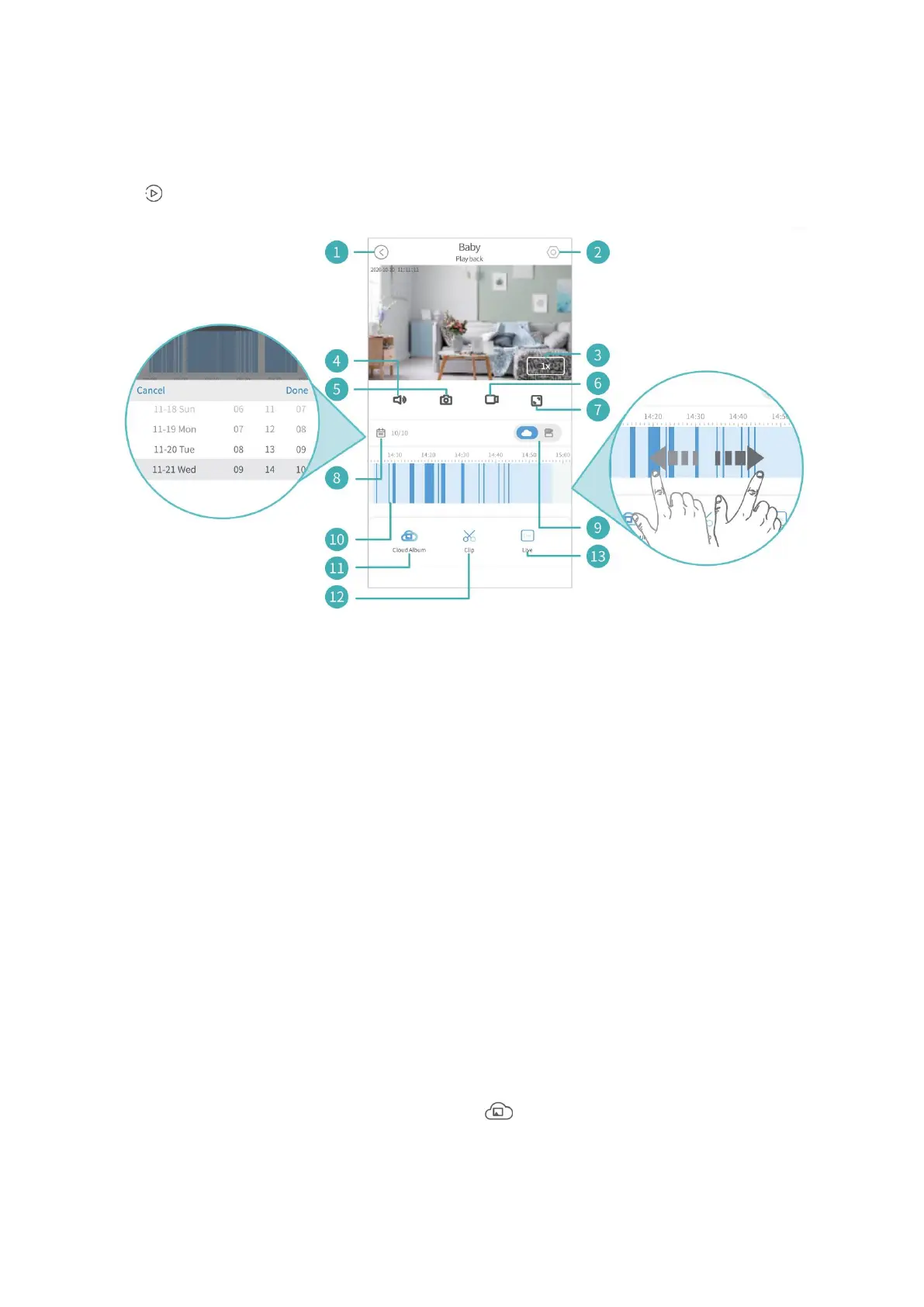
Tap on the Live Video to watch the recorded videos in cloud/memory card.
1. Back to the home page.
2. Detailed Settings.
3. Only available for playing videos from cloud. Tap to play the video at x1.0, x2.0,
x4.0 or x0.5 speed.
4. Turn on/off the live audio from the camera.
5. Tap to capture a photo and save it to local album.
6. Tap to start recording the live video; tap again to end and save it to local album.
7. Full screen.
8. Calendar.
9. Switch between cloud and memory card.
10. Timeline:
Slide leftward or rightward on the timeline to play the videos. Pinch and spread,
or double tap on the timeline to enlarge or narrow it.
When you play the recorded videos from cloud, the timeline will show two colors:
deep blue (motion/sound/human outlines detected) and light blue (nothing
detected).
11. Enter the Cloud Album.
12. Only available for videos from cloud. Slide the arrow on the yellow frame to
adjust the video length you cut, and tap to save the video to the cloud album.
13. Switch to Live Video.



 To Next Page