17
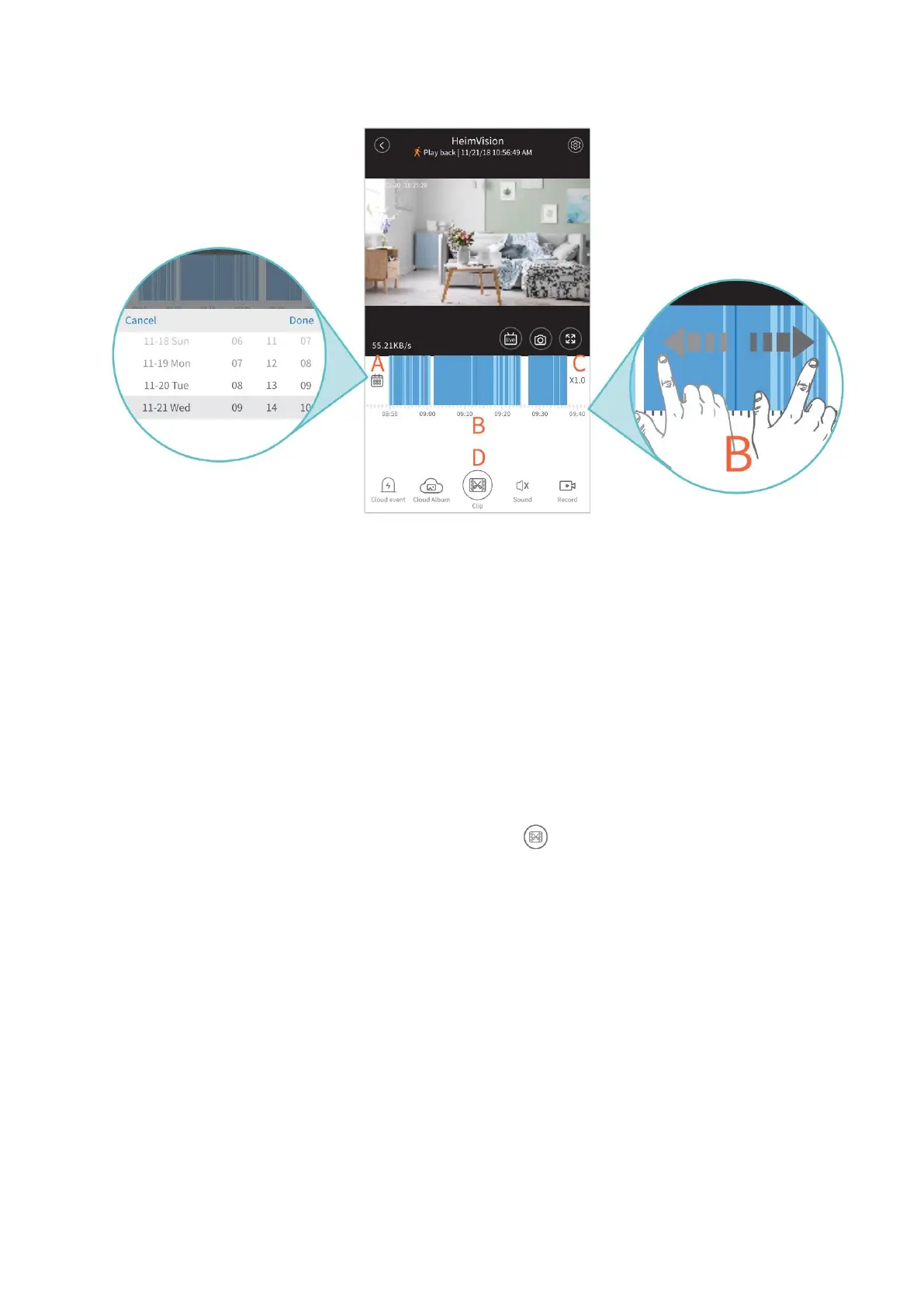
A. Calendar
Tap to show a calendar, then select an exact time to check the video recorded.
B. Timeline:
Slide leftward or rightward on the timeline to play the video recorded. Spread/pinch
or double tap on that timeline to enlarge or narrow it.
When you play recorded videos from cloud, the timeline will show two colors to
differentiate videos recorded with sound/motion/human outlines detected (deep blue
parts) from videos recorded without anything detected (light blue parts).
C. Playback speed:
Only available for playing videos from cloud. Tap to play the video at x1.0, x2.0, x4.0
or x0.5 speed.
D. Clip:
Only available for playing videos from cloud. Tap to cut the video and save it to
the cloud album or delete.
Alarms and Notifications
The camera will record videos to the cloud or memory card only when
motion/sound/human outlines are detected if you subscribe to a cloud plan of Alarm
Trigger Recording or select Event Recording for your memory card.
Apart from recording videos, the camera can also give out Alarm Tone and send push
notifications when motion/sound/human outlines are detected.



 To Next Page