8
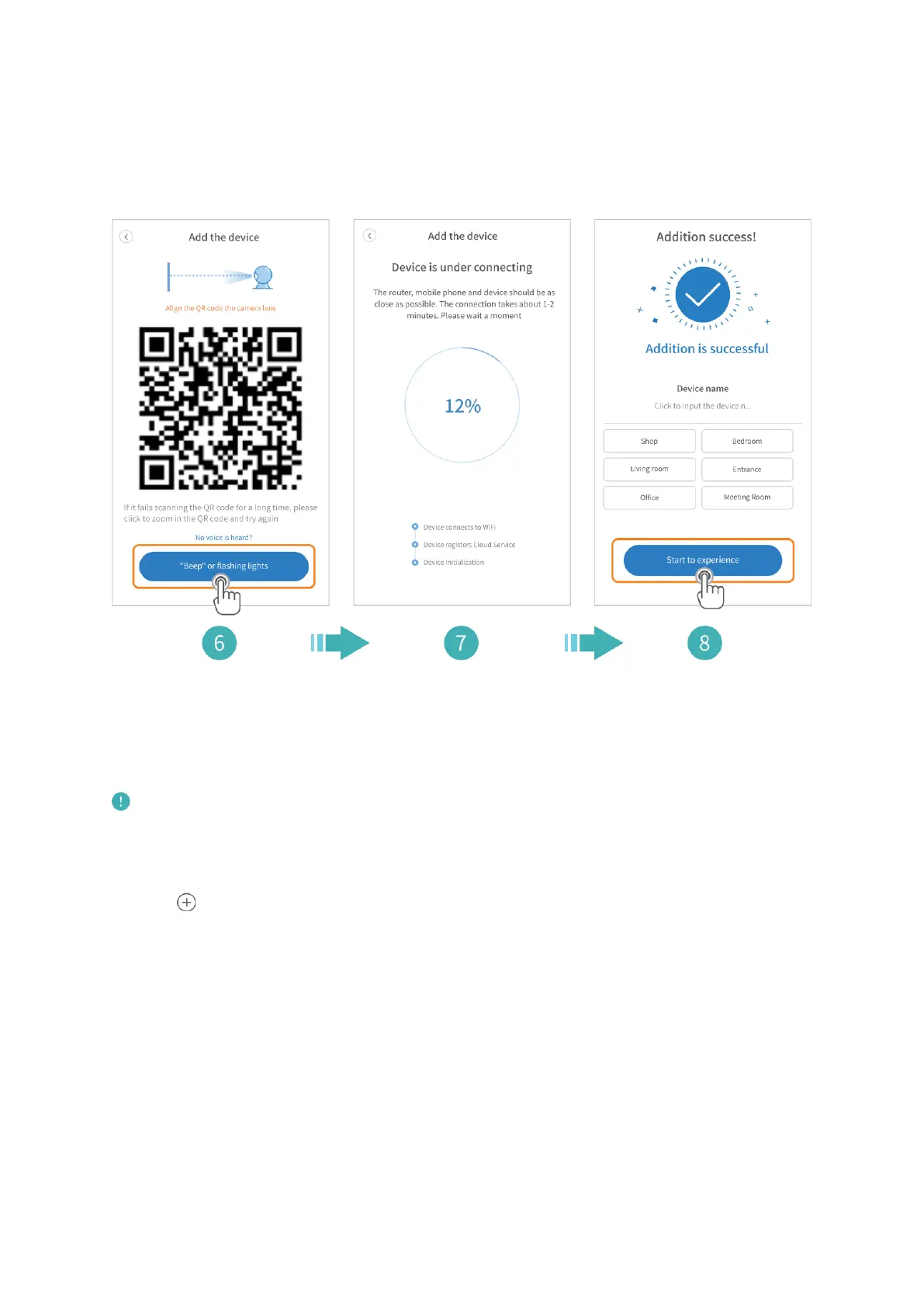
6. Align the QR code on your mobile device with the camera lens and keep a distance of
4-8 inches. Tap “Beep” or flashing lights after you hear two beeps from the camera.
7. Wait for the connection.
8. Name your camera and tap Start to experience to finish the connection.
Connect the camera by AP hotspot
Power on the camera, wait until you hear “Please configure camera by AP hotspot or
scanning code”.
Note:
No password is required for the Wifi HeimLink_AP_xxxx. If your mobile device prompts
you that the Wifi is unsecure, please ignore it.
1. Tap in the center or upper right corner.
2. Select Intelligent camera.
3. Select Addition of AP hotspot.
4. Tap Next.
5. Tap Go to Setting.
6. Connecting to the Wifi HeimLink_AP_xxxx.



 To Next Page