11
4
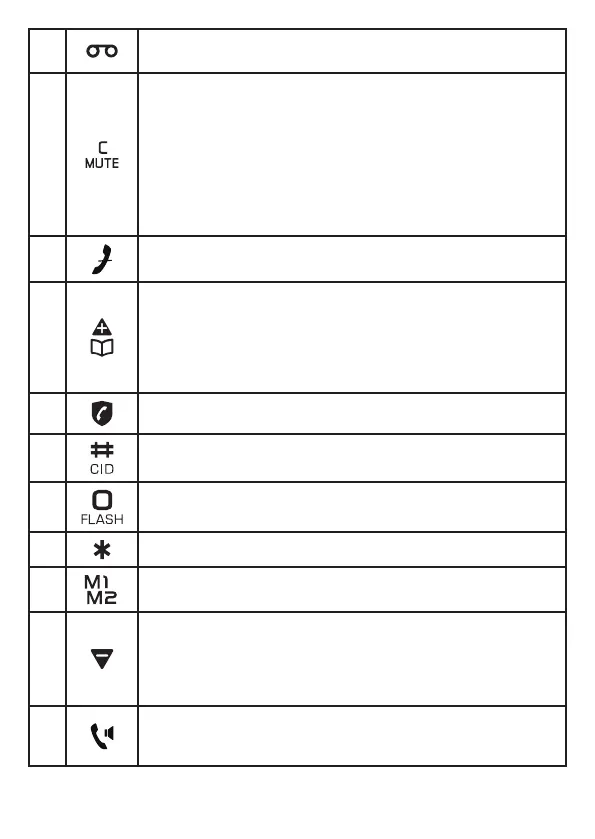
There are new voicemail received from your telephone
service provider*.
5
INT
• Press to start an intercom conversation or transfer a call
(for multi-handset models only).
Mute
• Mute the microphone during a call.
C
• Delete digits or characters while using the dialing keys.
• Return to previous menu.
6
Silence the ringer temporarily while the handset is
ringing.
7
• Review the phonebook when the phone is not in use.
• Increase the listening volume during a call.
• Scroll up while in a menu, phonebook, caller ID log, or
redial list.
• Move the cursor to the lift when entering numbers or
names.
8 Direct access to the Call Block menu.
9
Press and hold review the caller ID log when the phone is
not in use.
10
Press and hold to answer an incoming call when you hear
a call waiting alert.
11 View dialing options in Caller ID. (Refer to Section 10.2)
12
/
Press M1 or M2 to dial pre-recorded number stored in
direct memory.
13
• Decrease the listening volume during a call.
• Scroll down while in a menu, phonebook, caller ID log,
or redial list.
• Move the cursor to the right when entering numbers or
names.
14
Press to make or answer a call.
During a call: Press to activate/deactivate the handset
speakerphone.


 To Next Page