25
When the caller ID log is full and a new call is received/made, the oldest
entry will be deleted automatically. The caller ID log can hold numbers up
to 24 digits and names up to 12 characters.
Missed call notication
If an incoming call has been missed (i.e. not answered), the missed call
icon will be displayed on the idle screen with the number of missed calls
displayed, e.g. .Youcanclearthenoticationbyviewingthecallsliston
any handset registered to the base.
10.1. View and dial out in the caller ID log
1. Long press . The most recent entry is at the top of the list will be
displayed.
2. Press or to scroll through and view the list.
3. When the entry you want is highlighted, press to dial.
10.2. View dialing options
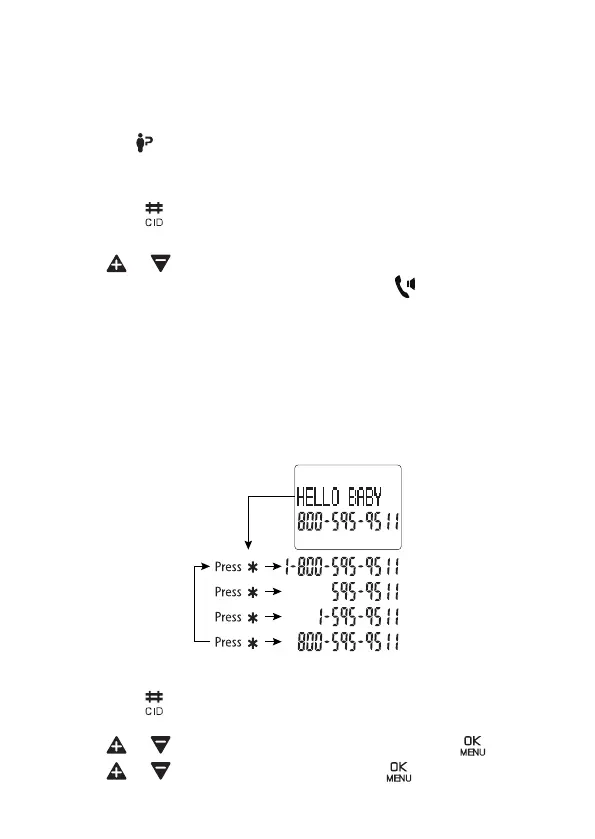
Although the caller ID log entries received have 10 digits (the area code
plus the seven-digit number), in some areas, you may dial a 1 plus the
seven digits, or a 1 plus the area code plus the seven digits. You can
change the number of digits that you dial from or store to the phonebook.
WhilereviewingthecallerIDlog,press*keyrepeatedlytodisplaydierent
dialing options for local and long distance numbers before dialing or saving
the telephone number in the phonebook.
10.3. Save a caller ID log entry to your phonebook
1. Long press . The most recent entry is at the top of the list will be
displayed.
2. Press or to choose the entry you want and press .
3. Press or to choose ADD TO PB, press .


 To Next Page