Quick Start Guide REX 300 23
8. Remote maintenance of S7-MPI/PROFIBUS PLCs
Note: This is not possible with REX 300 eco variants, as they are not equipped with an
MPI interface.
The following steps are necessary to access an S7 MPI/PROFIBUS PLC with your REX
300unit:
8.1 Installdriver
PleaseinstalltheNETLink®-S7-NETdriveronyourremotemaintenancecomputer.
ThedrivercanbefoundontheenclosedCDorthecurrentversiondownloadedat
www.helmholz.de.
8.2 Create station
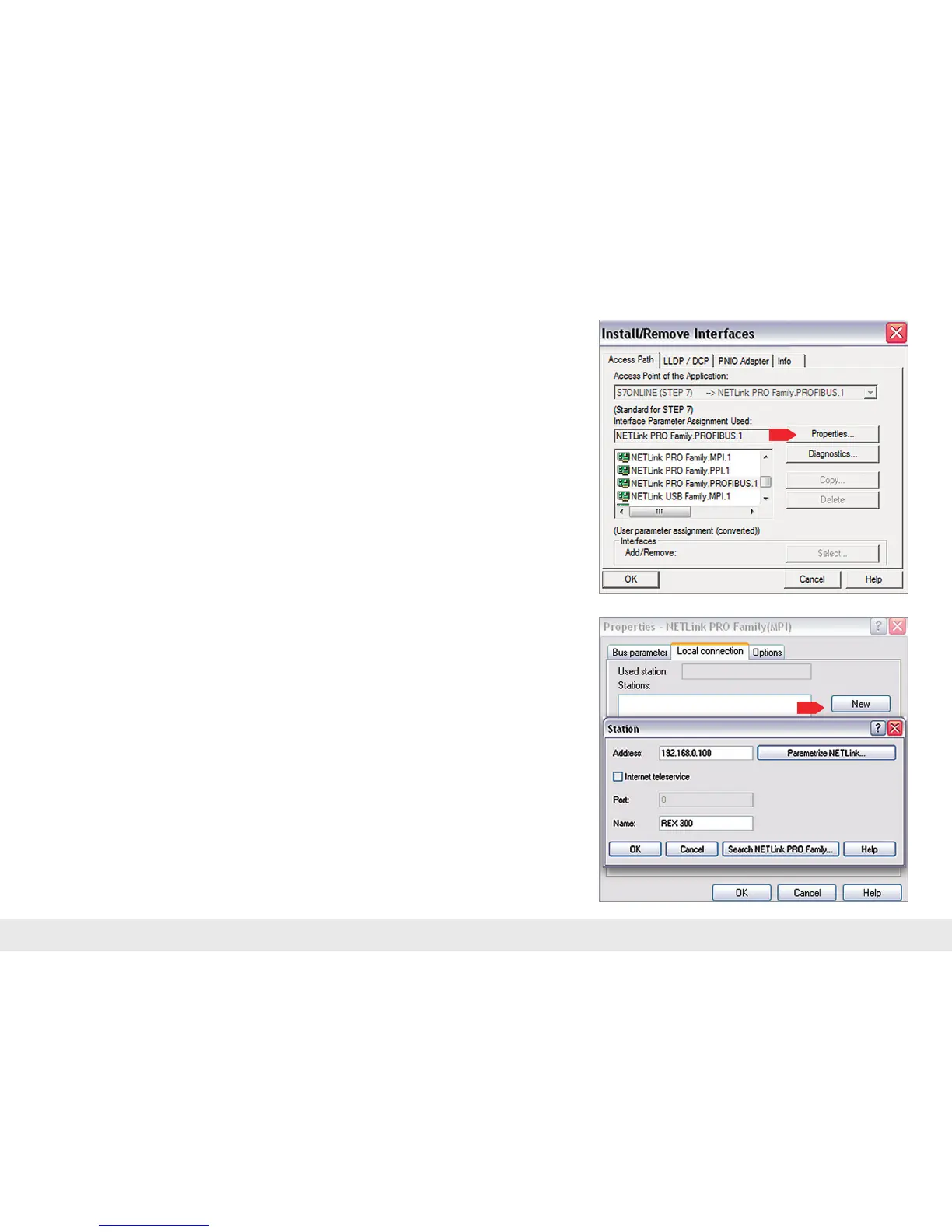
Followingsuccessfulinstallation,theaccesspathsofthe"NETLink®PROFamily"are
availableinthePG/PCinterface.
Note: For the TIA Portal¹ as well, the general assignments must rst be carried out in the
PG/PC interface (accessible via the Windows
2)
Control Panel).
Selectaconguration(MPI/PPIorPROFIBUS)andopenthe"Properties…"page.
8.3 Assign IP address and name
Click the “New” button under the “Local connection” tab to add the REX router.
Enter the LAN IP address and the name of the router into the corresponding input
elds.
The internal communications adapter can be reached with these settings both locally
viaLANandviaVPN.Thenclickon"OK."
Note:PleasenotethattheportrequiredbytheREX300unitinordertocommuni-
cateusingthedriverwillbeopenedbydefault.The"Internetteleservice"function
maynotbeactivated.
Followingtheassumptionofthesettings,itispossibletoreachdevicesattheMPI/
PROFIBUSportoftheREX300.Selectiontakesplacevia"SetPG/PCinterface"inthe
programming software.



 To Next Page