Quick Start Guide REX 30024
9. Remotely servicing an Ethernet PLC
9.1
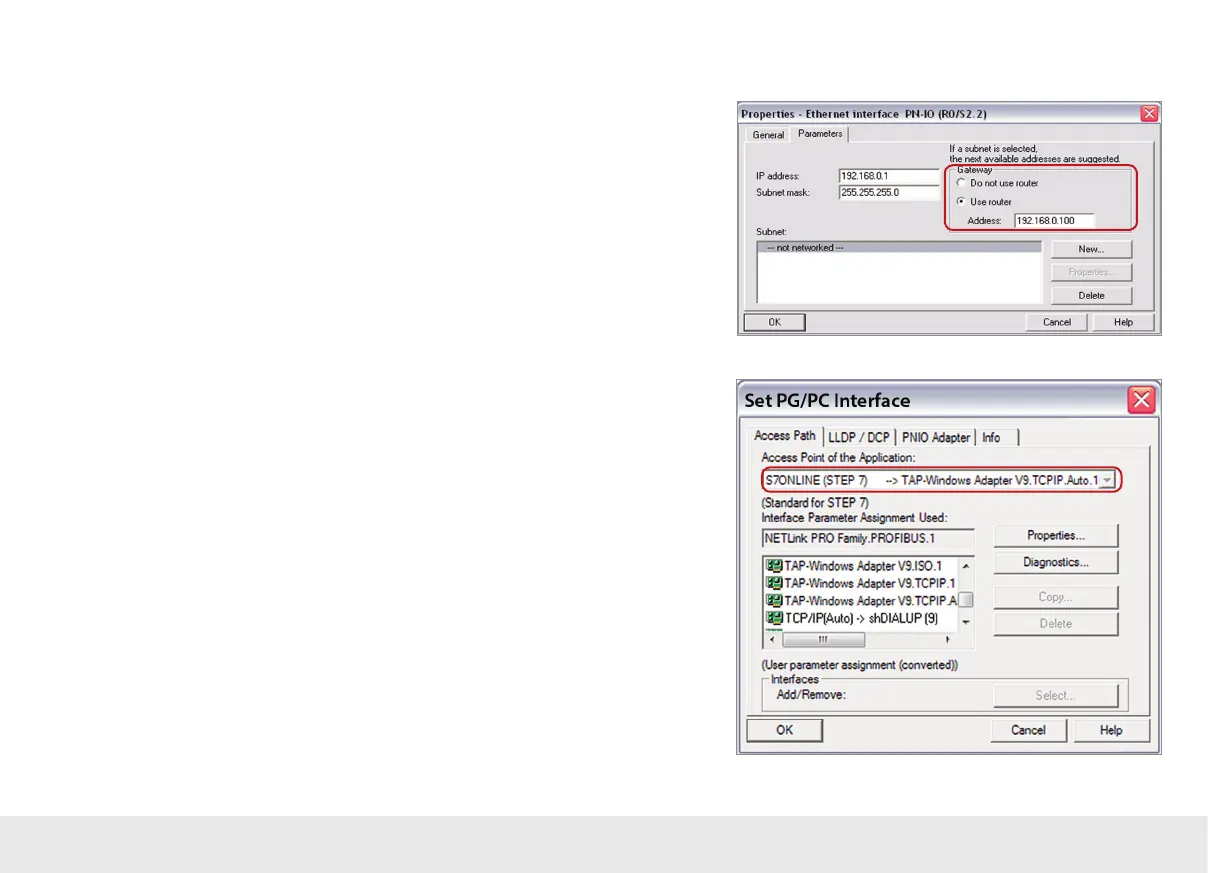
In order to be able to access an Ethernet PLC through a VPN connection, the "Use
router" option must principally be enabled and correctly lled out in the Ethernet
port of the PLC. The IP you need to enter under "Address" corresponds to the LAN IP
address of the REX 300.
Note: The IP address of the PLC must lie within the address range of the LAN interface of
the REX 300.
If you can't enable the "Use router" option in your project or are using an Ethernet
device into which a gateway IP address cannot be entered, please go to the "Device
Administration" page in the myREX24 portal, open the "Settings" tab, and check the
security settings there. The SNAT function should be enabled under "General Firewall
Settings" so that you will be able to reach devices in which a gateway IP has not been
entered. This function is always enabled in myREX24 congurations.
9.2
In order to be able to reach the PLC through the VPN tunnel, you will have to select
the appropriate VPN adapter in the PG/PC interface. The virtual network connection
responsible for this is the TAP Windows
2
Adapter V9.



 To Next Page