Quick Start Guide REX 30018
5. Establishing a VPN connection to your REX 300
Note: In order for the following steps to work, the REX router must have already been
con gured.
5.1 Establishing a VPN connection and transferring IP packages
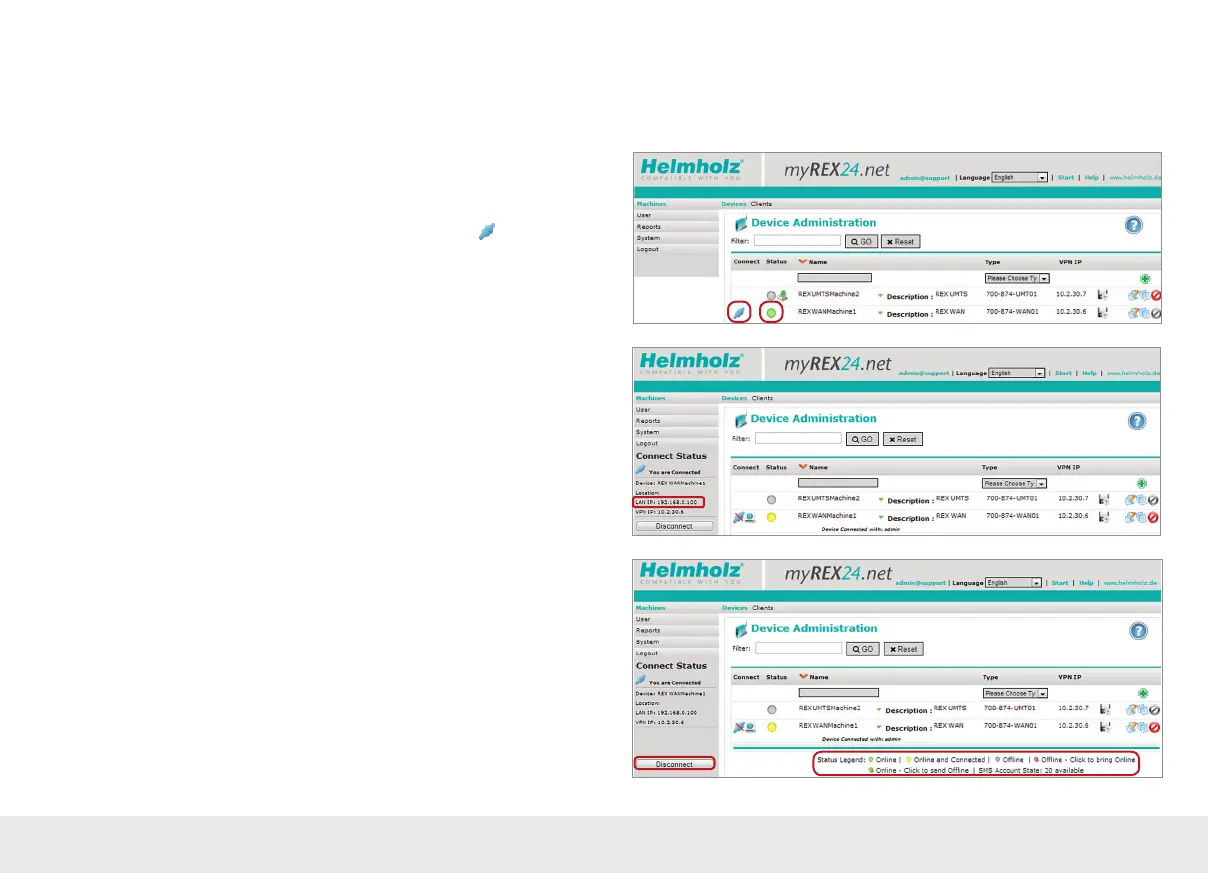
After you log in successfully with shDIALUP, your online account will be opened.
Logged-in REX routers will be indicated with a green circle.
If you now want to connect to a REX router, you can click on the
"QuickConnect"
button to establish a connection to your system.
The "Connect Status" eld will show the REX "LAN IP" address on the equipment side
(important for the "PG/PC interface", for example; see page 22).
Once a connection to the REX 300 has been established, all the IP packets that are
valid for the LAN network in the eld will be forwarded.
To terminate the remote access connection, click the “Disconnect” button.
The “Status Legend” provides more information on additional “status” options.



 To Next Page