Quick Start Guide REX 300 5
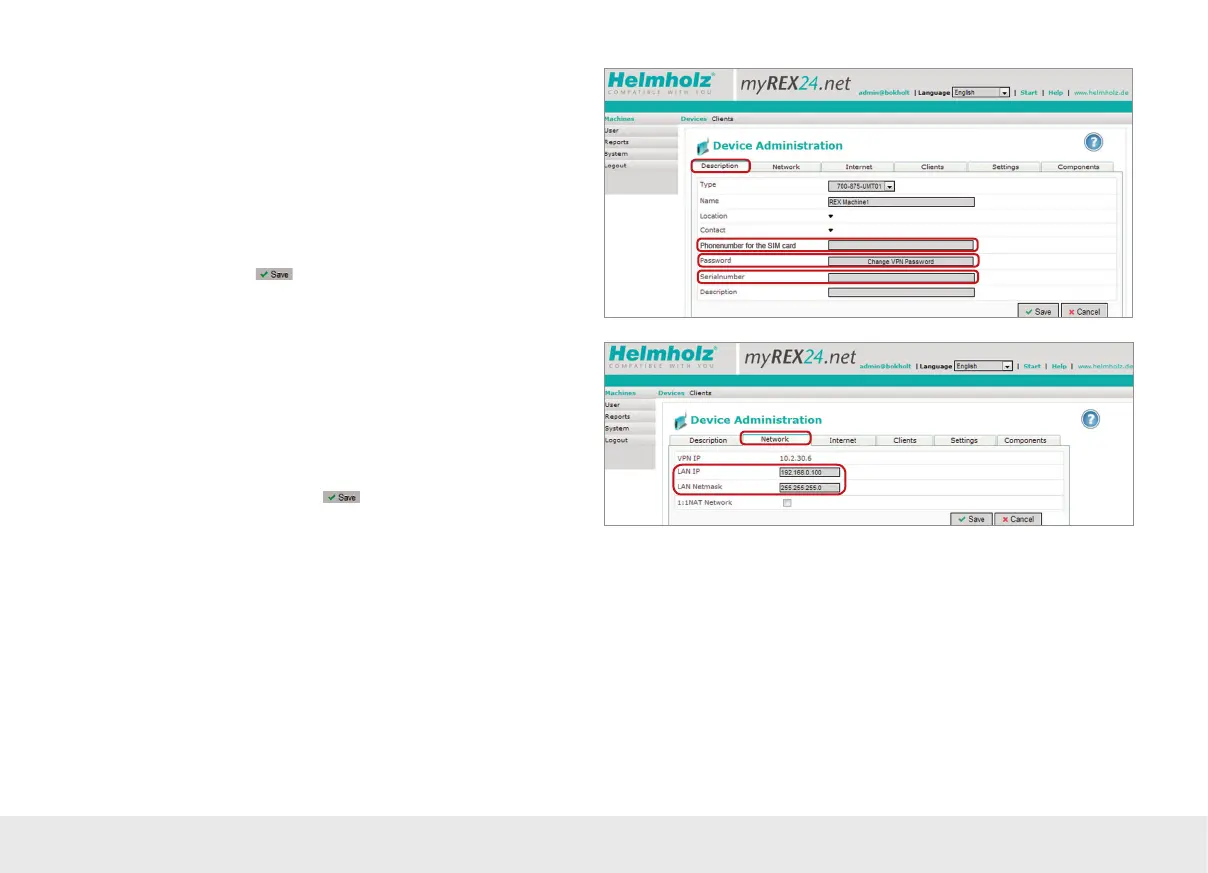
Enter the IP address and the appropriate subnet mask for your equipment network
into the LAN parameter elds. All REX 300 routers come with a default IP address of
192.168.0.100/24. If you don‘t have to/don‘t wish to change this address, it should
be noted that this address area on the REX 300 WAN side may not be used.
If you would like to connect additional TCP/IP components for purposes of remote
maintenance at the LAN interface of the REX 300, this IP address is also the standard
gateway for these devices (see page 24).
Open the „Internet“ tab without clicking on
.
The description page for the device you just created will appear now. Please note
that the location and contact information data are optional.
A eld for entering a phone number for the SIM card will be shown for GSM devices
only. If you do enter a number, the myREX24 portal will be able to control the REX
300 router using SMS text messages.
The “Change VPN Password” eld requires no entry. The password is generated
automatically.
To make sure that the conguration is sent to the right device, you will need to enter
the REX 300 router‘s serial number. The purpose of the additional description eld is
to make it possible to distinguish between several remote servicing units internally.
Go to the „Network“ tab without
.



 To Next Page