5
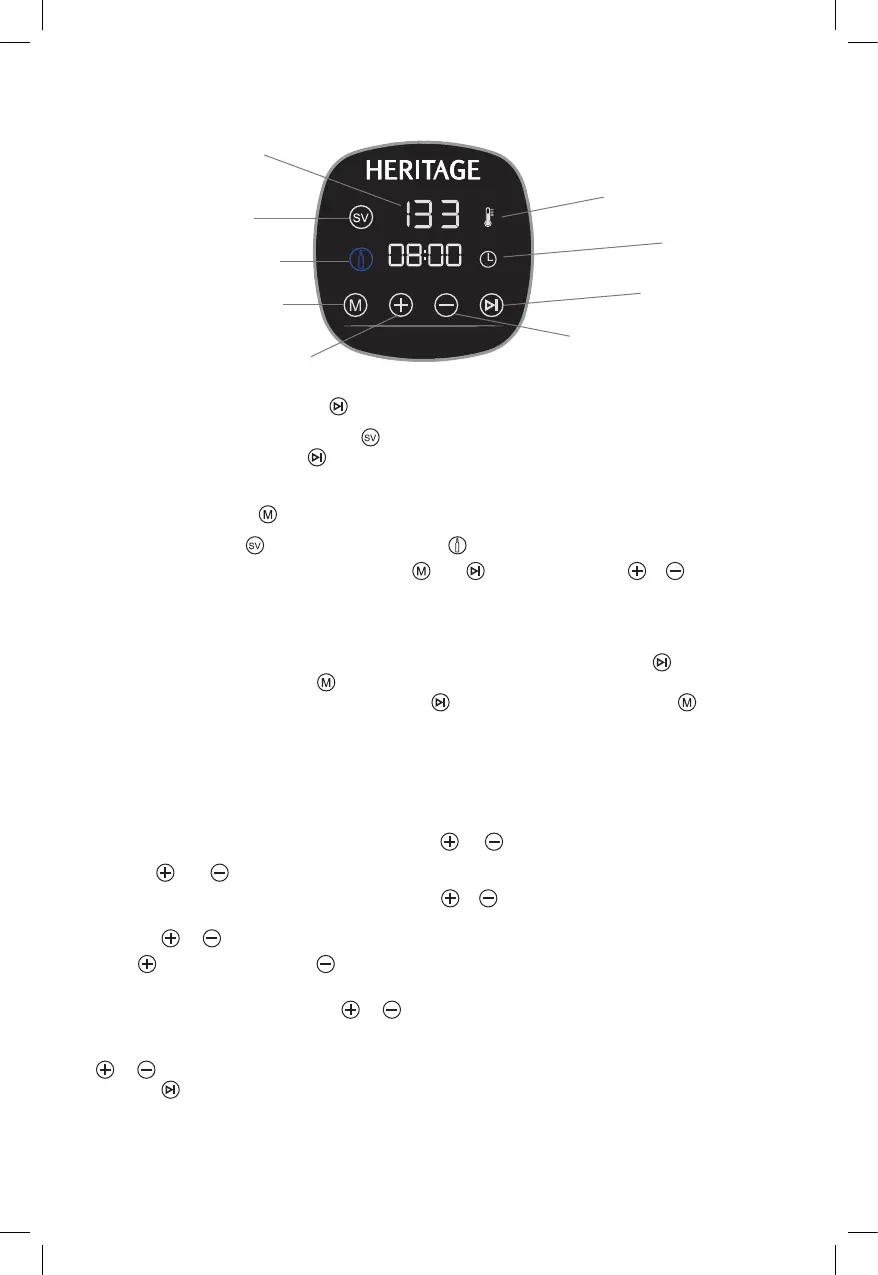
CONTROL PANEL & FEATURES
START/STOP BUTTON
Press the Start/Stop Button to enter (SOUS VIDE) program or wine cooling program after
plugging the appliance. The
button will start the heating /cooking / cooling process. Press
this button again to stop the cooking process.
MODE BUTTON
Select the sous vide or wine cooling function .
After entering desired function by Pressing
and , press both button & and hold for
2 seconds to change from Fahrenheit to Celsius. (Default display is Fahrenheit).
NOTE: The temperature cannot be changed from Fahrenheit to Celsius while the sous
vide precision cooker is in use.
NOTE: To change from SOUS VIDE function to Cooling function : Press
the Start/
Stop button, then press the
button and hold for 2 seconds. To change from Cooling
function to SOUS Vide function : Press the Start/Stop button and press
button.
NOTE: The sous vide precision cooker can be unplugged from electrical outlet, and
plugged back in, in order to change from one function to the other function (i.e. from
sous vide to wine cooling or from wine cooling to sous vide), Repeat above operation.
After one mode of operation was already in use its recommended to leave 30 minutes
before changing between the two modes.
SETTING ADJUSTMENT BUTTONS &
Use the and buttons to adjust to the desired temperature and time settings.
When using the temperature setting, press the
& buttons once to increase or to
decrease the temperature in increments of 1°F or 0.1°C while in Celsius mode. Press and
hold the
or buttons to change the values faster.
Press button to increase or button to decrease the time and temperature settings. Press
button 1 time and temperature adjusts with 1°F or 0.1°C while in Celsius mode.
To adjust cooking time, press the
or button to increase or decrease time in increments
of 1 minute for cooking time between 10 minutes and 2 hours (00:10- 02:00), and in
increments of 10 minutes between 2 hours and 72 hours (02:00- 72:00). Press and hold the
or button to changes the values faster. Once desired temperature is reached, press and
hold the
button to begin cooking.
Refill evaporated water during use, so that always water is filled into cooking container
between MIN and MAX marking of the Sous vide precision cooker. Otherwise, the device
could be damaged.
Temperature Display
Temperature indicator
Sous Vide indicator
Time indicator
Wine cooling indicator
Start/Stop Button
Mode selection button
(time/temperature)
Setting adjustment Button
(MINUS time/temperature)
Setting adjustment Button
(ADD time/temperature)


 To Next Page