39
•
Remove the complete body cover.
Installation
Installation is in the reverse order of removal.
(d) Front upper cover assembly
Removal
•
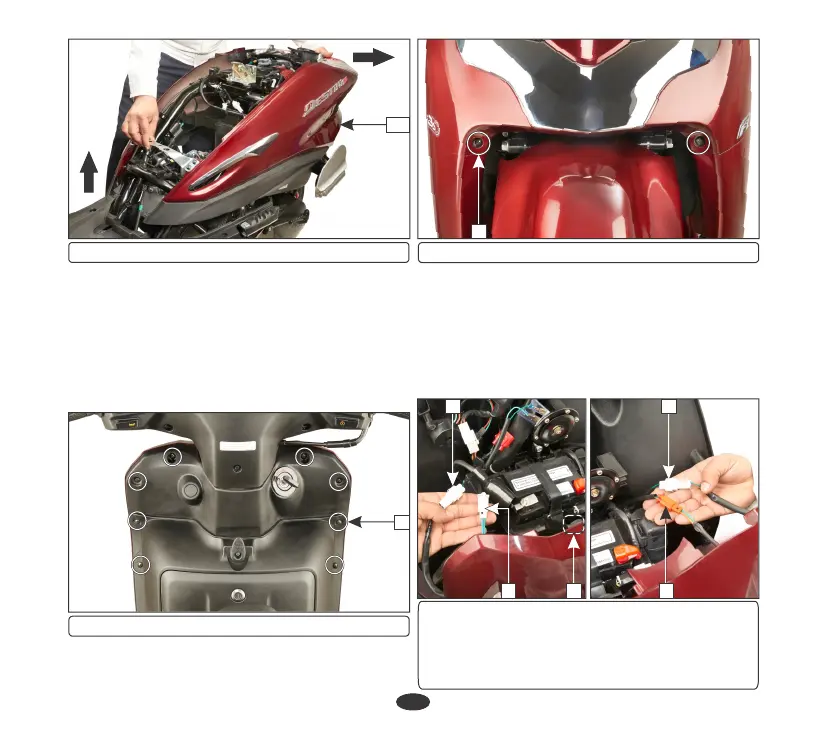
Remove the eight screws (1) on the inner
cover side.
14
(14) Body cover
(1) Screws
1
•
Remove the two screws (2) near the front
fender.
•
Disconnect the right turn signal indicator
connector (4) and left turn signal indicator
connector (5) and disconnect the right
position lamp connector (6) and left
position lamp connector (7).
•
Release the front upper cover lug from the
grommet (3) and pull it slightly to remove it.
(3) Grommet
(4) Right turn signal indicator connector
(5) Left turn signal indicator connector
(6) Right position lamp indicator connector
(7) Left position lamp indicator connector
3
(2) Screws
2
4
6
5
7



 To Next Page