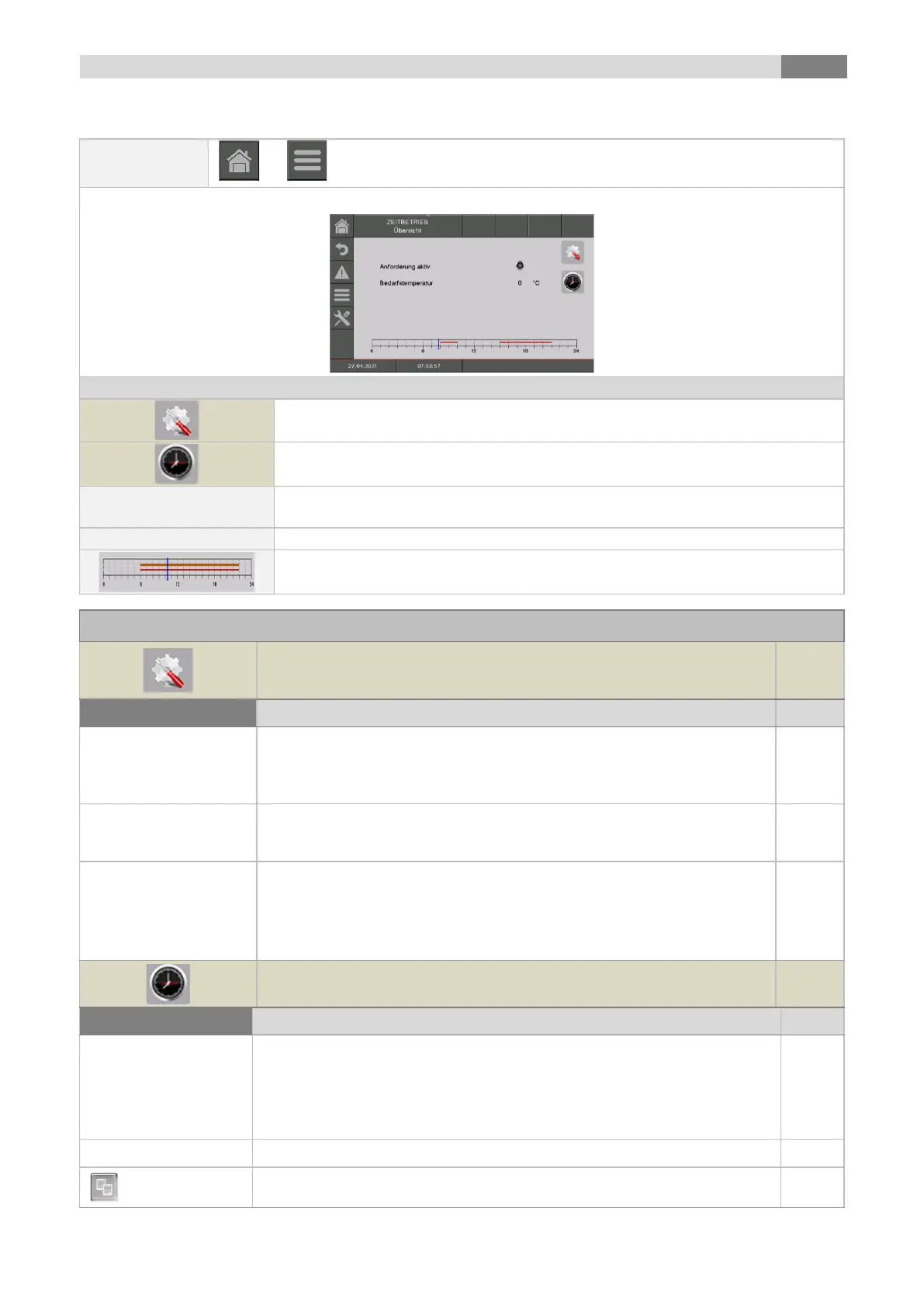
Menu navigation and adjustment values
the menu for the "settings" will be displayed
the menu for the "time program“ will be displayed
Indicates the state of the active requirement of the time mode
If the indicator lamp lights up, the requirement is activated
Indicates the required temperature in °C
Display of the set times according to the time program;
the menu for the "time program“ will be displayed
- manually: fix requirement (demand temperature) during the set time
- via ModBus: requirement via ModBus during the set time (address:
45000-45022) - weather compensated: requirement via heating curve
during the set time
If the boiler works only as a heat supplier (no heating circuit installed),
the set up boiler set temperature (20-100) gets supplied during the set
heating times.
Indicates/activates the min. loading (20-58) (ON/OFF)
▪ Outside of the hot water tank loading time, the hot water tank
temperature is loaded to the set min. loading.
If hot water tank temperature is lower than the min. loading / temperature
value, the hot water tank loading will start
1 - 3 times can be set. The second and third time can be added by the +.
Example:
▪ time 1: 08:00 – 10:00
▪ time 2: 15:00 – 21:00
▪ time 3: 00:00 – 00:00
Setting up individual hot water tank loading times of every weekday
By pressing the symbol Monday preset gets assigned to remaining
weekdays



 To Next Page