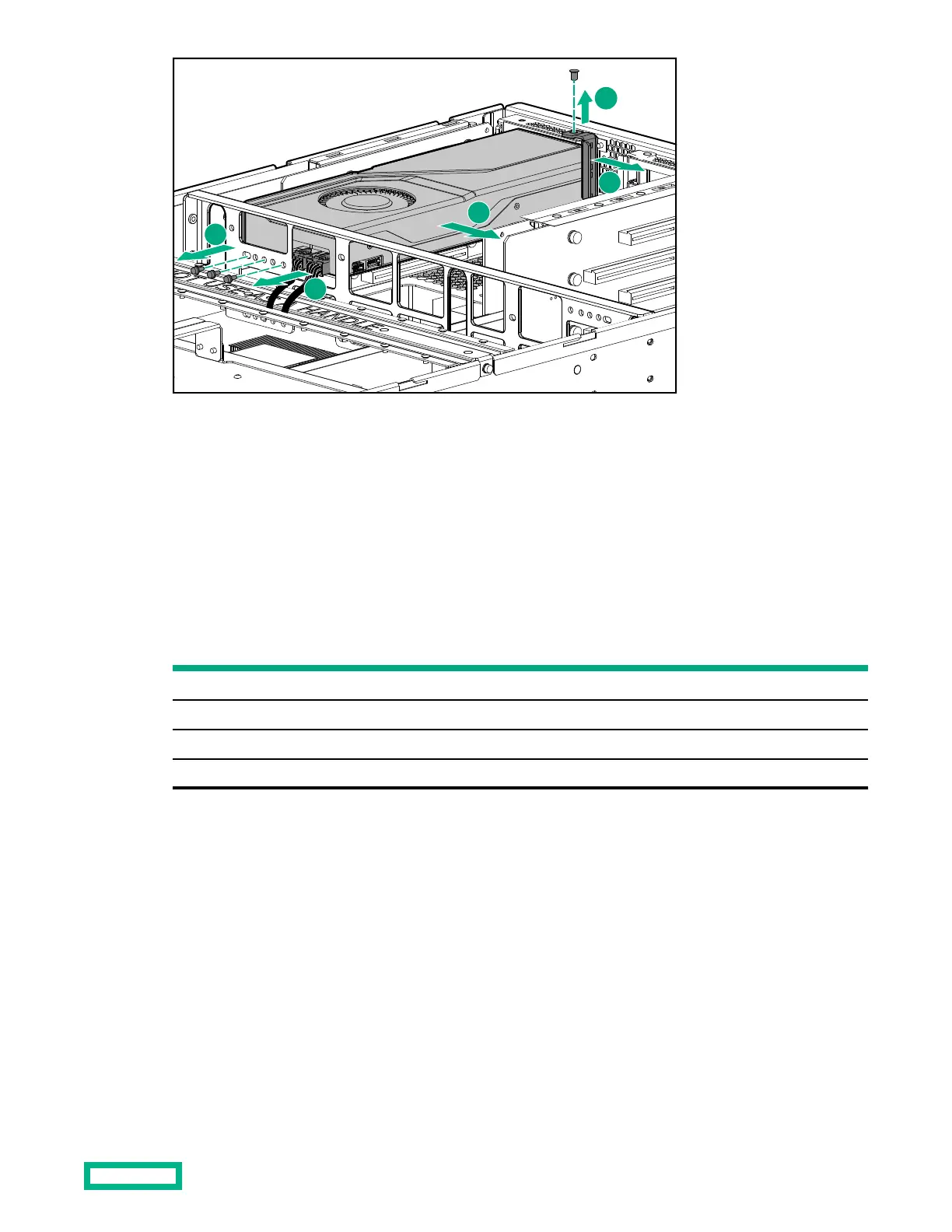
➀ Disconnect any power cables connected to the GPU card.
➁ Remove any screws that secure the GPU card to the GPU support bracket.
➂ Remove the screw that secures the retention bracket.
➃ Remove the retention bracket.
➄ Remove the GPU card.
5.
Insert the replacement card and secure with screws to the GPU support bracket.
6.
Connect any power cables that were disconnected from the card.
Ensure that the power cables are properly connected.
GPU location
Power connector on power board
PCIe slot 2 J13
PCIe slot 4 J12
PCIe slot 13 J10
PCIe slot 15 J11
7.
Install the retention bracket and secure it with its screw.
8.
Install the rear air bales.
9. Install the PCIe riser cover.
10. Install the rear top cover.
After GPU card replacement
Procedure
1. Slide the chassis into the rack and reconnect the cables.
2. Connect power to the system but do not power on the system.
3. To verify cabling, run test upi.
GPU card replacement
44


 To Next Page