24
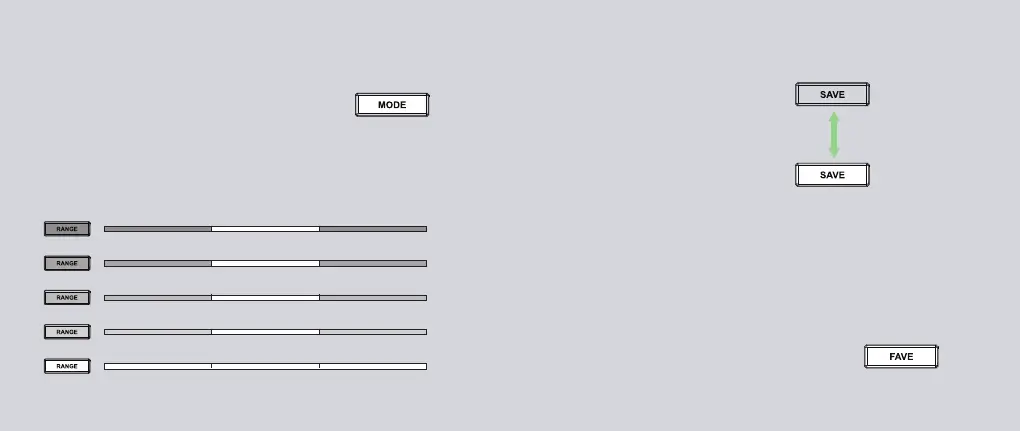
Press the FAVE button to cycle through your favorite
configurations. If you want to delete a saved configuration
from the list, please press the SAVE button to unsave it, and it
will not appear in the next cycle.
To use Save and Fave function, please ensure you are NOT in Configuration Mode. If you
are in Configuration Mode, please press any button of MODE/SAVE/FAVE/RANGE or
wait 2 seconds to exit.
100% 100%
100%
75% 100%
75%
50% 100%
50%
25% 100%
25%
0% 100%
0%
Adjust the Range
The range function allows you to control the width of the light field. The
light intensity of both sides will change according to the current light
configuration. The middle light bar will remain the same.
Preset Light Modes
Press the MODE button to cycle through preset lights
to quickly anchor the start position to find your
favorite lights from thousands of combinations.
The current light configuration has been saved.
Press the SAVE button again to unsave it.
You can find all the saved configurations in FAVE.
The current light configuration is not saved.
Press the SAVE button to save it to your favorite
configurations.
Save and Unsave Lights
Cycle Through Saved Lights
Saved
(Light on)
Unsaved
(Light off)
Press to
Switch


 To Next Page