29
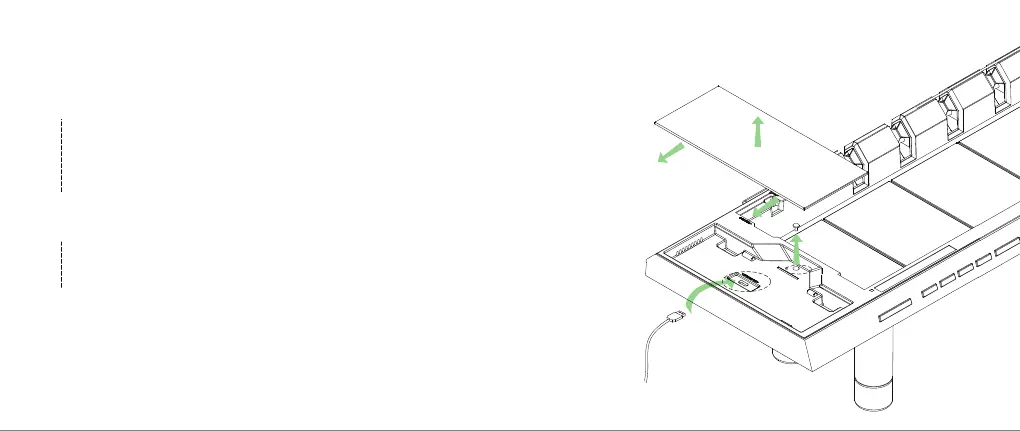
Uninstall the wireless charging module.
Gently unscrew the wireless charging screw by using a 3mm hex key (Allen
Wrench) (does not come with the product), slide the module outward, and lift
to remove. You have to remove the Studio’s top surface first to expose the
screw indicated in the picture. WARNING: Installing or uninstalling the wireless
module without shutting down the Studio's internal power supply may lead to
irreversible damage to the machine and immediately voids the warranty.
2
Connect to a computer and upgrade the firmware offered by Hexcal.
Connect the firmware upgrade cable to both the Studio and your computer, turn
on the internal (INT) power supply, go to the "Firmware Upgrade" section on the
hexcal.com website, and follow instructions to download latest Hexcal Studio
firmware.
3
Repeat Step-1 (MUST COMPLY) and Reinstall wireless charging
mode.
After successfully making the upgrade, shut down the internal power supply of
the Studio and reinstall the wireless charging module back to the Studio.
WARNING: Installing or uninstalling the wireless module without shutting down
the Studio's internal power supply may lead to irreversible damage to the machine
and immediately voids the warranty.
4
2
2
2
2
3


 To Next Page