3.6.5 NAT (P2P Internet penetrate function)
This function is used for connecting the device to mobile phone (Superlive Pro program), or browse from
website. (support IE、Chrome and Firefox browser)
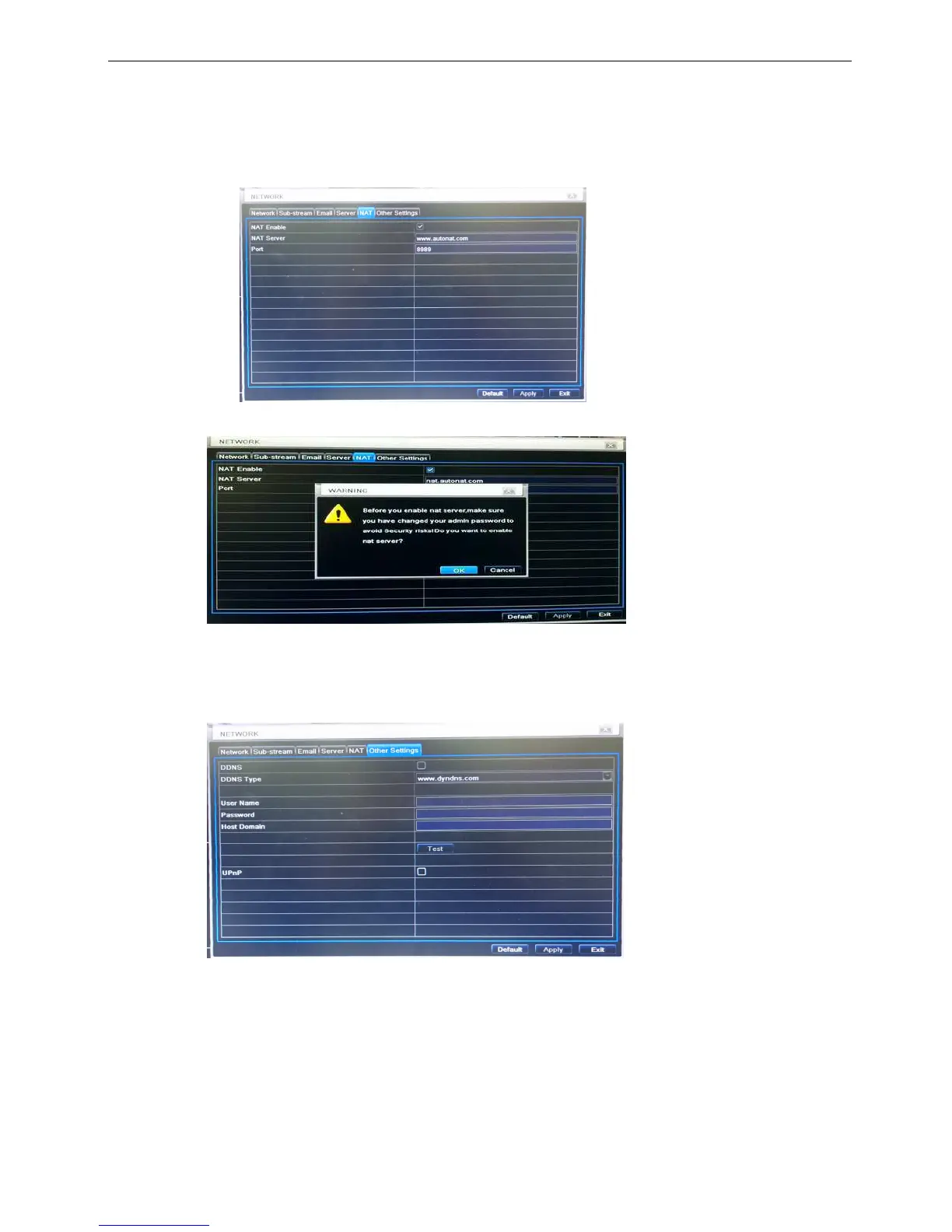
Step1: Go to MenuSetup NetworkNAT interface. Refer to Fig 3-29.
Step2: Enable NAT.
※ (The NAT Server default is www.autonat.com and Port number is 8989, no need to modify.)
Step3: Click “Apply” to save the settings.
※ When you enable the function, there will pop-up the following information, remind you modify the
account and password, avoid security risk.
※ How to use this function, please reference the Appendix A part setting step.
3.6.6 Other settings
Step1: Enable DDNS server: user needs to input user name, password and host domain name of the
registered website, click TEST to test the effectively of relevant information.
Fig 3-30 network configuration-other settings
STEP2: click “default” button to resort default setting; click “apply” button to save the setting; click “exit” button
to exit current interface.
Note: The domain name server that selected by user is a banding domain name of DVR. User should
logon the website which provided by the server supplier to register a user name and password firstly,
and then apply a domain name on line for the server. After the successful apply, user can access the
server from the IE client by inputting that domain name.
*Please reference Appendix B to setup DDNS function.



 To Next Page