Chapter 4 Typology Display
In Typology interface, you can view the relaonships among dierent devices added and congure
the typology.
4.1 Relate Operaons
Select a device added, go to → General Applicaon → Typology to enter the typology display
interface.
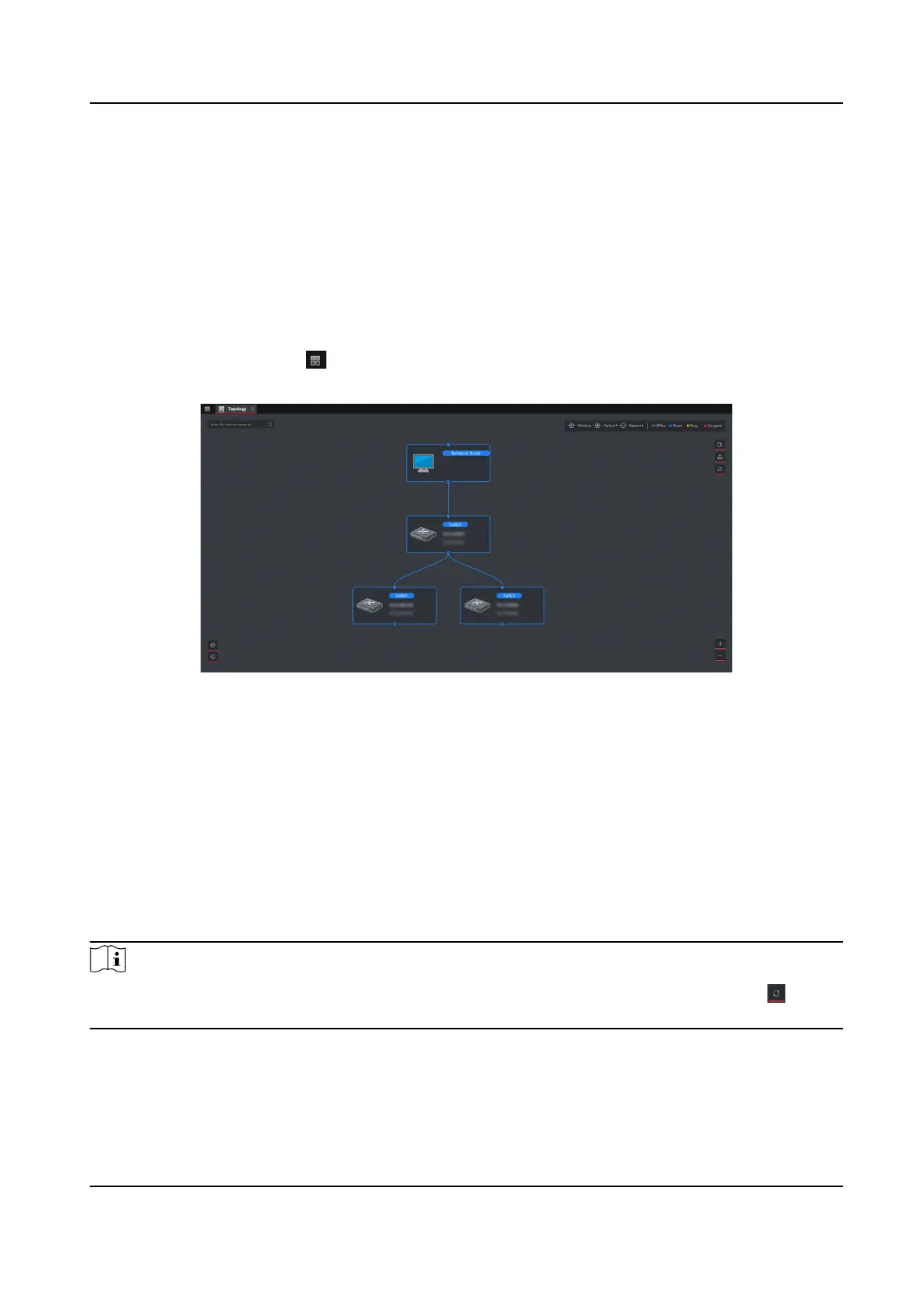
Figure 4-1 Typology Display
Interface Descripon
• On the upper-le corner, you can enter another name or IP address of a device to view the
corresponding typology.
• On the upper-right corner, you can view the icon of lines and the meaning of
dierent colors,
select two device to show the ash of the signal transmission between them, and export or
refresh the typology.
• On the
lower-le corner, you can do the typology sengs and view the ps.
• On the lower-right corner, you can click the icons or scroll your mouse wheel to enlarge or
narrow the typology.
Note
If you enter the typology interface for the rst me, no typology is displayed, please click to
refresh it.
Gigabit PoE Switch Client User Manual
6



 To Next Page
 Loading...