6.2.7 Hik-Connect
Go to Conguraon → Network → Plaorm Access . Refer to Hik-Connect for details.
6.2.8 ISUP
SDK is based on Intelligent Security Uplink Protocol (ISUP). It provides APIs, library les, and
commands for the third-party
plaorm to access devices such as NVRs, speed domes, DVRs,
network cameras, mobile NVRs, mobile devices, decoding devices, etc. With this protocol, the
third-party plaorm can realize funcons like live view, playback, two-way audio, PTZ control, etc.
Steps
1.
Go to
Conguraon → Network → Plaorm Access .
2.
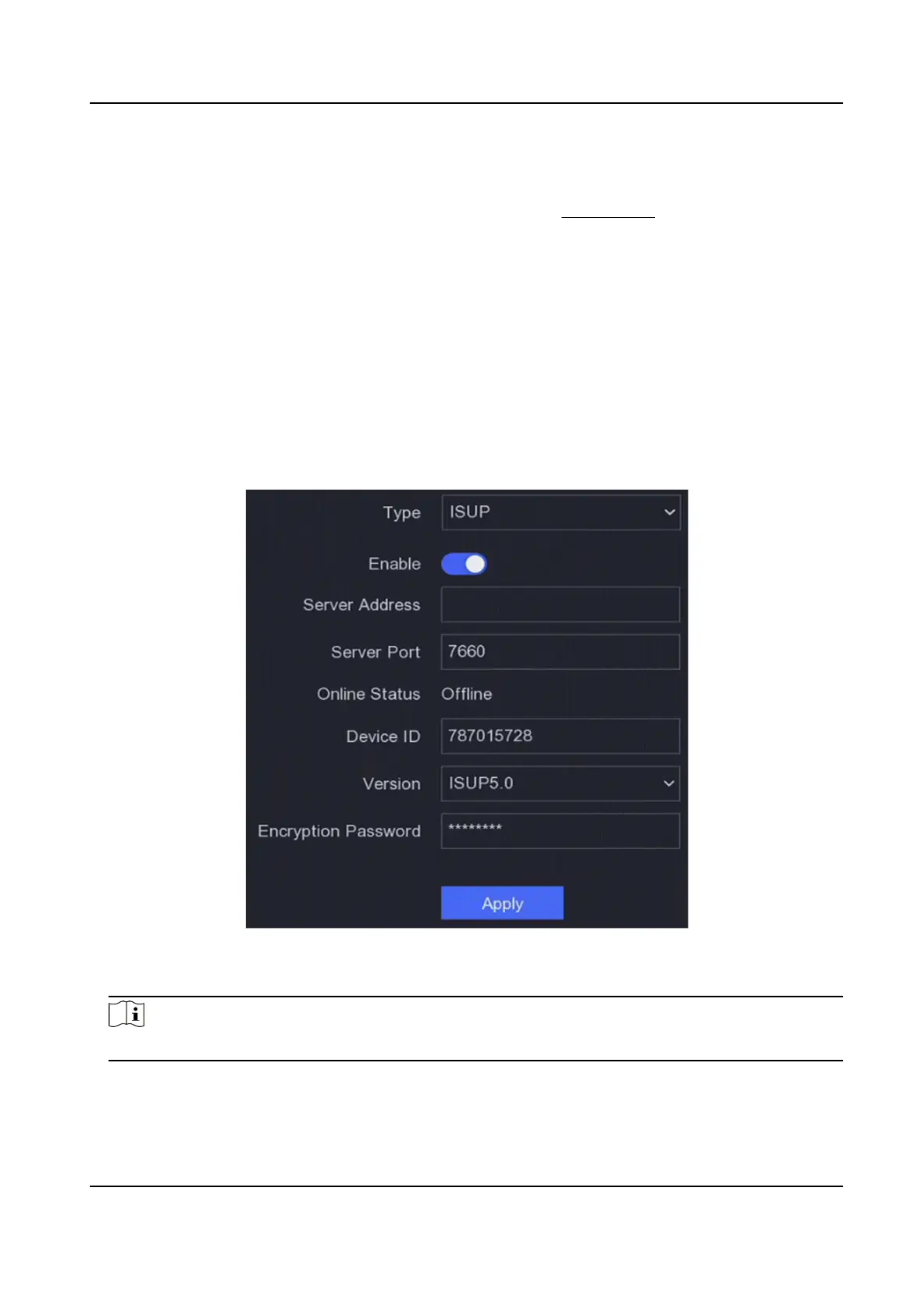
Set Type as ISUP.
Figure 6-7 ISUP
3.
Turn on Enable.
Note
Enabling ISUP will disable other plaorm access.
4.
Set the related parameters.
Server Address
Network Video Recorder User Manual
48


 To Next Page
 Loading...