Chapter 8 Group Intercom
You can realize group intercom via the device.
Before You Start
●
The device is connected to the plaorm.
●
Register the device on the group intercom service conguraon interface via the web browser.
Steps
1.
Select Group Intercom on the main menu.
2.
Set
plaorm parameters.
1) Select Plaorm.
2) Enable Group Intercom.
3) Set IP Address and Port.
3.
Go back to the login page, enter the registered User Name and Password on the group intercom
service
conguraon interface, and select Login.
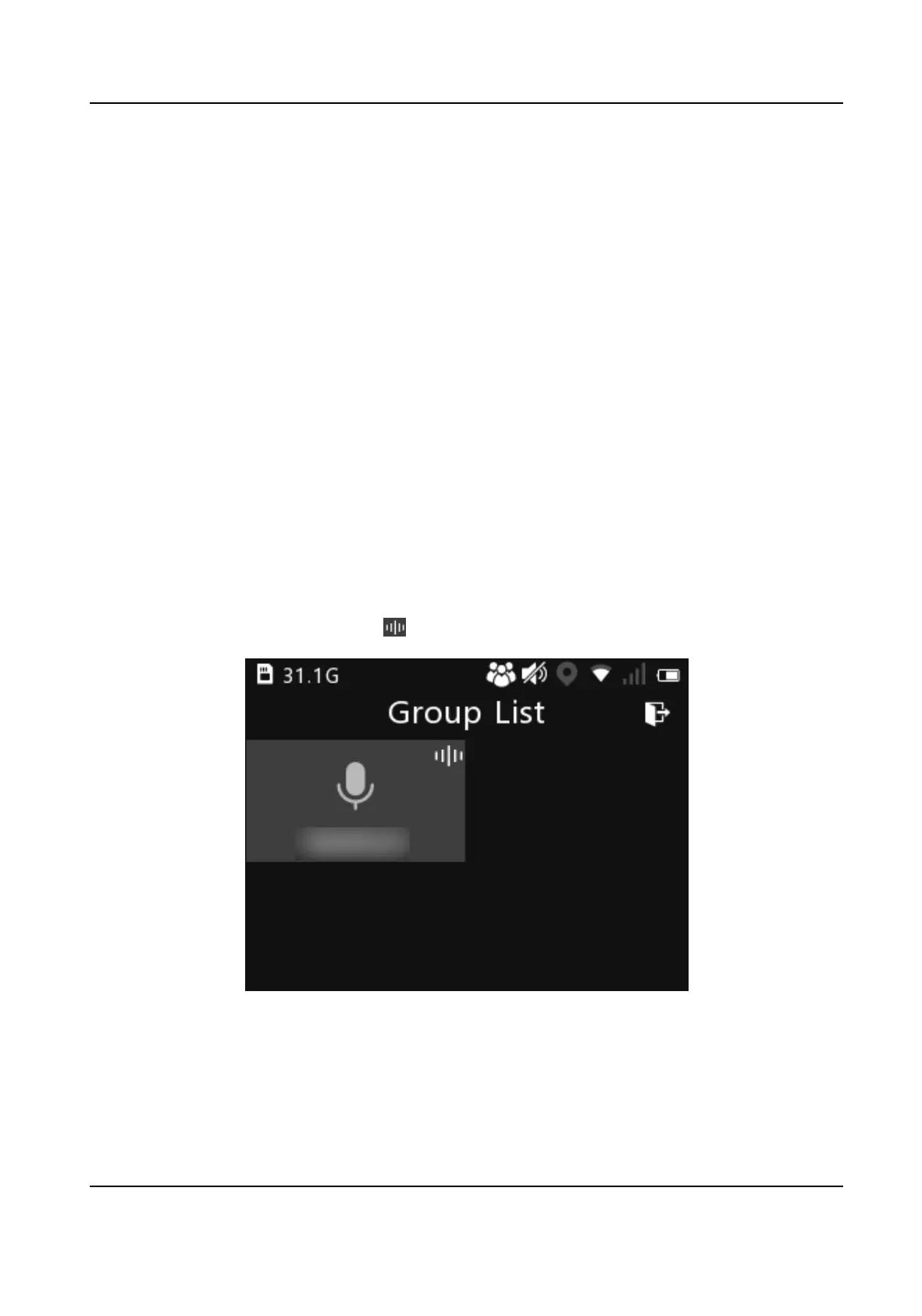
Aer login, you will enter Group List page. The device will show the group list which is managed
by the central plaorm automacally.
4.
Select a group to view group members and status.
5.
On the group member page, select Set XX as Current Group, and select OK. Then, the current
intercom group will be marked with
in the group list.
Figure 8-1 Group List
6.
On the group member page, select an online member, and select Audio Call to send a full-
duplex audio call.
Aer the member received, you can start the audio call. Aer the call is over,
you can select Hang Up to end the audio call.
7.
Oponal: You can do the below operaons.
Body Camera User Manual
27













 To Next Page