Accessories
122 Centrella® Smart+ Bed Instructions for Use (193587 REV 10)
PATIE NT HELPER BRACKET SUPPORT (P7928) AND PAT IE NT HELPER SLEEVE (P3212)
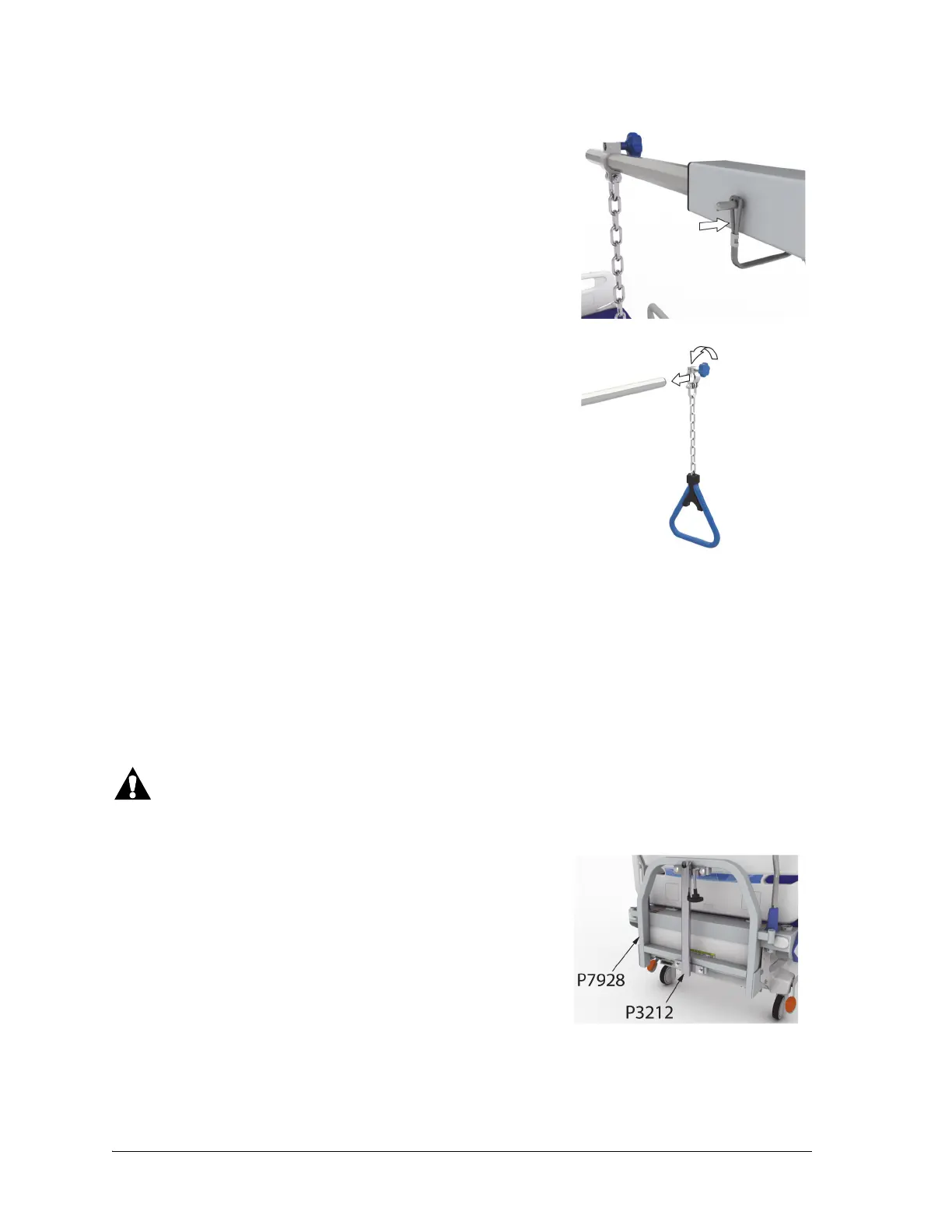
8. Make sure the pin is through the retainer.
9. Install the clamp of the trapeze handle assembly on to the
horizontal arm, and tighten the clamp to attach the trapeze
handle assembly to the horizontal arm.
To Remove
1. Loosen the clamp that attaches the trapeze handle assembly to the horizontal arm, and remove
the trapeze handle assembly from the horizontal arm.
2. Remove the pull pin, and then remove horizontal arm from the assembly.
3. Remove the pull pin, and then remove arm assembly from the Patient Helper mount.
4. Insert the pin into the Patient Helper mount.
Warning—Do not exceed the 113.5 kg (250 lb) load capacity of the Patient Helper Bracket Support.
Injury or equipment damage could occur.
The patient helper bracket support (P7928) is for use with patient
helper sleeves from traction equipment manufacturers.
The patient helper sleeve (P3212) must be installed before the
adapter bracket is installed on the bed. Refer to the equipment
manufacturer’s instructions for installation procedures. The P3212
patient helper sleeve is for use with the Orthopedic System, Inc.
patient helper.












 To Next Page