10
EN
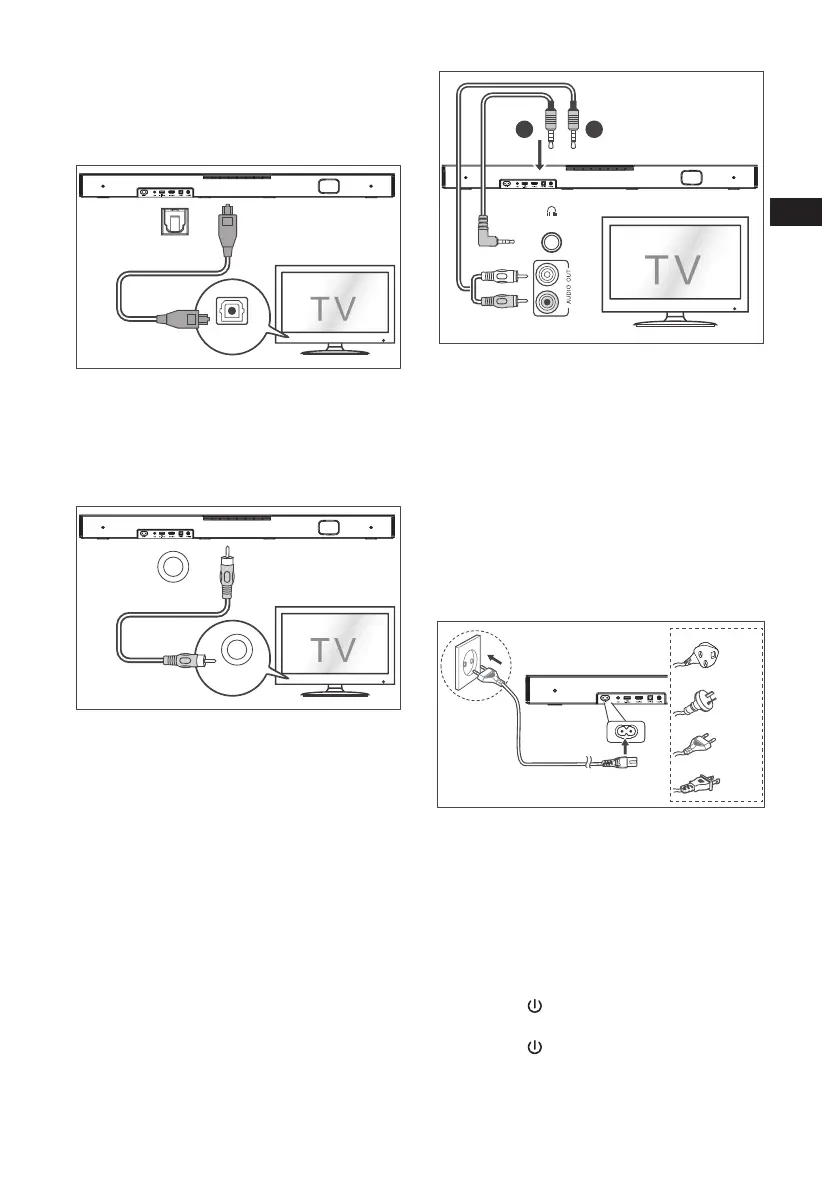
4.2 Use the OPTICAL Socket
- Connect an OPTICAL cable to the TV’s
OPTICAL OUT socket and the OPTICAL
socket on the unit.
OPTICAL
OPTICAL
COAXIAL
COAXIAL
4.3 Use the COAXIAL Socket
• You also can use the COAXIAL cable to
connect the TV's COAXIAL OUT socket and
COAXIAL socket on the unit.
HDMI ARC
HDMI ARC
OPTICAL
USB
.KGJVNUTK
B
A
OPTICAL
COAXIAL
COAXIAL
Tip: The Soundbar may not be able to decode all
digital audio formats from the input source. In this
case, the Soundbar will mute. This is NOT a defect.
Ensure that the audio setting of the input source (e.g.
TV, game console, DVD player, etc.) is set to PCM or
Dolby Digital (Refer to the user manual of the input
source device for its audio setting details) with
HDMI ARC / OPTICAL / COAXIAL input.
4.4 Use the AUX Socket
A. Use a 3.5mm to 3.5mm audio cable to
connect the TV’s or external audio device
headphone socket to the AUX socket on the
unit.
B. Use a RCA to 3.5mm audio cable to connect
the TV’s audio output sockets to the AUX
socket on the unit.
HDMI ARC
HDMI ARC
OPTICAL
USB
.KGJVNUTK
B
A
OPTICAL
COAXIAL
COAXIAL
4.5 Connect Power
Risk of product damage!
- Ensure that the power supply voltage
corresponds to the voltage printed on the
back or the underside of the unit.
- Before connecting the AC power cord,
ensure you have completed all other
connections.
• Connect the mains cable to the AC~ socket of
the Sound Bar and then into a mains socket.
HDMI ARC
HDMI ARC
OPTICAL
USB
.KGJVNUTK
B
A
OPTICAL
* Power cord quantity and plug very by regions.
5. Basic Operation
5.1 Standby/ON
When you rst connect the main unit to the mains
socket, the main unit will be in Standby mode.
• Press the
button on the unit or on the
remote control to switch the unit ON.
• Press the
button again to switch the unit
back to STANDBY mode.
• Disconnect the mains plug from the mains
socket if you want to switch the unit OFF
completely.



 To Next Page