19
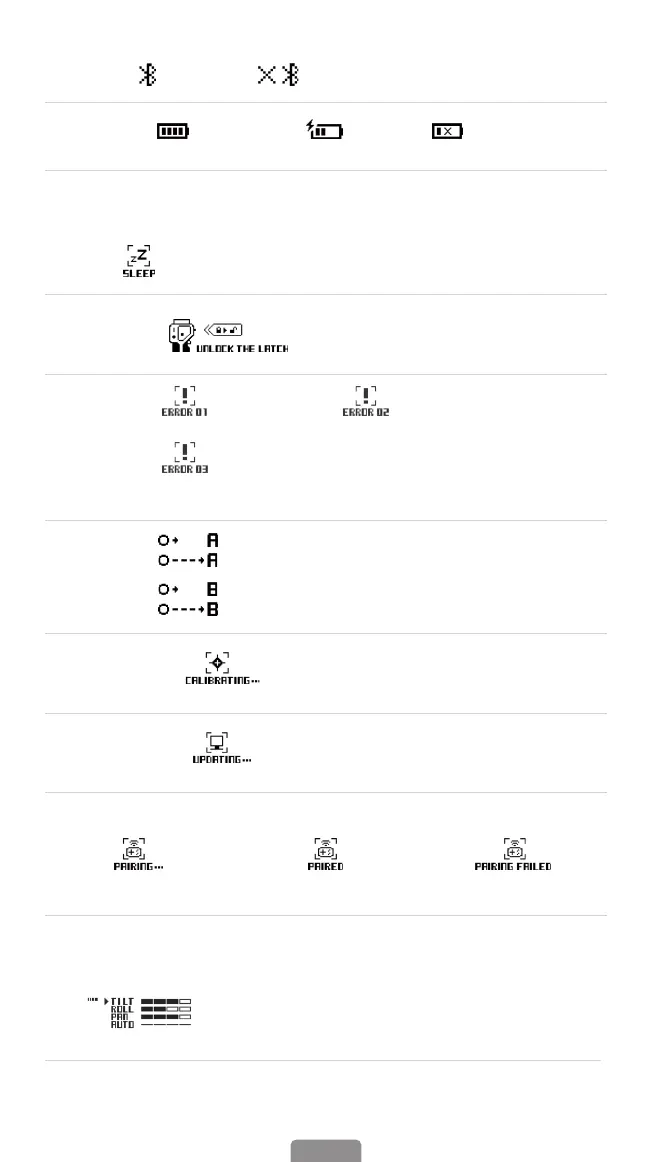
③ Bluetooth: Connected Disconnected
④ Battery Level: Current Level Charging Low Battery
Others
1. Standby: Gimbal enters standby mode
2. Pan Axis Latch: Pan axis is locked, unlock the Latch
3. Error:
Firmware error Gyroscope error
Overloading (this error occurs when you didn't unlock the
motor before using gimbal, or the gimbal is not leveled; or the motor
is subject to external interference.)
4. A-B Motion:
Move to the position A from the current position at a
constant speed.
Move to the position B from the current position at a
constant speed.
5.Auto Calibration: Calibrating
6.Firmware Update: Updating
7. Pair Remote Control(Sold Separately):
Pairing
Paired Successfully
Pairing Failed
8.Motor Torque Adjustment:
Motor torque level of each axis;
AUTO represents the motor self-adaptation level (AUTO
bars ashing represents motor self-adaptation is being
performed; AUTO bars stop ashing represents the
completion of self-adaptation).



 To Next Page