Stack’d Series HOMEGRID Technical
Page 21 Chapter 4: How to match communication with Inverter
3.3. Connection with inverter
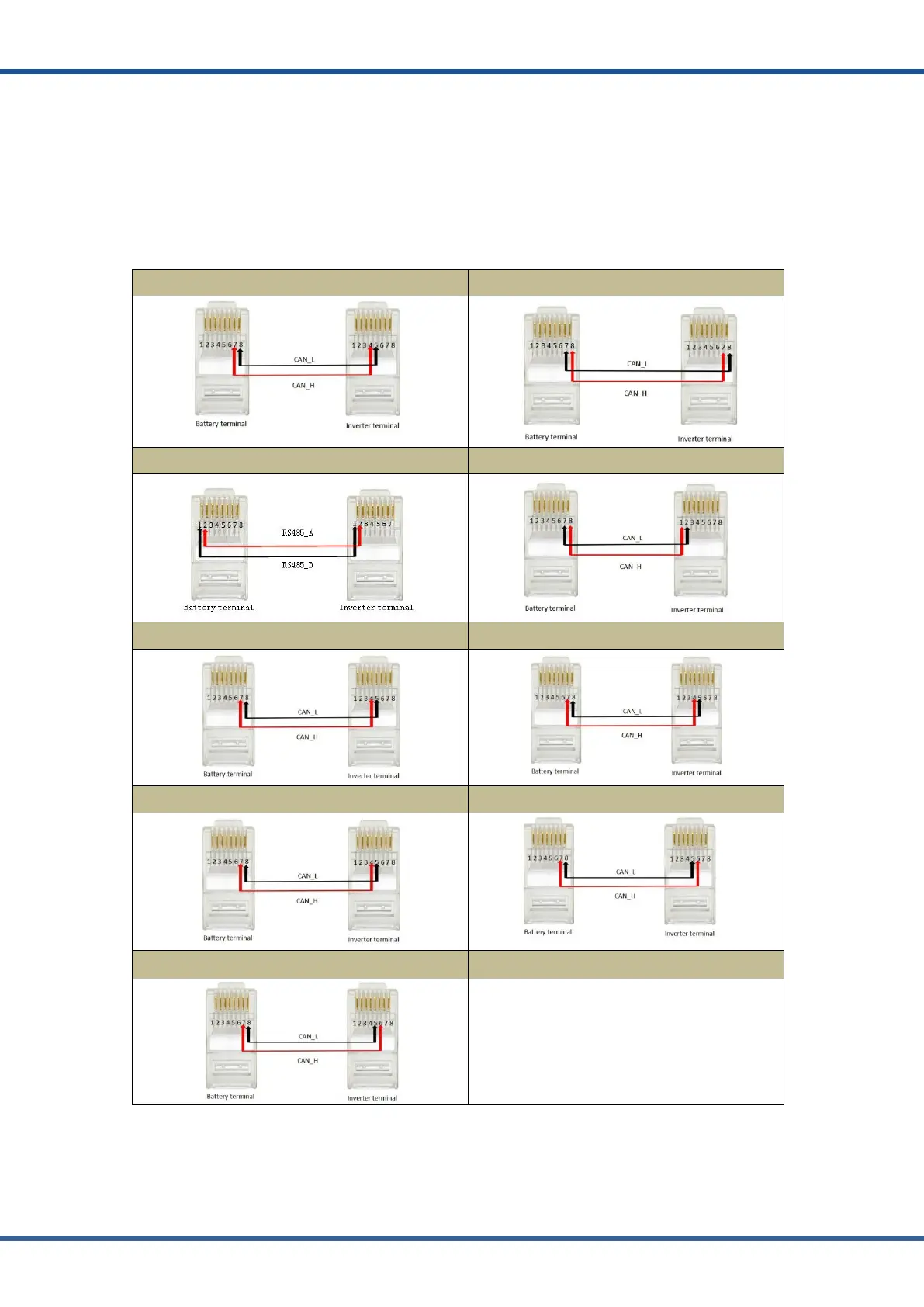
This section will introduce how to hardware connect HOMEGRID series products with 8.2
section “Inverter Matching List”. Inverters manufacturers may upgrade their products, resulting
in hardware communication interface changes. If communication is not possible in the
application according to the following wiring method, please contact with us.
The CAN/RS485 communication port of HOMEGRID is connected with the communication
interface of inverter.
Connect to the Sol Ark Inverter Connect to Victron inverter
Connect to the Growatt inverter Connect to the Sofar inverter
Connect to the Solis inverter Connect to the Goodwe inverter
Connect to the Sermatec inverter Connect to the Must inverter
Connect to the GreenCell inverter Connect to the Must inverter
NOTE:
●The above CAN and RS485 communication connections are not connected the ground wire, in the application
of relatively large interference, it is recommended to connect the ground wire, the ground wire connection
method is a single-ended shielding line.



 To Next Page