64
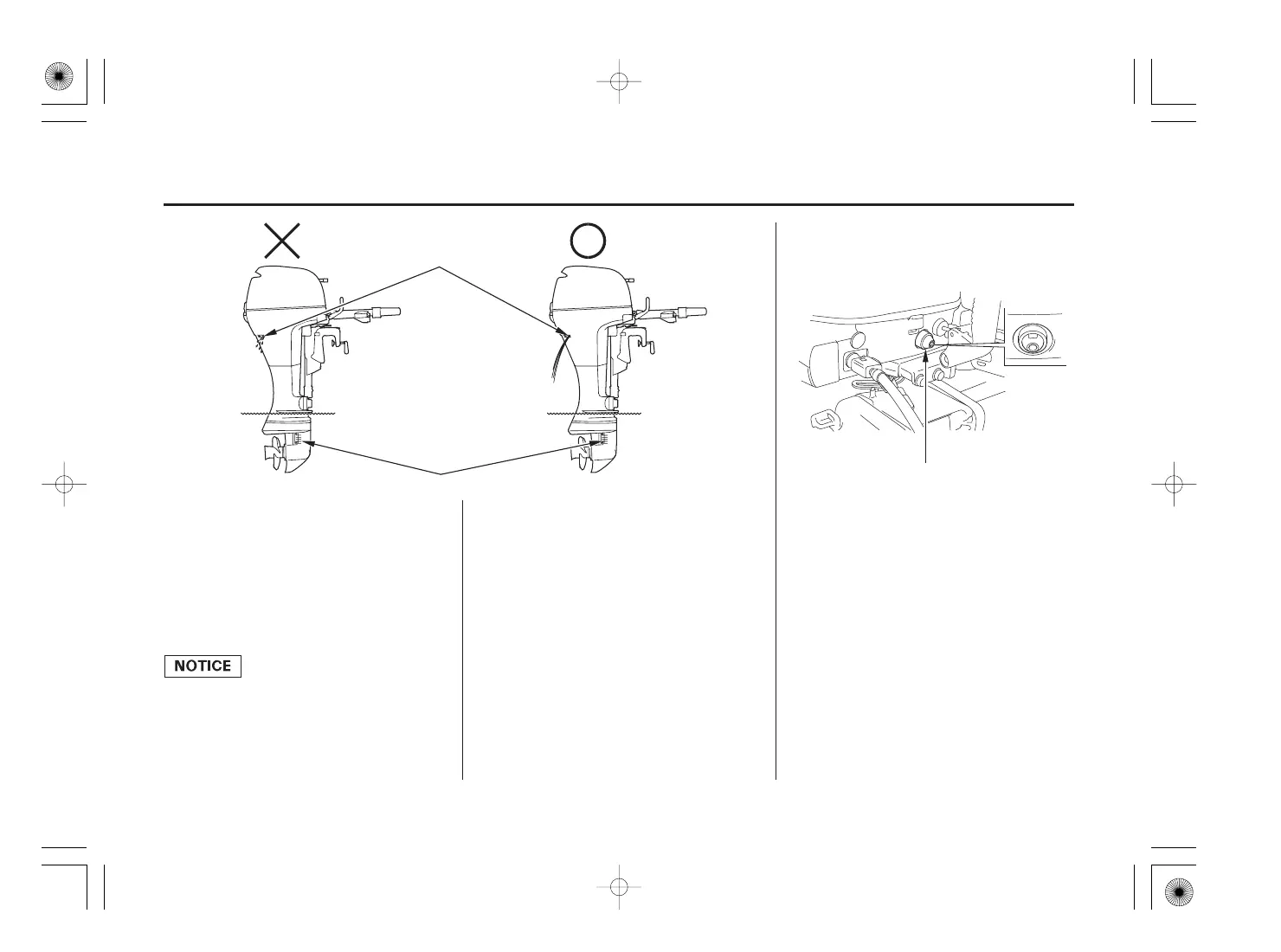
If water does not flow out, or if
steam comes out, stop the engine.
Check to see if the screen in the
cooling water intake port is
obstructed and remove foreign
materials if necessary. Check the
cooling water check hole for
clogging. If water still does not
flow out, have your outboard
motor checked by an authorized
Honda outboard motor dealer. Do
not operate the engine until the
problem has been corrected.
STARTING THE ENGINE (H type)
WATER CHECK HOLE
NORMAL: ON
OIL PRESSURE INDICATOR LIGHT
COOLING WATER INTAKE PORT (each side)
ABNORMAL: OFF
After starting, check whether the
cooling water is flowing out of the
cooling water check hole. Amount
of water flowing out of the check
hole might vary due to the
thermostat operation, but this is
normal.
Check to see if the oil pressure
indicator light turns ON.
8. 9.
11/09/05 18:06:00 32ZY0620_064


 To Next Page