EasyManua.ls Logo

Honda CB750F2 - Seat; Document Compartment

Honda CB750F2
100 pages
Print Icon
To Next Page IconTo Next Page
To Previous Page IconTo Previous Page
Loading...
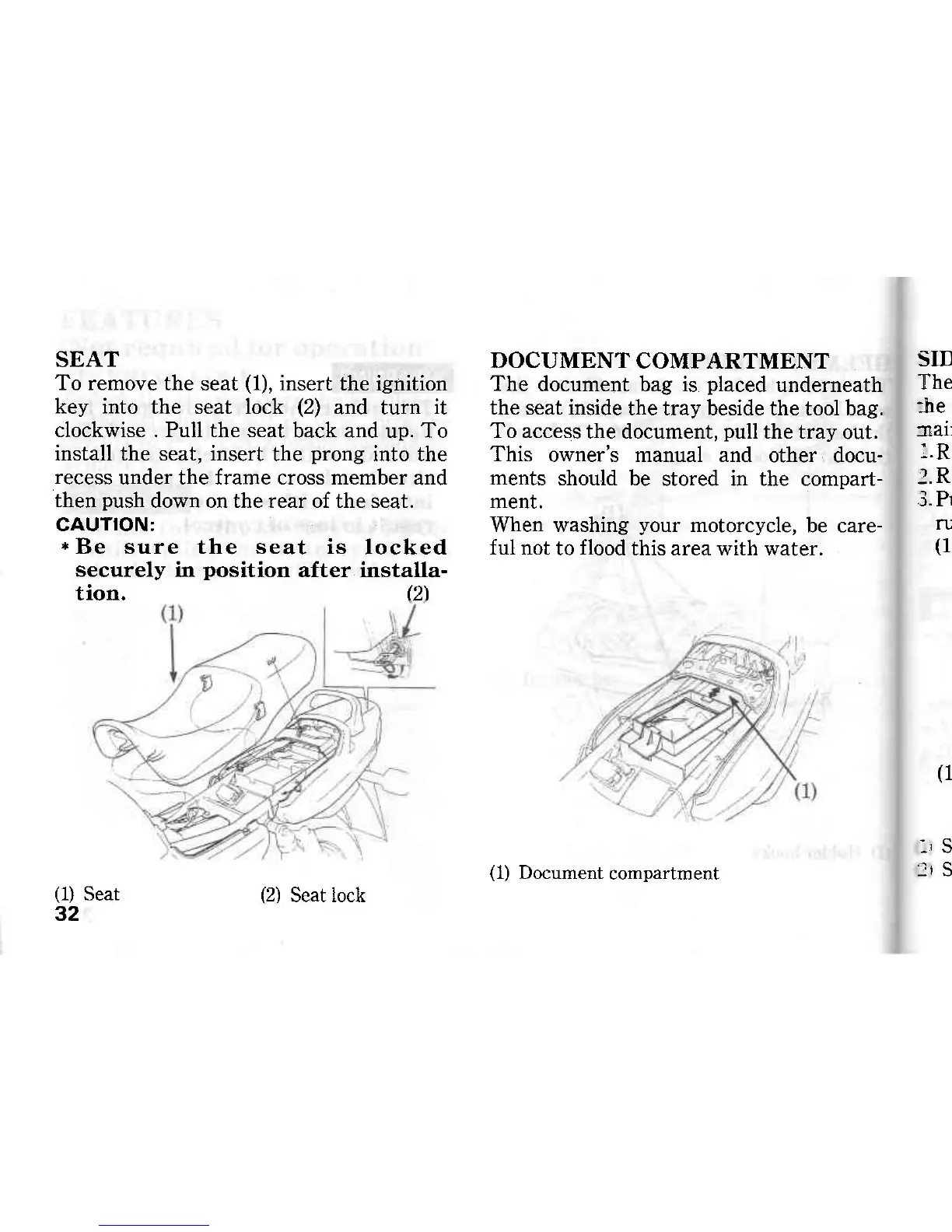
SEAT
To remove
the seat
(1),
insert
the ignition
key into
the seat lock
(2)
and turn
it
clockwise . Pull the seat
back and up. To
install the seat, insert
the
prong
into the
recess
under the frame cross member
and
then
push
down on the rear of the seat.
GAUTION:
*
Be sure the seat is
locked
securely
in
position
after installa-
tion. e)
DOCUMENT
COMPARTMENT
The
document bag is
placed
underneath
the seat inside
the tray beside the tool bag.
To access
the document,
pull
the tray
out.
This
owner's manual and
other docu-
ments
should be
stored in the compart-
ment.
When washing
your
motorcycle,
be care-
ful not
to
flood
this area with
water.
(1)
Seat
32
(2)
Seat lock
(1)
Document
compartment
SII]
lfhe
-ie
:nair
:.R
t.R
i. Pr
ru
(1
(1
l, S
!rS

Other manuals for Honda CB750F2

Related product manuals