Home
Honeywell
Thermostat
9000 color touchscreen
Page 11 (Registering Your Thermostat Online)
Honeywell 9000 color touchscreen - Registering Your Thermostat Online; Total Connect Comfort Account Setup
186 pages
Manual
Save Page as PDF
To Next Page
To Next Page
To Previous Page
To Previous Page
Loading...
9
T
o view and set y
our
Wi-Fi thermostat
remotely
, you must ha
ve a
T
otal Connect
Comf
or
t account.
Use the follo
wing steps.
1
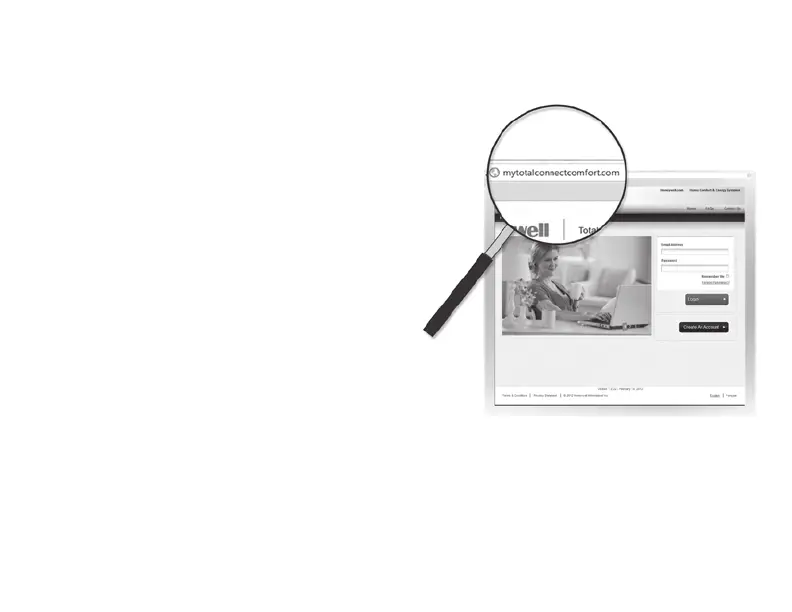
Open the
T
otal Connect Comfor
t web
site.
Go to mytotalconnectcomf
ort.com
Re
gist
ering
your
t
herm
ost
at
online
10
12
Table of Contents
Main Page
English
4
Table of Contents
4
Connecting to Your Wi-Fi Network
8
Registering Your Thermostat Online
11
Setting the Time/Date
15
Setting the Fan
16
Setting System Mode
17
Preset Energy-Saving Schedules
18
Adjusting Program Schedules
19
Overriding Schedules-Home
22
Overriding Schedules-Business
23
Viewing Equipment Status
24
Setting Vacation Hold-Home
25
Setting Holiday/Event Schedules- Business
26
Setting Custom Events-Business
27
Setting Holiday Schedule-Business
29
Setting Holiday Override-Business
30
Initiating Occupancy Mode-Business
31
Customizing Screen Color
32
Setting Preferences
33
Cleaning the Thermostat Screen
34
Adjusting Security Settings
35
Smart Response Technology
36
Pre-Occupancy Purge
37
Compressor Protection
38
Auto Changeover
39
Setting Advanced Preferences
40
Disconnecting Your Wi-Fi Network
43
Reconnecting Your Wi-Fi Network
44
Unregistering Your Thermostat
45
Changing System Setup
46
System Setup
49
Frequently Asked Questions
52
Getting Help and Responding to Alerts
54
Software Updates
56
Troubleshooting
57
Regulatory Information
59
Limited Warranty
60
Français
66
À Propos du Nouveau Thermostat
67
Référence Rapide : Utilisation Résidentielle
67
Référence Rapide : Utilisation Commerciale
68
Installation
70
Connexion À Votre Réseau Wi-Fi
70
Enregistrement de Votre Thermostat en Ligne
73
Réglage de L'heure/La Date
77
Réglage du Ventilateur
78
Programmes D'économie D'énergie Préconfigurés
80
Réglage des Horaires de Programmation
81
Dérogation Aux Programmes
84
Affichage du Statut de L'équipement
86
Réglage du Maintien Pendant
87
Réglage des Programmes
88
Réglage des ÉVénements
89
Table des Matières
91
Réglage du Programme des
91
Lancement du Mode Occupé : Commerciale
93
Personnalisation de la Couleur de L'écran
94
Nettoyage de L'écran du Thermostat
96
Réglages de Sécurité
97
Technologie Smart Response
98
Fonctionnement
99
Balayage Avant Occupation
99
Protection du Compresseur
100
Commutation Automatique
101
Réglage des Préférences Avancées
102
Déconnexion du Réseau Wi-Fi
105
Reconnexion Au Réseau Wi-Fi
106
Déconnexion de Votre Thermostat
107
Modification de la Configuration du Système
108
Foire Aux Questions
114
Obtenir de L'aide Et Répondre Aux Alertes
116
Mises À Jour Logicielles
118
Dépannage
119
Garantie Limitée
122
Español
128
Acerca de Su Nuevo Termostato
129
Referencia Rápida: Uso Doméstico
129
Referencia Rápida: Uso Empresarial
130
Conexión de la Red Wifi
132
Registro del Termostato en Línea
135
Funcionamiento
139
Configuración de la Hora y la Fecha
139
Configuración del Ventilador
140
Configuración de la Modalidad del Sistema
141
Cronogramas Predeterminados para Ahorro de Energía
142
Ajuste de Los Cronogramas del Programa
143
Anulación de las Programaciones: Doméstico
146
Anulación de las Programaciones: Empresarial
147
Visualización del Estado del Equipo
148
Configuración del Mantenimiento en Vacaciones: Doméstico
149
Configurar Programación de Días Festivos/ Eventos: Comercial
150
Configuración de Eventos Personalizados: Empresarial
151
Configuración de la Programación de Días Festivos: Empresarial
153
Índice
154
Configuración de la Anulación de Días Festivos: Uso Empresarial
154
Inicio de la Modalidad de Ocupación: Empresarial
155
Cómo Personalizar el Color de la Pantalla
156
Instalación
157
Configuración de las Preferencias
157
Limpieza de la Pantalla del Termostato
158
Ajuste de las Configuraciones de Seguridad
159
Tecnología Smart Response
160
Purga Previa a la Ocupación
161
Protección del Compresor
162
Conversión Automática
163
Configuración de Preferencias Avanzadas
164
Desconexión de la Red Wifi
167
Reconexión de Su Red Wifi
168
Baja del Termostato
169
Cambio de la Configuración del Sistema
170
Preguntas Frecuentes
176
Cómo Obtener Ayuda y Reaccionar Ante las Alertas
178
Actualizaciones de Software
180
Localización y Solución de Problemas
181
Garantía Limitada
184
Related product manuals
WIFI 9000 COLOR TOUCHSCREEN
30 pages
Honeywell 9000
198 pages
Honeywell 9000 Series
12 pages
Honeywell Wi-Fi Thermostat 9000
12 pages
Honeywell T3
22 pages
Honeywell T4 Pro
36 pages
Honeywell T6 Pro
18 pages
Honeywell TH8320U
20 pages
Honeywell TH8320R1003
140 pages
Honeywell TH8321WF1001
72 pages
Honeywell Home Pro Series
17 pages
Honeywell FocusPRO TH5220D
20 pages


 To Next Page