– 34 –
USER FUNCTIONS
USER FUNCTIONSUSER FUNCTIONS
USER FUNCTIONS
User Access
Õ Ö × Ø Ù Ú Û Ü Ý Þ
ß à á â à ã ä å æ ç è é è å ç ä
ê ë å ç à ì á í ç î
ï ð ñ ò ó ô
õ ö ö ö ÷ ø ö ö ÷ ö ö ù ÷ ú ö
û üý
þ ÿ
✁
✂ ✄
☎
ï ô ó ð
✆
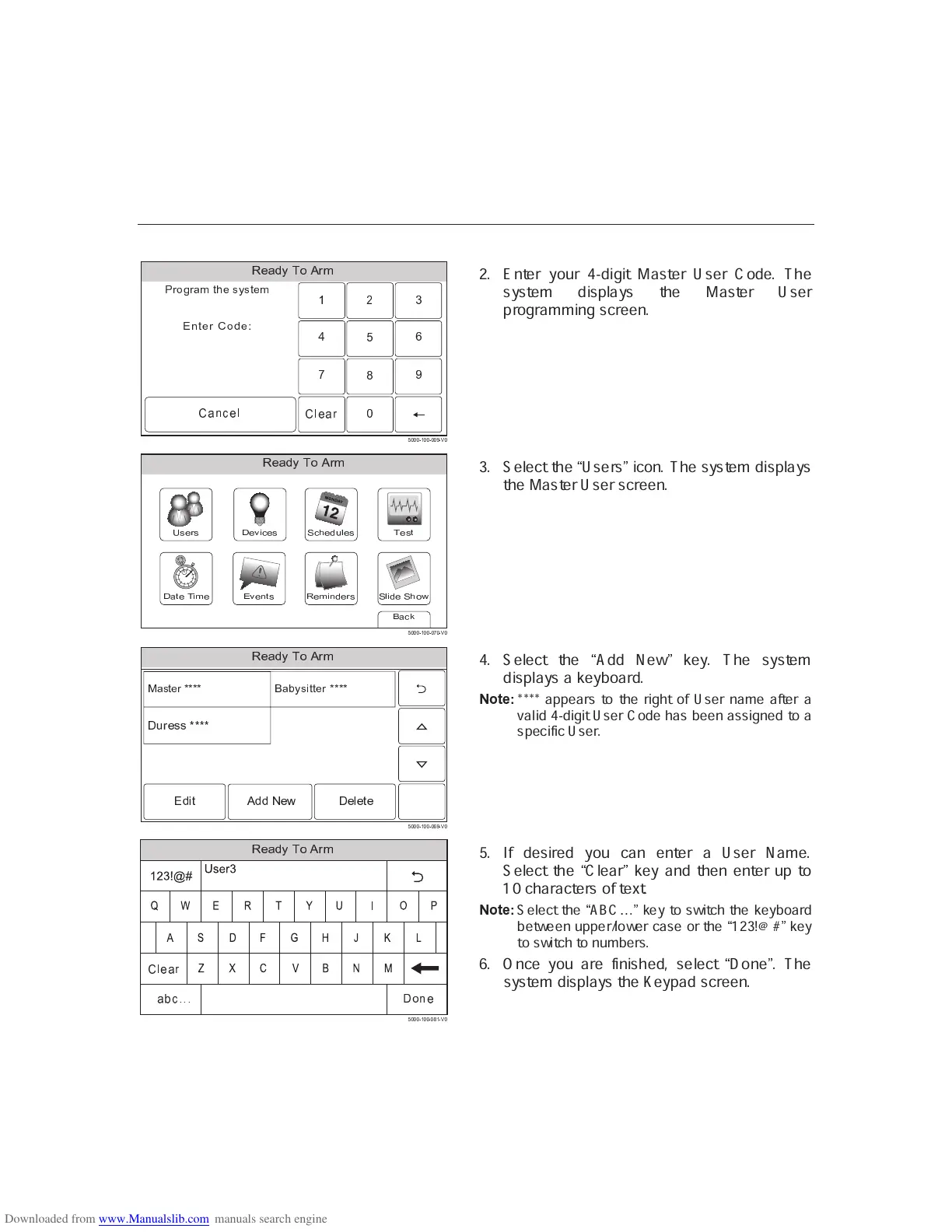
2. Enter your 4-digit Master User Code. The
system displays the Master User
programming screen.
✝ ✞ ✟ ✠ ✡ ✝ ☛ ☞ ✌✍ ✎ ✏ ✡ ✑ ✟ ✒ ✡
Õ Ö × Ø Ù Ú Û Ü Ý Þ
✓ ✔ ✡ ✕ ✏ ✖
✗ ✎ ✘ ✙
✚ ✡ ✒ ✟ ✕ ✠ ✡ ✛ ✖
✑ ✡ ✖ ✏✝ ✘ ☛ ✡ ✠ ✜ ✞ ✡ ✖✍ ✡ ✔ ✟ ✘ ✡ ✖✢ ✖ ✡ ✛ ✖
õ ö ö ö ÷ ø ö ö ÷ ö
✣
ö ÷ ú ö
3. Select the
Ó
Users
Ô
icon. The system displays
the Master User screen.
✤ ✥ ✦ ✧ ★ ✩ ✪ ✫ ✬ ✭
✮ ✯ ✯ ✯ ✰ ✱ ✯ ✯ ✰ ✯ ✲ ✳ ✰ ✴ ✯
✵ ✶ ✷ ✸ ✹ ✺ ✻ ✻ ✻ ✻ ✼
✶ ✽ ✾ ✷ ✿ ✸ ✸ ✹ ✺ ✻ ✻ ✻ ✻
❀ ❁ ❂ ❃ ❄ ❁ ❁ ❅ ❆ ❇ ❈ ❆ ❉ ❆ ❃ ❆
❈ ❊ ❋ ❆ ● ● ❍ ❍ ❍ ❍
4. Select the
Ó
Add New
Ô
key. The system
displays a keyboard.
■ ❏ ❑ ▲ ▼
**** appears to the right of User name after a
valid 4-digit User Code has been assigned to a
specific User.
◆ ❖ P ◗ ❘ ❙ ❚ ❯ ❱ ❲
❳ ❨ ❨ ❨ ❩ ❬ ❨ ❨ ❩ ❨ ❭ ❬ ❩ ❪ ❨
!
!"#$
"
#
$
%
& '
(
)
*
+
,
-.
/
0
1
2
3
4
5
6
7
8
9
:
❫ ❴ ❵ ❛ ❜
❝ ❞ ❡
❵
%&$'()
❛ ❢ ❣ ❤ ❤ ❤
5. If desired you can enter a User Name.
Select the
Ó
Clear
Ô
key and then enter up to
10 characters of text.
■ ❏ ❑ ▲ ▼
Select the
✐
ABC
❥ ❦
key to switch the keyboard
between upper/lower case or the
✐
123!@#
❦
key
to switch to numbers.
6. Once you are finished, select
Ó
Done
Ô
. The
system displays the Keypad screen.



 To Next Page
 Loading...