EasyManua.ls Logo

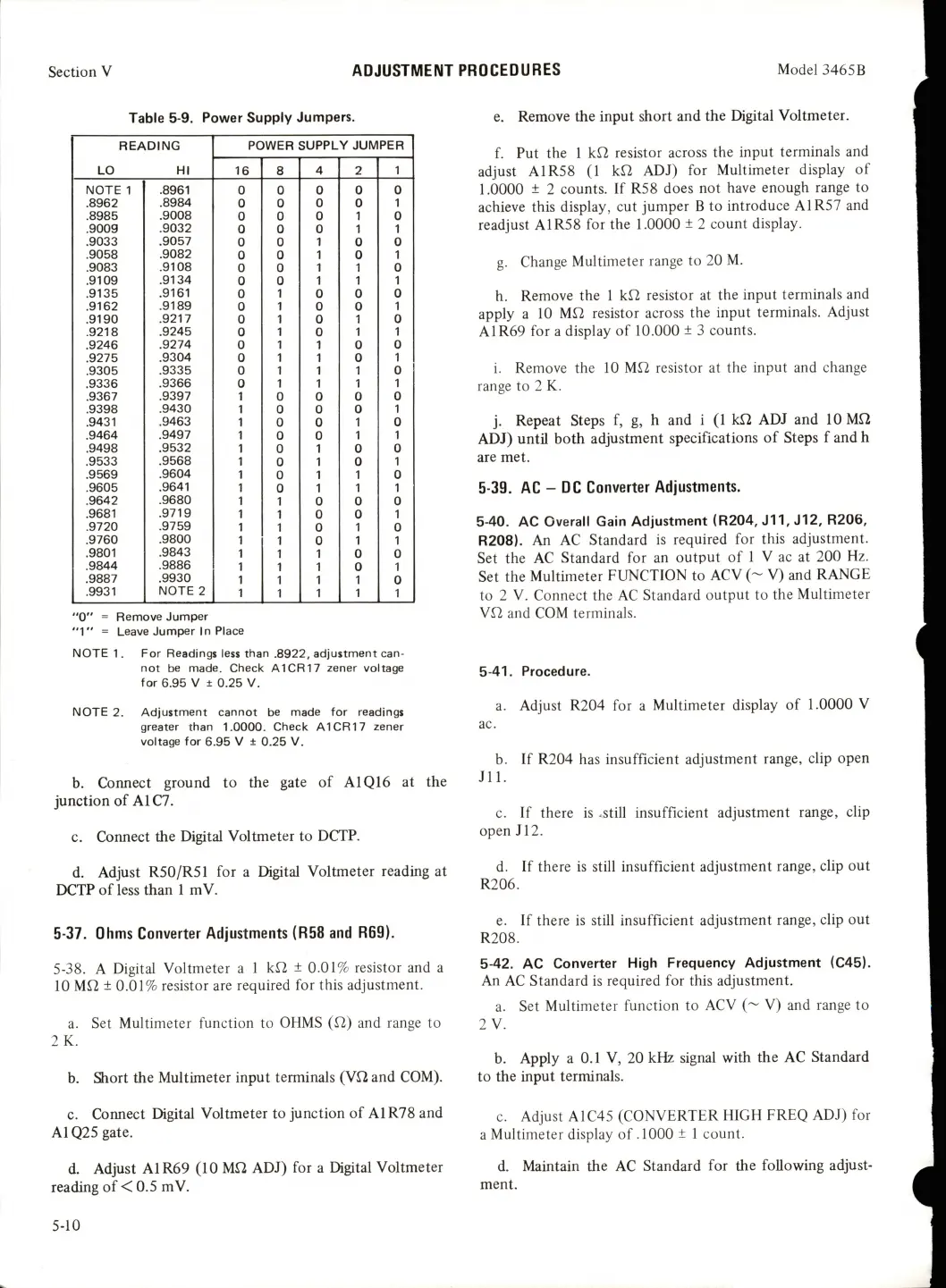
HP 3465B - Ohms Converter Adjustments (R58 and R69); AC-DC Converter Adjustments

HP 3465B
58 pages
Print Icon
To Next Page IconTo Next Page
To Previous Page IconTo Previous Page
Loading...
Section
V
ADJUSTMENT
PROCEDURES
Model
3465B
Table
5-9.
Power
Supply
Jumpers.
READING
POWER
SUPPLY
JUMPER
LO
HI
16
8
4
2
1
NOTE
1
.8961
0
0
0
0 0
.8962
.8984
0
0
0
0
1
.8985
.9008
0
0
0
1
0
.9009
.9032
0
0 0
1
1
.9033
.9057
0 0
1
0 0
.9058
.9082
0
0
1
0
1
.9083
.9108
0
0
1
1
0
.9109
.9134
0
0
1
1
1
.9135
.9161
0
1
0 0
0
.9162
.9189
0
1
0 0
1
.9190
.9217
0
1
0
1
0
.9218
.9245
0
1
0
1
1
.9246
.9274
0
1
1
0
0
.9275
.9304
0
1
1
0
1
.9305
.9335
0
1 1 1
0
.9336
.9366
0
1 1 1
1
.9367
.9397
1
0
0
0
0
.9398
.9430
1
0 0
0
1
.9431
.9463
1
0
0
1
0
.9464
.9497
1
0 0
1 1
.9498
.9532
1
0
1
0
0
.9533
.9568
1
0
1
0
1
.9569
.9604
1
0
1
1
0
.9605
.9641
1
0
1
1
1
.9642
.9680
1
1
0
0
0
.9681
.9719
1
1
0
0
1
.9720
.9759
1
1
0
1
0
.9760
.9800
1
1
0
1
1
.9801
.9843
1
1
1
0 0
.9844
.9886
1
1
1
0
1
.9887
.9930
1 1 1 1
0
.9931
NOTE
2
1
1
1 1
1
"0"
=
Remove
Jumper
"1"
=
Leave
Jumper
In
Place
NOTE
1.
For
Readings
less
than
.8922,
adjustment
can
not
be
made.
Check
A1CR17
zener
voltage
for
6.95
V
±
0.25
V.
NOTE
2.
Adjustment
cannot
be
made
for
readings
greater
than
1.0000.
Check
A1CR17
zener
voltage
for
6.95
V
±
0.25
V.
b.
Connect
ground
to
the
gate
of
A1Q16
at
the
junction
of
A1C7.
c.
Connect
the
Digital
Voltmeter
to
DCTP.
d.
Adjust
R50/R51
for
a
Digital
Voltmeter
reading
at
DCTP
of
less
than
1
m
V.
5-37.
Ohms
Converter
Adjustments
(R58
and
R69).
5-38.
A
Digital
Voltmeter
a
1
kf2
±
0.01%
resistor
and
a
10
Mf2
±
0.01%
resistor
are
required
for
this
adjustment.
a.
Set
Multimeter
function
to
OHMS
(f2)
and
range
to
2K.
b.
Siort
the
Multimeter
input
terminals
(Vf2
and
COM).
c.
Connect
Digital
Voltmeter
to
junction
of
A1R78
and
A1Q25
gate.
d.
Adjust
A1R69
(10
Mf2
ADJ)
for
a
Digital
Voltmeter
reading
of
<
0.5
mV.
e.
Remove
the
input
short
and
the
Digital
Voltmeter.
f.
Put
the
1
kf2
resistor
across
the
input
terminals
and
adjust
A1R58
(1
kfi
ADJ)
for
Multimeter
display
of
1.0000
±
2
counts.
If
R58
does
not
have
enough
range
to
achieve
this
display,
cut
jumper
B
to
introduce
A1R57
and
readjust
A1R58
for
the
1.0000
±
2
count
display.
g.
Change
Multimeter
range
to
20
M.
h.
Remove
the
1
kf2
resistor
at
the
input
terminals
and
apply
a
10
Mfl
resistor
across
the
input
terminals.
Adjust
A1R69
for
a
display
of
10.000
±
3
counts.
i.
Remove
the
10
Mf2
resistor
at
the
input
and
change
range
to
2
K.
j.
Repeat
Steps
f,
g,
h
and
i
(1
kfi
ADJ
and
10Mf2
ADJ)
until
both
adjustment
specifications
of
Steps
f
and
h
are
met.
5-39.
AC
-
DC
Converter
Adjustments.
5-40.
AC
Overall
Gain
Adjustment
(R204,
J11,
J12,
R206,
R208).
An
AC
Standard
Is
required
for
this
adjustment.
Set
the
AC
Standard
for
an
output
of
1
V
ac
at
200
Hz.
Set
the
Multimeter
FUNCTION
to
ACV
(~
V)
and
RANGE
to
2
V.
Connect
the
AC
Standard
output
to
the
Multimeter
Vf2
and
COM
terminals.
5-41.
Procedure.
a.
Adjust
R204
for
a
Multimeter
display
of
1.0000
V
b.
If
R204
has
insufficient
adjustment
range,
clip
open
JIl.
c.
If
there
is
.still
insufficient
adjustment
range,
clip
open
J12.
d.
If
there
is
still
insufficient
adjustment
range,
clip
out
R206.
e.
If
there
is
still
insufficient
adjustment
range,
clip
out
R208.
5-42.
AC
Converter
High
Frequency
Adjustment
(C45).
An
AC
Standard
is
required
for
this
adjustment.
a.
Set
Multimeter
function
to
ACV
(~
V)
and
range
to
2
V.
b.
Apply
a
0.1
V,
20
kHz
signal
with
the
AC
Standard
to
the
input
terminals.
c.
Adjust
A1C45
(CONVERTER
HIGH
FREQ
ADJ)
for
a
Multimeter
display
of
.1000
±
1
count.
d.
Maintain
the
AC
Standard
for
the
following
adjust
ment.
5-10

Table of Contents

Related product manuals