EasyManua.ls Logo

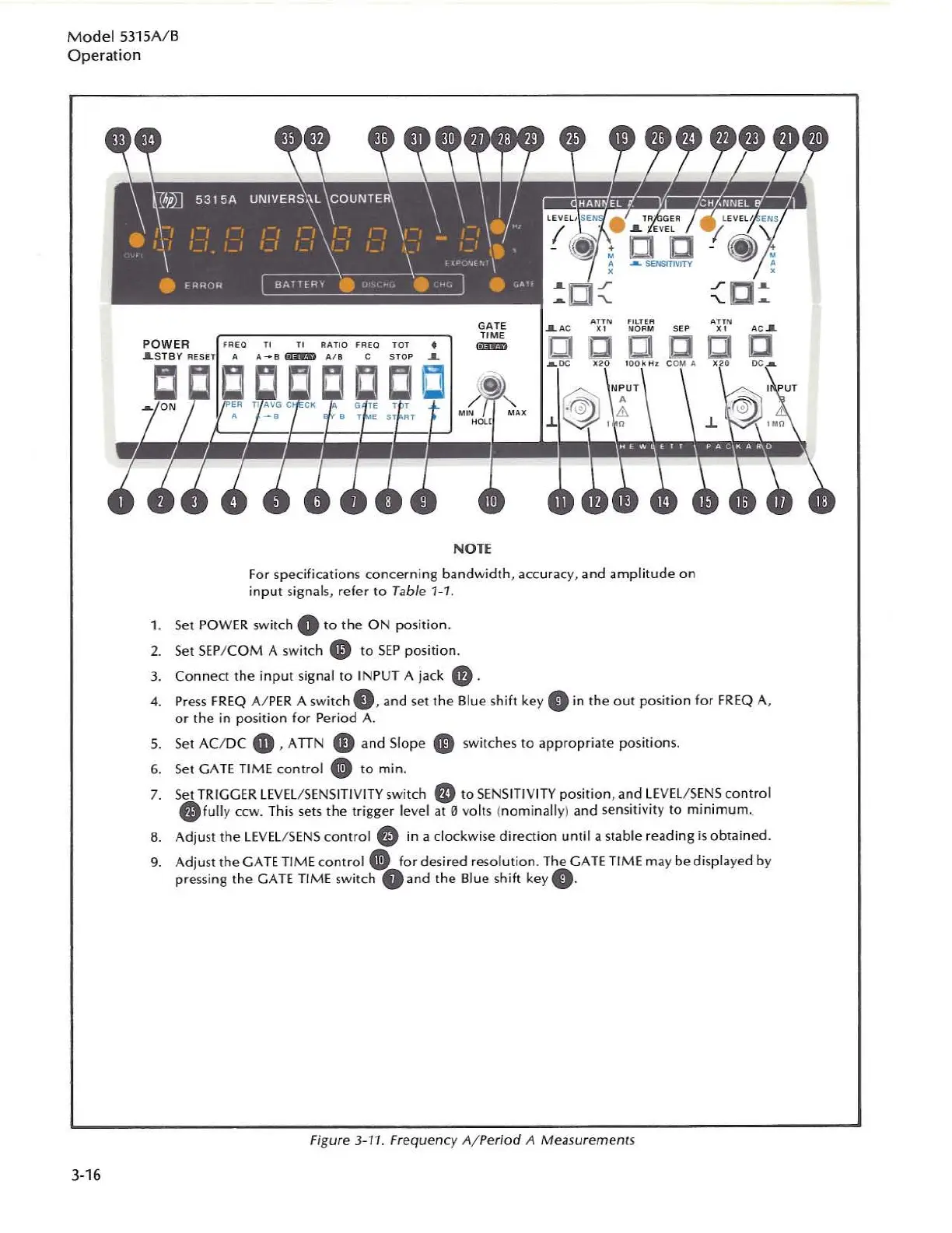
HP 5315 A - Frequency A;Period a Measurements

HP 5315 A
103 pages
Print Icon
To Next Page IconTo Next Page
To Previous Page IconTo Previous Page
Loading...
Model
5315
A/
B
Operation
3-16
NOTE
f
or
specifications
conc
ern
ing bandwidth, accuracy, and
amp
li
tude
on
input signa
ls,
refer to Table 1-
1.
1. Set
POWER
switch 0 to
the
ON
po
si
tion.
2.
Set
SEP
/ COM A switc
h"
to S
EP
posi
ti
o
n.
3.
Connect
the
i
nput
signal to
IN
PUT A jack
".
4.
Press
FREQ
Al
PER
A switch
0,
and set
the
Blue shi
ft
key.
in
the
out
pO
Sit
ion for
FREQ
A,
or
the
in position for Period
A-
S.
Set AC/DC
.,
, A TIN
..,
and
Slope.
switches
to
a
pp
ropriate posi
ti
ons.
6.
S
et
GATE
TI
ME
contro
l.
to min.
7.
Set
TRI
GG
ER
LE
VEl/
SE
NS
I
TI
VI
TY
swi
tch
ED
to
SENS
IT
IV
ITY
position,
and
LE
VEL/SE
NS
control
.fully
ccw. This
se
ts
the
trigger level
at
0 volts (
no
minally) and s
en
sitivity to minimum.
8. Adjust
the
LEVEL
/
SENS
control"
in
a clockwise di
redion
until a st
able
reading
is
ob
tain
ed.
9.
Adjust
the
GATE
TIME
cont
rol
0:
for desir
ed
resolution. The
GATE
TI
ME
ma
y
bedisp
layed by
pressing the
GATE
TIME
switch O and
the
Slue shift key
•.
F
igu
re 3-11. Frequency
A/Period
A Measurements

Table of Contents

Related product manuals