EasyManua.ls Logo

HP 54600A - Page 23

HP 54600A
60 pages
Print Icon
To Next Page IconTo Next Page
To Previous Page IconTo Previous Page
Loading...
FigureS
Delayed
sweep
markers
Operating
Your
Oscilloscope
To
use
delayed
sweep
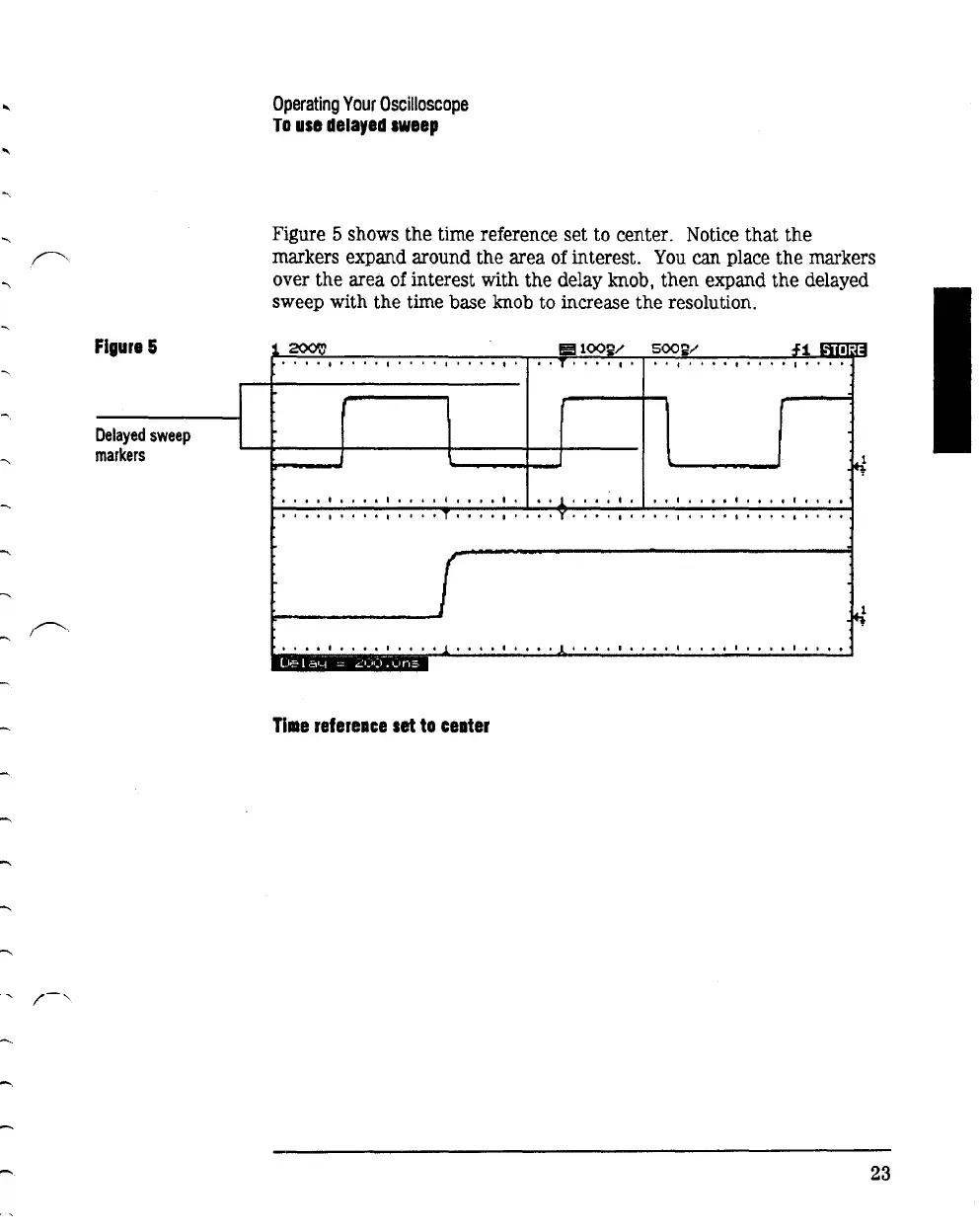
Figure 5 shows the time reference set to center. Notice that the
markers expand around the area
of
interest.
You
can place the markers
over the area
of
interest with the delay knob, then expand the delayed
sweep with the time base knob to increase the resolution.
500~/
It
I I 1 I I I I 1 I I I I 1 o o
tIft
'•
I''''
I'
o 0 I I I I
If
t I o I 1 I I o o
•••
I I
••••
I.
I I I I I I I I
I.
·l
. . I ; I I I
I.
I
••
I
••••
I.
I I I
I
••
I I
•••
I
••
I T I I 0 I
••••
l
••••
I
••••
I
••••••
I
••
I
•••
I
'
•••
I
••••
I
••••
..1
•••••••••
.1
•••
0 '
••••
I
••
0.
I
••••
i.
I.
I
Tille
refereace
set
to
ceater
23

Related product manuals