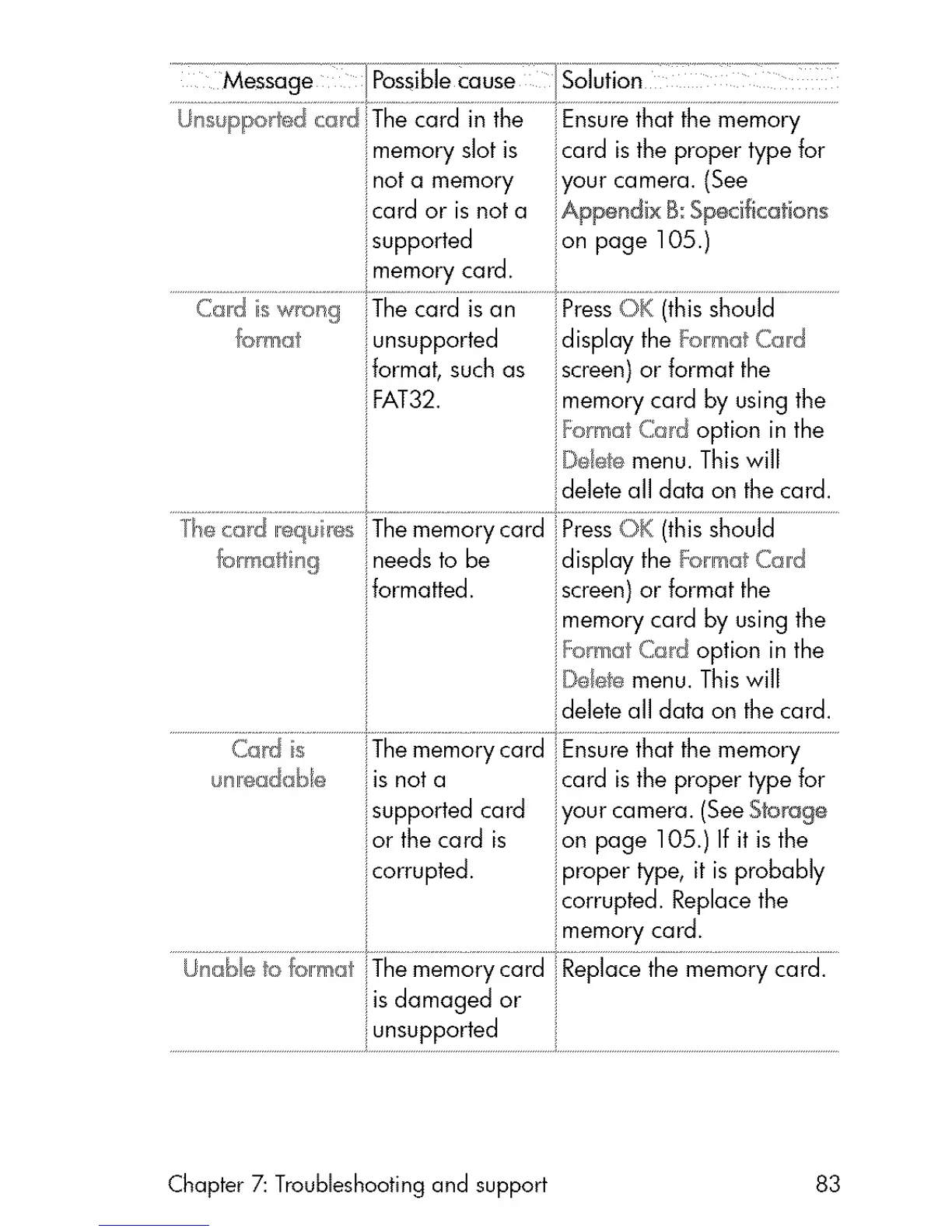
Unsupported cad The card in the Ensure that the memory
iImemory slot is card is the proper type for
not a memory iyour camera. (See
card or isnot a iAppondix B Specifications
supported on page 105.)
Cal!d iswral_g The card is an Press OK (thisshould
fo _mat unsupported display the _:armatCal!d
ilformat, suchas iscreen) or format the
FAT32. imemory card by using the
i_'_ormatCard option in the
j jDdete menu. Thiswill
_!deleteall data on the card.
'_e card ,eq_ _s The memorycard jPressOK (thisshould
iIneedsto be idisplay the FormatCa,d
formatted, iscreen)or format the
jmemory card by using the
i_:omat Cad option in the
iDdete menu. Thiswill
ildeleteall data on the card.
unl!eda :_e is not a icard is the proper type for
supported card iyourcamera.(SeeStorage
or the card is ion page 105.) If it is the
corrupted, iproper type, it is probably
icorrupted. Replacethe
imem°rycard:.............................................
Unak:*e to format !iThememorycard Replacethe memory card.
is damaged or i
..............................................................................uns,pptr,td........................................................................................................................................
Chapter 7: Troubleshooting and support 83



 To Next Page