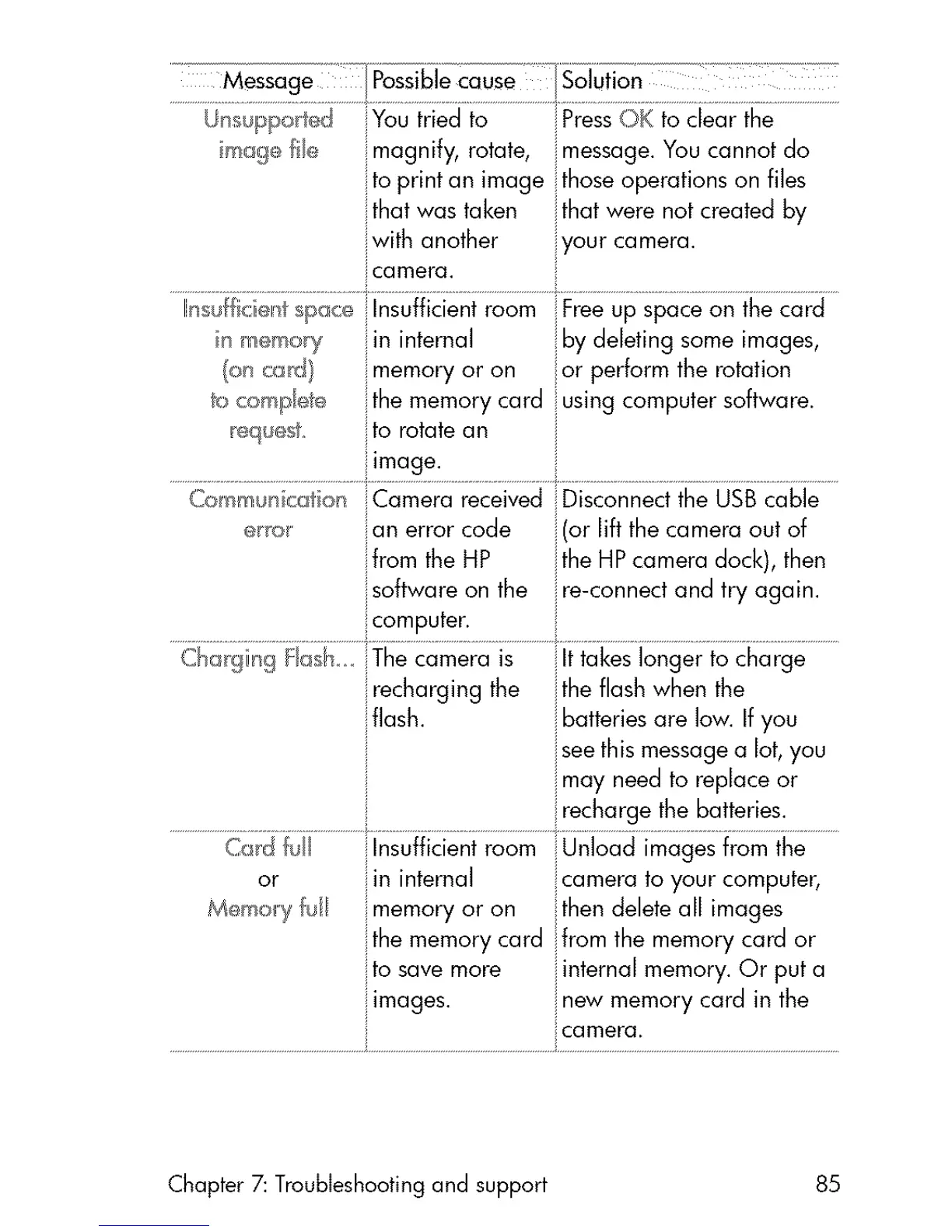
Youtriedto PressC)Ktoclearthe
ilmagnify,rotate,message.Youcannotdo
toprintanimagethoseoperationsonflies
thatwastaken thatwerenotcreatedby
:_withanother yourcamera.
icamera.
_ m_moy ilininternal iibydeletingsomeimages,
(oncG_t) imemoryoron or performtherotation
C®l_m_n_f_on Camera received
_r_ on errorcode
ifrom the HP
software on the
i computer.
Disconnect the USB cable
(or lift the camera out of
ithe HP camera dock), then
ire-connect and try again.
recharging the i the flash when the
iflash, i batteries are low. If you
i see this message a lot, you
i may need to replace or
i recharge [he ba!!er!es ...................
C_d Insufficient room Unload images from the
or in internal :camera to your computer,
Memory ul memory or on then delete all images
ilthe memory card from the memory card or
to save more i internal memory. Or put a
images, i new memory card in the
_ camera.
Chapter 7: Troubleshooting and support 85



 To Next Page