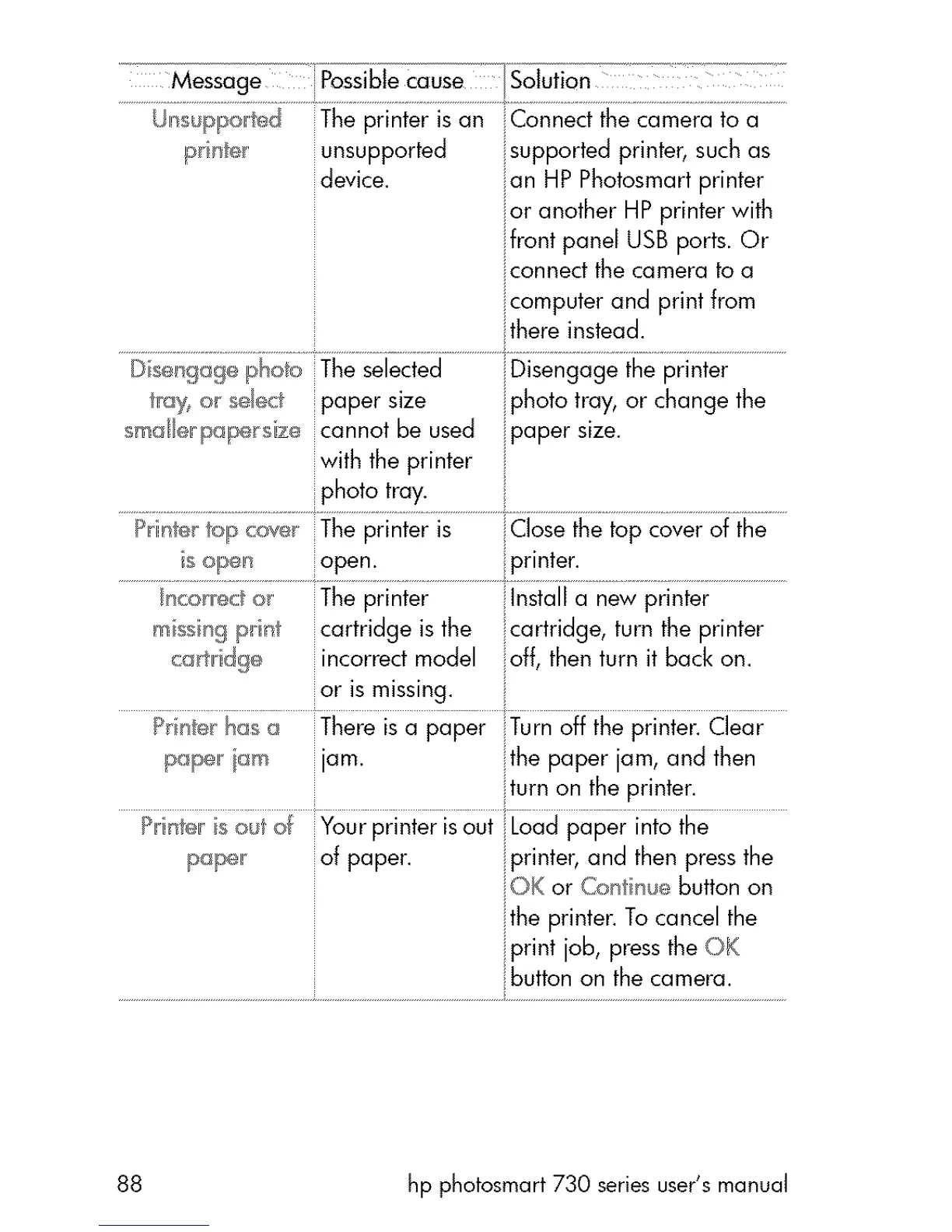
Message PossibteCause I£oJu_i_n
unsupported supported printer, such as
device, an HP Photosmart printer
ior another HP printer with
ifront panel USB ports. Or
iconned the camera to a
i computer and print from
there instead.
i
D seuf_ogc_photo The selected iDisengage the printer
r%< o_ e_.ct paper size i photo tray, or change the
smal_rpaF_ size cannot be used ipaper size.
with the printer
photo tray.
Privateertolp _ove The printer is Close the top cover of the
i open open. printer.
m ssing print cartridge is the cartridge, turn the printer
camid%_ incorrect model off, then turn it back on.
or is missing.
P_te_ has a There is a paper Turn off the printer. Clear
pape, _m jam. ;;the paper jam, and then
turn on the printer.
Print_:_rsoul of Your printer isout Load paper into the
p_@el! of paper, i printer, and then press the
iOK or Co t hue button on
ithe printer. To cancel the
print job, press the OK
88 hp photosmart 730 series user's manual



 To Next Page