EasyManua.ls Logo

HP 8508A - Page 34

HP 8508A
130 pages
Print Icon
To Next Page IconTo Next Page
To Previous Page IconTo Previous Page
Loading...
Operation
Since
the
circuit
impedance
is
50
ohms,
and
the
measurements
are
at
relatively
low
frequencies,
we
can
neglect
the
loading
effects
of
the
probe
tips
on
the
circuit
response.
For
more
sensitive
applications,
the
HP
11576A
10:1
Divider
or
HP
10216A
Isolator
accessories
can
be
used
with
the
probes
to
minimize
loading
effects
and
measure-
ment
errors.
:
Measurement
details
1.
Connect
both
probes
at
point
“J1”
(the
amplifier
input)
in
the
circuit.
Press
[PRESET]
to
return
the
HP
8508A
to
a
known
starting
state.
2.
Check
that
the
circuit
under
test
is
powered
up
and
that
the
HP
8508A
A
UNLOCKED
indicator
is
off.
Press
[B/
A
MAG]
and
[B-A
PHASE]
to
display
vector
ratio.
3.
Select
[DISPLAY]
dB
to
measure
the
amplifier’s
gain
as
a
log
ratio.
Press
[SHIFT]
then
[SAVE
REF]
to
store
the
reference
and
set
the
ratio
displays
to
magnitude
0.0dB
and
phase
0
degrees.
4.
Move
the
B
probe
to
point
“J2”
(the
amplifier
output)
and
measure
the
gain
and
phase
change.
Change
the
_
frequency
of
the
oscillator
over
its
operating
range
and
check
the
frequency
response
variation.
In
a
circuit
with
adjustable
gain,
the
HP
8508A
METER
display
is
an
aid
to
tuning.
(Use
of
nes
meter
display
is
covered
in
the
next
example.)
Any
unmodulated
RF
signal
in
the
frequency
range
100kHz
to
1GHz‘can
be
used
as
a
source
for
these
measure-
ments.
This
includes
a
source
that
is
part
of
a
larger
device
under
test.
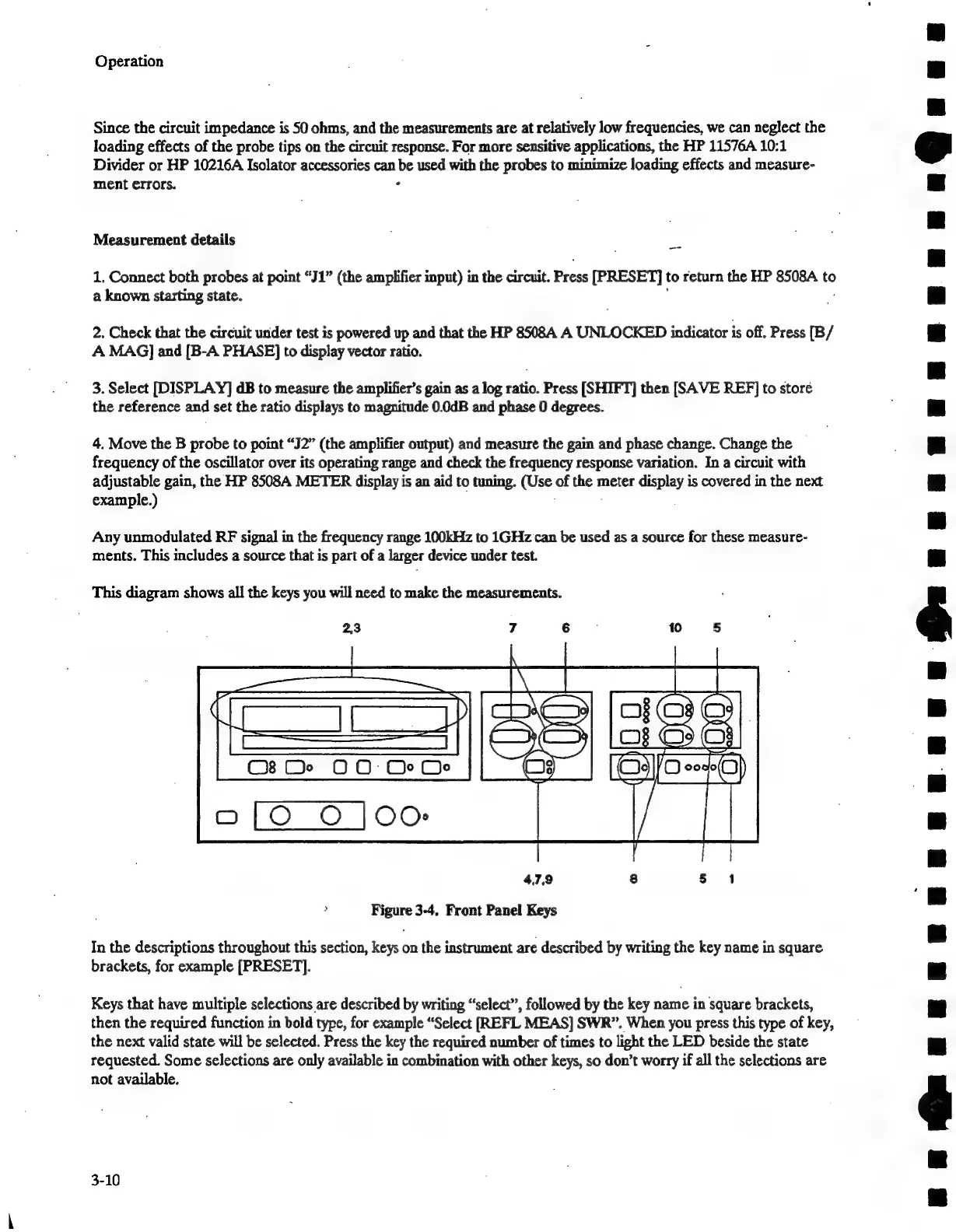
This
diagram
shows
all
the
keys
you
will
need
to
make
the
measurements.
2,3
7
6
10
5
Cs
De
OO
Or Oe
4.7.9
8
§
1
>
Figure
3-4,
Front
Panel
Keys
In
the
descriptions
throughout
this
section,
keys
on
the
instrument
are
described
by
writing
the
key
name
in
square
brackets,
for
example
[PRESET].
Keys
that
have
multiple
selections
are
described
by
writing
“select”,
followed
by
the
key
name
in
square
brackets,
then
the
required
function
in
bold
type,
for
example
“Select
REFL
MEAS]
SWR”.
When
you
press
this
type
of
key,
the
next
valid
state
will
be
selected.
Press
the
key
the
required
number
of
times
to
light
the
LED
beside
the
state
requested.
Some
selections
are
only
available
in
combination
with
other
keys,
so
don’t
worry
if
all
the
selections
are
not
available.
3-10
BGuunaunnnnnunnnQ@uaaun
.

Related product manuals