EasyManua.ls Logo

HP 8508A - Power Supply Adjustments

HP 8508A
130 pages
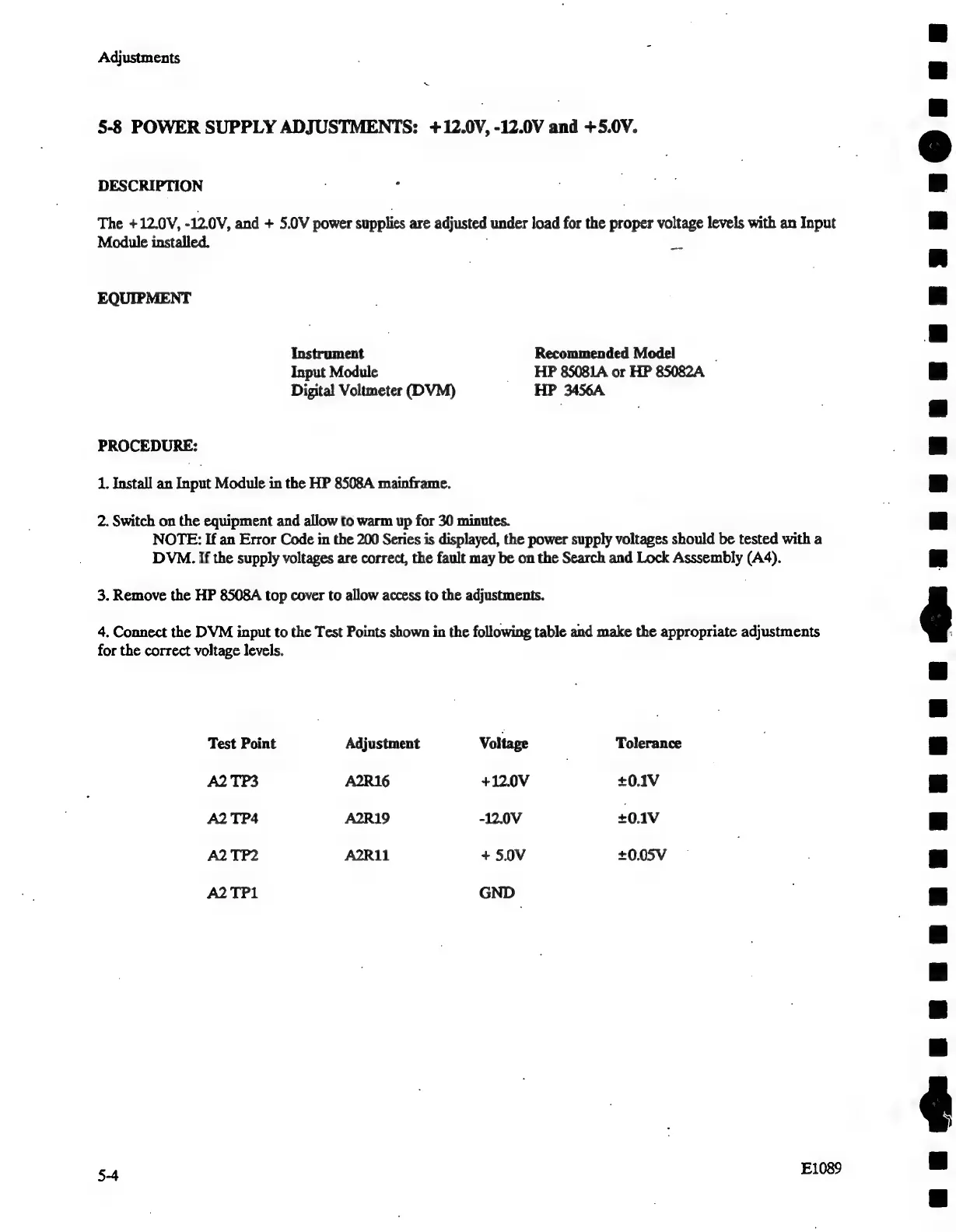
Print Icon
To Next Page IconTo Next Page
To Previous Page IconTo Previous Page
Loading...
Adjustments
x
5-8
POWER
SUPPLY
ADJUSTMENTS:
+12.0V,
-12.0V
and
+5.0V.
DESCRIPTION
The
+12.0V,
-12.0V,
and
+
5.0V
power
supplies
are
adjusted
under
load
for
the
proper
voltage
levels
with
an
Input
Module
installed.
EQUIPMENT
Instrument
Recommended
Model
Input
Module
_
HP
85081A
or
HP
85082A
Digital
Voltmeter
(DVM)
HP
3456A
PROCEDURE:
1.
Install
an
Input
Module
in
the
HP
8508A
mainframe.
2.
Switch
on
the
equipment
and
allow
to
warm
up
for
30
minutes.
NOTE:
If
an
Error
Code
in
the
200
Series
is
displayed,
the
power
supply
voltages
should
be
tested
with
a
DVM.
If
the
supply
voltages
are
correct,
the
fault
may
be
on
the
Search
and
Lock
Asssembly
(A4).
3.
Remove
the
HP
8508A
top
cover
to
allow
access
to
the
adjustments.
|
4.
Connect
the
DVM
input
to
the
Test
Points
shown
in
the
following
table
and
make
the
appropriate
adjustments
for
the
correct
voltage
levels.
Test
Point
Adjustment
Voltage
Tolerance
A2TP3
A2R16
+12.0V
+0.1V
A2TP4
A2R19
-12.0V
+0.1V
A2TP2
AR
+
5.0V
+0.05V
A2TP1
GND
4
E1089
eauM@eupenpnpunununuenepua
@unpnpenpunneunuauupu@Q@aauan

Related product manuals