16 Interface Installation and Configuration Chapter 2
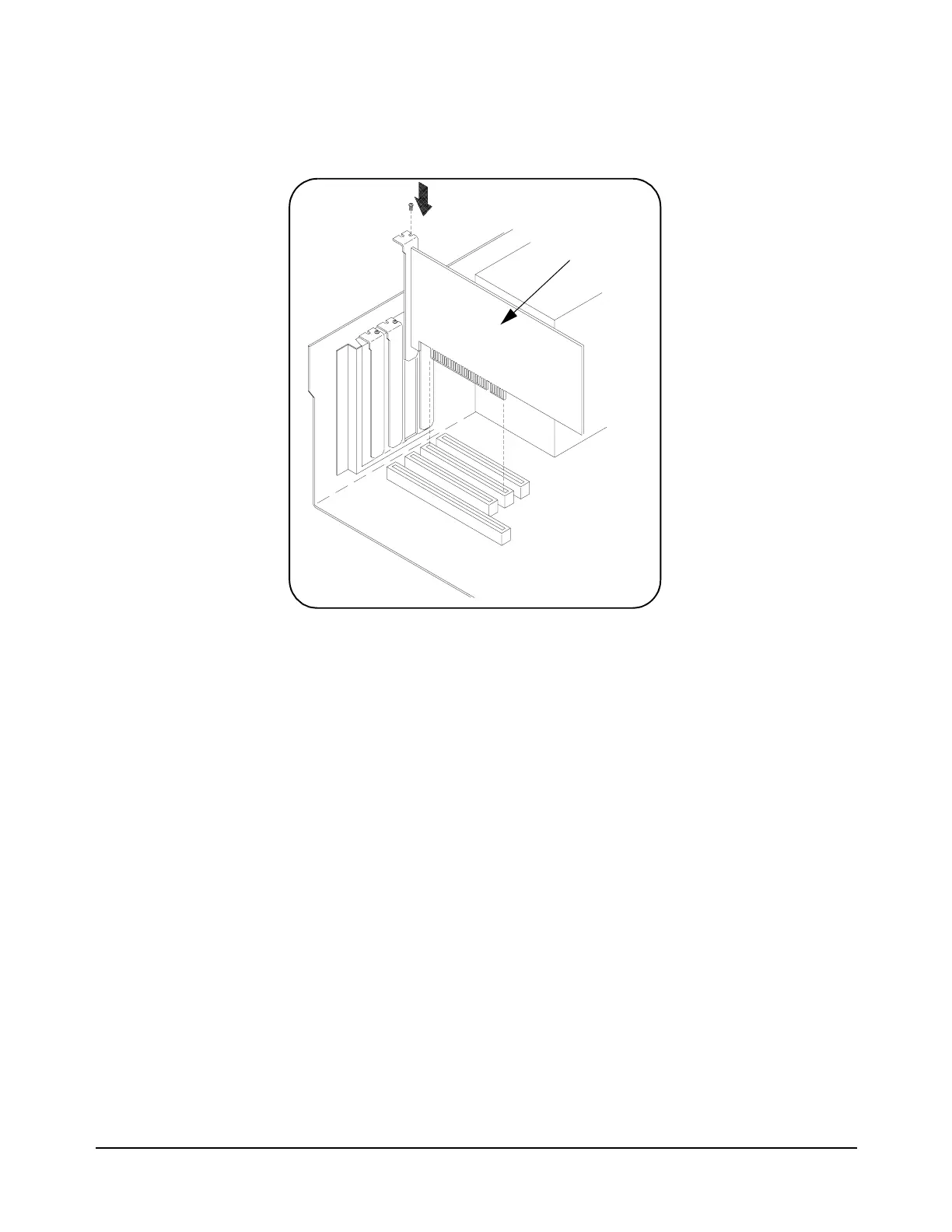
D. Align the bus contacts on the bottom of the host adapter with the PCI
bus slot. Carefully, but firmly, press the adapter into the slot.
E. Secure the host adapter bracket to the computer chassis with the
screw from the expansion slot cover removed in step C.
Connecting the Power Cable
F. Connect the power cable between the adapter and the PC as shown in
Figure 2-5. This provides power from the adapter to devices along the
interface via the interface cable. This allows you to cycle power on
any VXI mainframe in multi-frame systems without affecting other
frames. The power is also available to other IEEE 1394 devices that
may be part of the interface network. The Adaptec
®
host adapter is
capable of supplying 12V with a maximum current draw of 1.5 amps.
Figure 2-4. Installing the Host Adapter.
host adapter
Artisan Technology Group - Quality Instrumentation ... Guaranteed | (888) 88-SOURCE | www.artisantg.com



 To Next Page