Service Reference Guide, dc5000 360201-002 A–3
Connector Pin Assignments
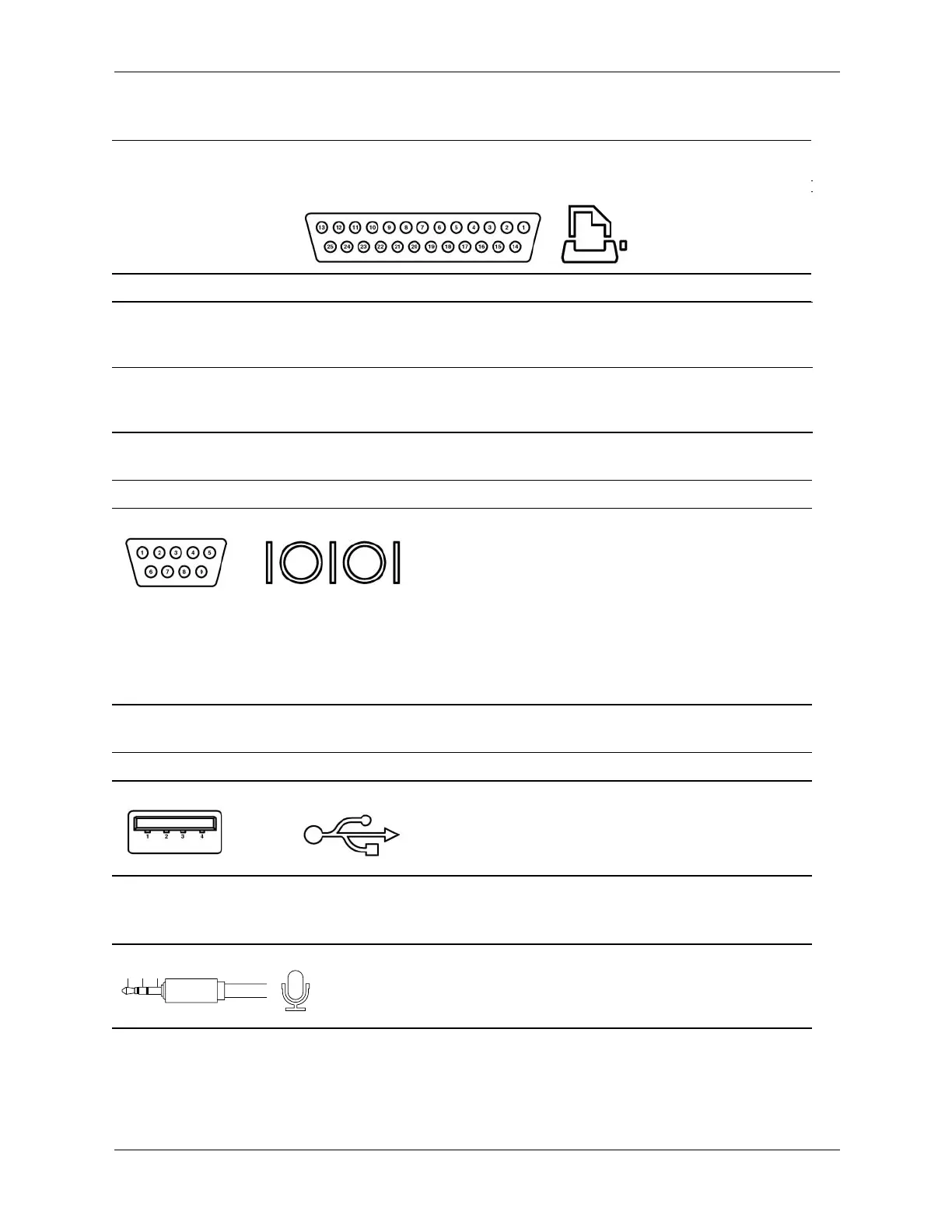
Parallel Interface
Connector and Icon
Pin Signal Pin Signal Pin Signal
1
2
3
Strobe
Data Bit 0
Data Bit 1
7
8
9
Data Bit 5
Data Bit 6
Data Bit 7
13
14
15
Select
Auto Linefeed
Error
4
5
6
Data Bit 2
Data Bit 3
Data Bit 4
10
11
12
Acknowledge
Busy
Paper End
16
17
18-25
Initialize Printer
Select IN
Signal Ground
Serial Interface, Powered and Non-Powered
Connector and Icon Pin Signal
1
2
3
Carrier Detect (12V if powered)
Receive Data
Transmit Data
4
5
6
Data Terminal Ready
Signal Ground
Data Set Ready
7
8
9
Request to Send
Clear to Send
Ring Indicator (5V if powered)
USB
Connector and Icon Pin Signal
1
2
3
4
+5 VDC
- Data
+ Data
Ground
Microphone
Connector and Icon (1/8" miniphone) Pin Signal
1 (Tip) Audio
2 (Ring) Power
3 (Shield) Ground
1
2
3
1
2
3








 To Next Page