23
4.2 Menu Tree
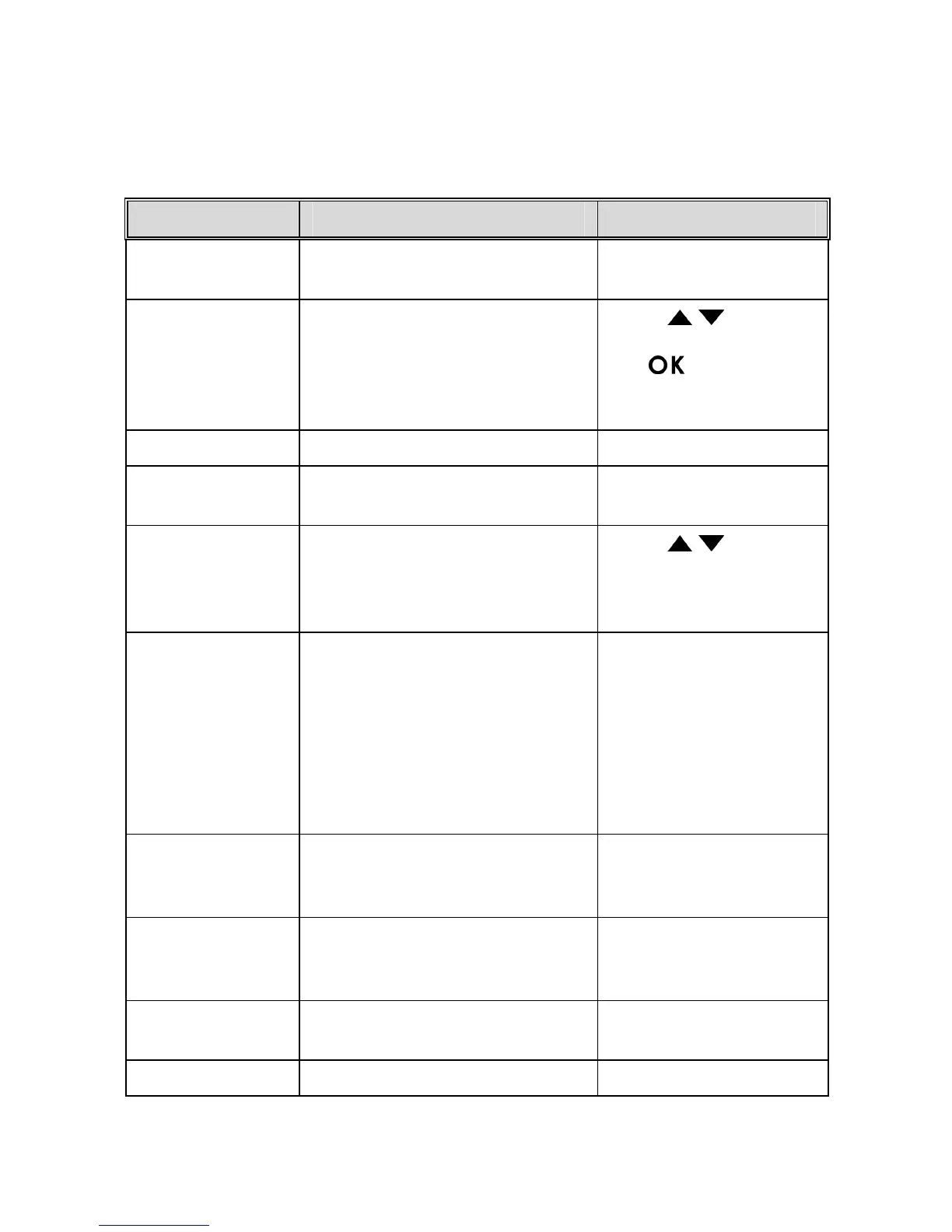
Refer to the below table for details on menu items and available menu
options.
Menu option Description Available option
File Playback
Select the file category that you
want to view.
Video / Emergency /
Picture
Date / Time Set the date and time.
Press
/ button to
adjust the value, press
the
button to
switch the field and
confirm.
Time Stamp Enable/Disable the date stamp. On / Off
Resolution
Set the desired video
resolution.
1080p (1920x1080) /
720p (1280x720)
EV
Set the exposure
compensation.
Press
/ button to
set the exposure level.
You may customize it
between-1.3~+1.3.
Smart
Scene Mode
Driving Priority: Calculates
exposure based on the entire
image area, but provides
greater exposure to the center
of a subject.
Scenery Priority:
Calculates
exposure based on the entire
image area.
Driving Priority/
Scenery Priority
Driver Fatigue
Alert
When enabled, the camcorder
sounds an audible tone after an
hour of driving.
On / Off
LCD Setting
Set the duration for the display
to automatically turn off right
after video recording starts.
On / Turn Off After 30
sec. / Turn Off After 3
min. / Off
Voice Record
Enable or disable sound
recording with the video.
On / Off
Beep Enable/Disable the alarm tone On / Off



 To Next Page