20
3.4 Driving Safety
Note:
1. The
Driving Safety
function is limited to triggering no more than two alarms at the same time. If a
voice and alert message have been triggered, any other alarm will be ignored until either of the two is
settled.
2. Satellite positioning must be completed before functions such as
Speed Cam Alert
,
Speed Position
Management
,
Speed Limit Alert
,
LDWS
and
FCWS
to be enabled. Be sure to check that Satellite
positioning has been completed prior to using the product.
3. The detections of
LDWS
and
FCWS
may be inaccurate when used in rain, at night or in environments
of insufficient lighting. Drivers are advised to exercise discretion based on actual road conditions.
3.4.1 Speed Cam Alert
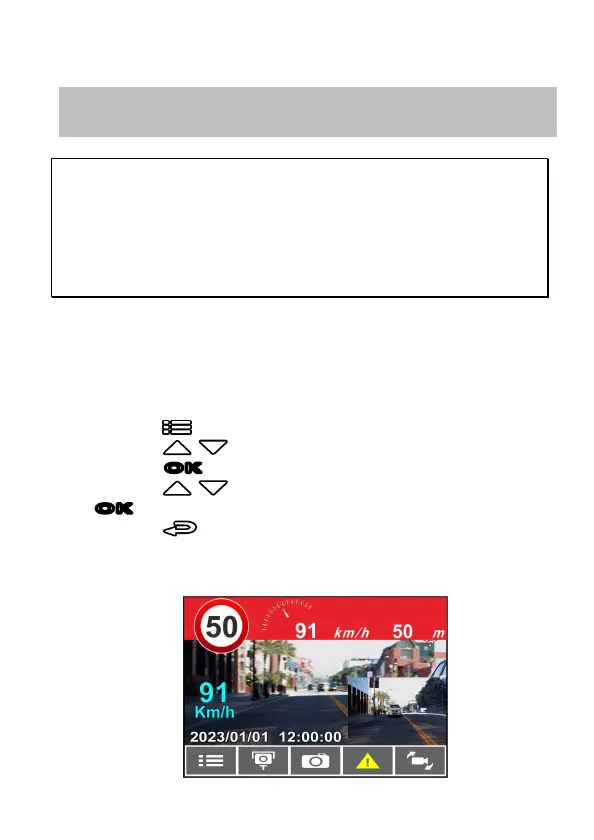
If the Speed Cam Alert function is enabled, once your car’s location is
determined by GPS and approaches a speed cam, this product produces
audible alert and screen message.
To enable the Speed Cam Alert, do the following:
1. Press the button to enter the OSD menu.
2. Press the / button to select Speed Cam Alert, and then
press the
OK
button for entering function menu.
3. Press the / button to select On, and then press the
OK
button to enable the function.
4. Press the button to return recording screen.
5. The alarm screen turns red to remind you to slow down if you are
driving faster than the speed limit.
The following driving safety function is for reference only. Drivers are advised
to exercise discretion based on actual road conditions.



 To Next Page