Pulley replacement only for presses operating at 60Hz frequency
Proprietary and Confidential MKT-0102-AI Rev 00 Page 7 of 10
align_p ulleys_2
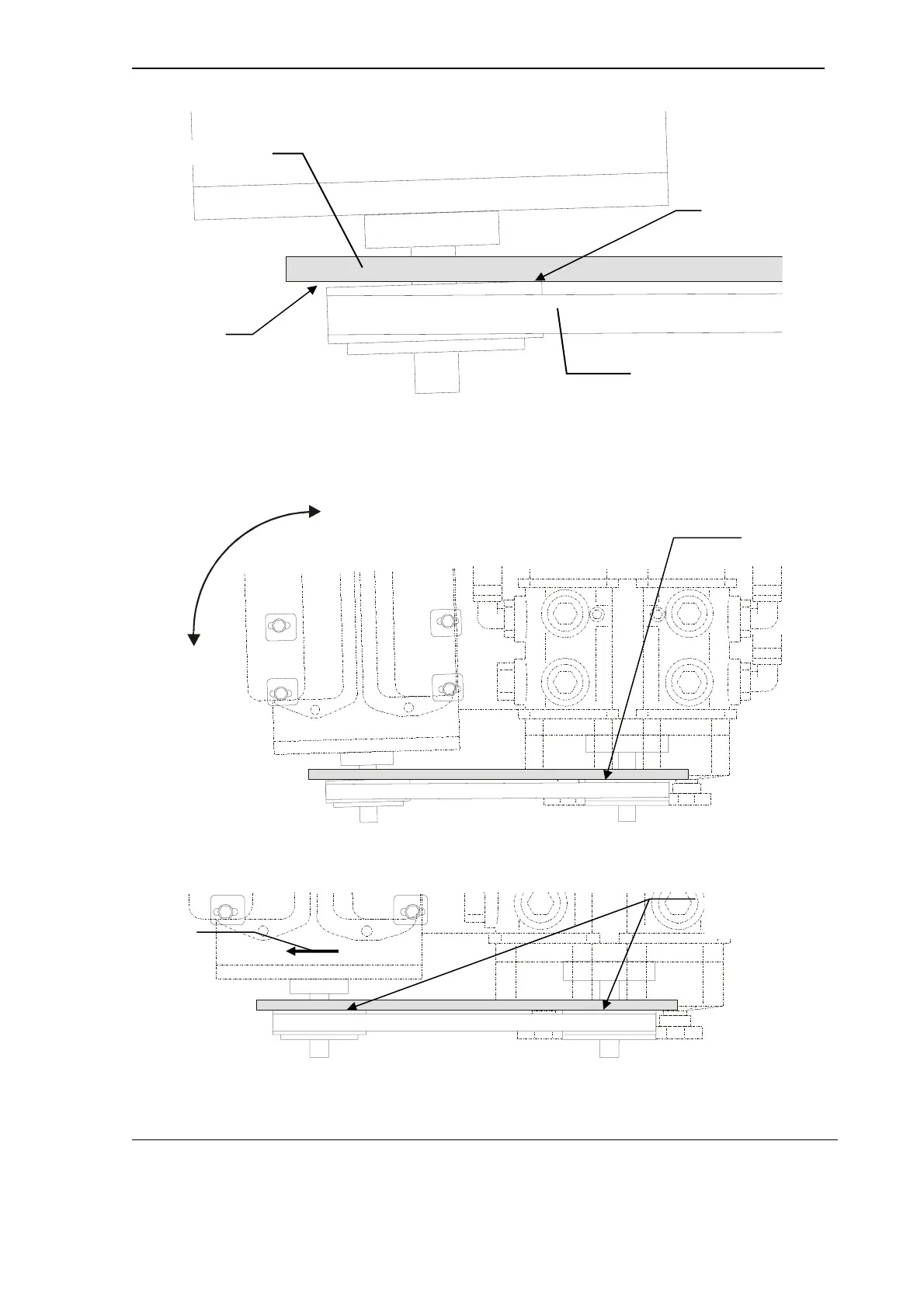
Figure 7 Touching the motor pulley
c. Rotate the motor on its base until the straight-edge makes full contact
across the back surface of the motor pulley (from one side to the
other). See Figure 8 and Figure 9.
align _pulle ys_ 3
Figure 8 Rotation of the motor
alig n_pu lle ys _4
Figure 9 Final alignment of both pulleys
FLAT AGAINST
BACK SURFACE
ROTATE THE
MOTOR ON
ITS BASE
PUMP
MOTOR
SLIDE MOTOR
UNTIL CORRECT
BELT TENSION IS
ACHIEVED.
FLAT AGAINST BACK
SURFACE OF BOTH
PULLEYS
MOTOR
PUMP
PULLEY NOT IN
CONTACT WITH
STRAIGHT EDGE
HERE.
STRAIGHT EDGE
TOUCHES MOTOR
PULLEY HERE
MOTOR
STRAIGHT EDGE
BELT



 To Next Page