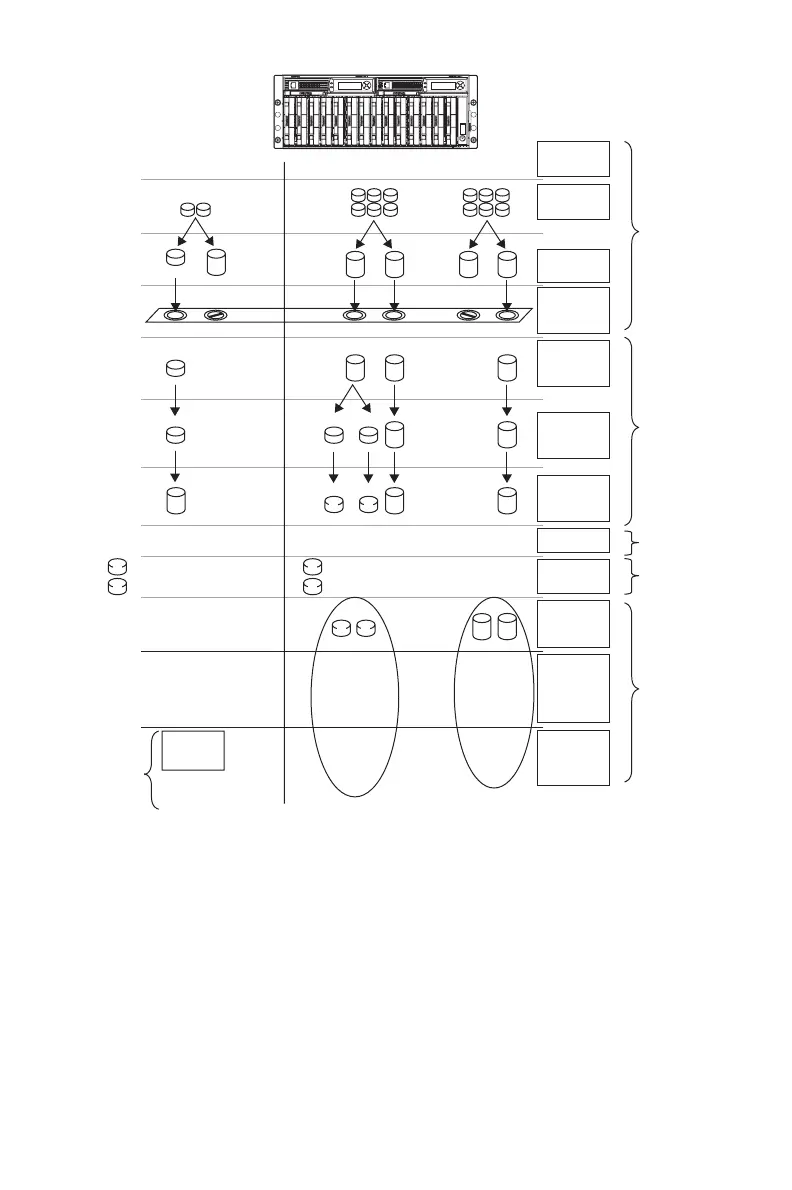
Single Server Cluster Implementation
Physical Disks
Logical Drives
(ACU - MSA1000
only)
RAID Arrays
(ACU - MSA1000
only)
Selective Storage
Presentaion
(ACU- MSA1000
only)
Visible Disks
(Windows Device
Manager)
Partitioning
(WebUI)
NTFS Volumes
(WebUI)
Shadow Copies
(Snapshots)
Cluster Physical
Disk Resources
Fault-tolerant
CIFS/SMB and
NFS File Shares
Cluster Virtual
Server Groups
(Network Name)
(IP Address)
(Cluster Admin)
File Folders
Storage
Elements
Logical
Storage
Elements
File
System
Elements
Shadow Copy
Elements
Cluster
Elements
File
Sharing
Elements
CIFS and NFS
File Shares
\Engineering
\Marketing
\Users \Sales \Engineering
\Marketing
\Users \Sales \Customers
from 02/10/03 09:30 \snapshot.0
from 02/10/03 11:30 \snapshot.1
from 02/10/03 09:30 \snapshot.0
from 02/10/03 11:30 \snapshot.1
Q:
Q:
Q:
R:
R:
R:
R:
T:
S:
S:
U:
U:
\Users
\\VirtualServerA
IP Addresss 172.1.1.1.
\\VirtualServerA
IP Addresss 172.1.1.2.
\Sales
\Marketing
\Engineering
\Snapshot.0
\Snapshot.1
\Sales
\Users
\Customers
\Marketing
\Engineering
\Snapshot.0
\Snapshot.1
T:
Figure 3 Storage Management process example
Physical storage elements
The lowest level of storage management occurs at the physical drive level.
Minimally, choosing the best disk carving strategy includes the followi ng
policies:
32
Storage Management Overview



 To Next Page