1. CD-RW/DVD-ROM
2. HDD 0, 1
NOTE:
This is logical drive 1 as presented by the SATA RAID controller.
3. PXE (net work boot)
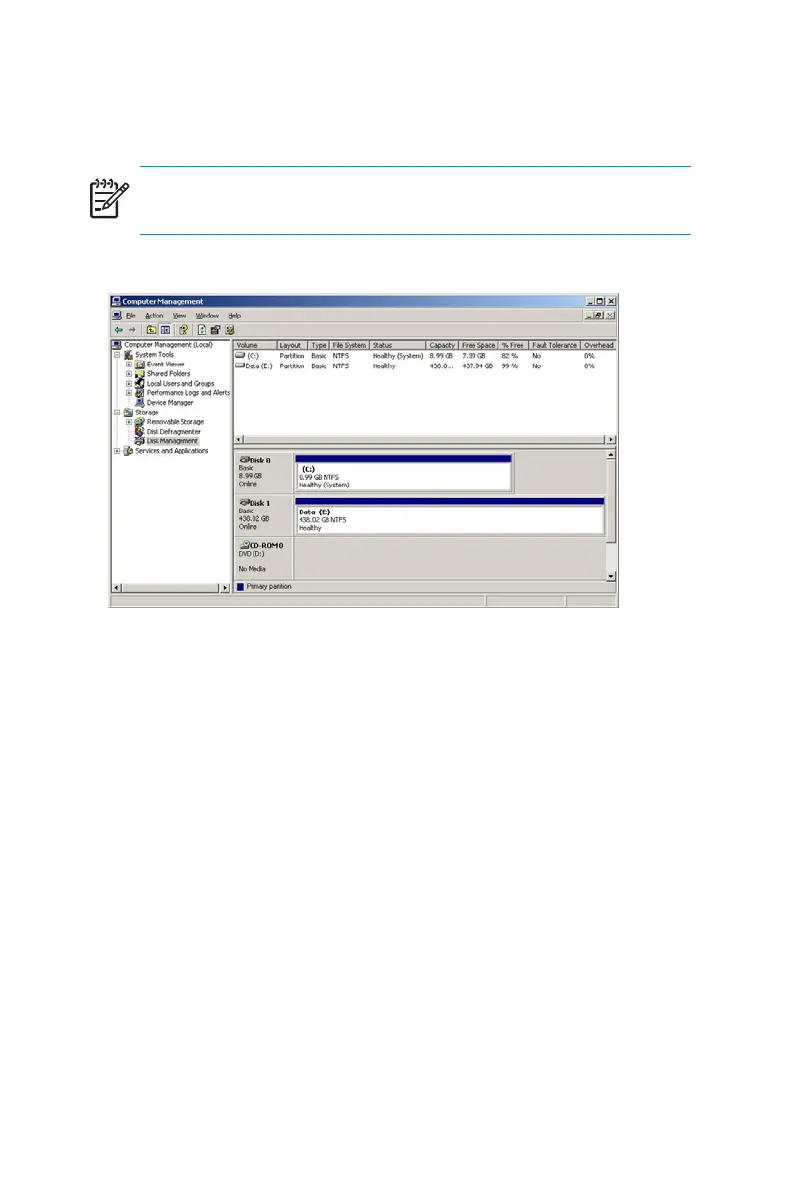
Figure 12 Disk management, partitioning (ML110 G2
Workgroup)
Under normal circumstances, the ML110 G2 (Workgroup) storage server
boots up from the OS logical drive. If the system experiences a drive
failure, the Adaptec 2410SA sounds an audib le alert to inform the user of
adrivefailure.
• If a single drive failure occurs, it is transparent to the OS.
• Ifaseconddrivefails,thedatavolumeislostandmustberestored
from backup.
WhentheprimaryOShasafailuresuchassystemfiles becoming
corrupted, registry corrupted, and the system hangs during boot, the system
should be restored to the factory default state using the Quick Restore DVD.
TheusershouldbackuptheiruserdataandthenusetheQuickRestoreDVD
to restore the system to the factory default state as soon as conveniently
possible.
52 Server Storage



 To Next Page