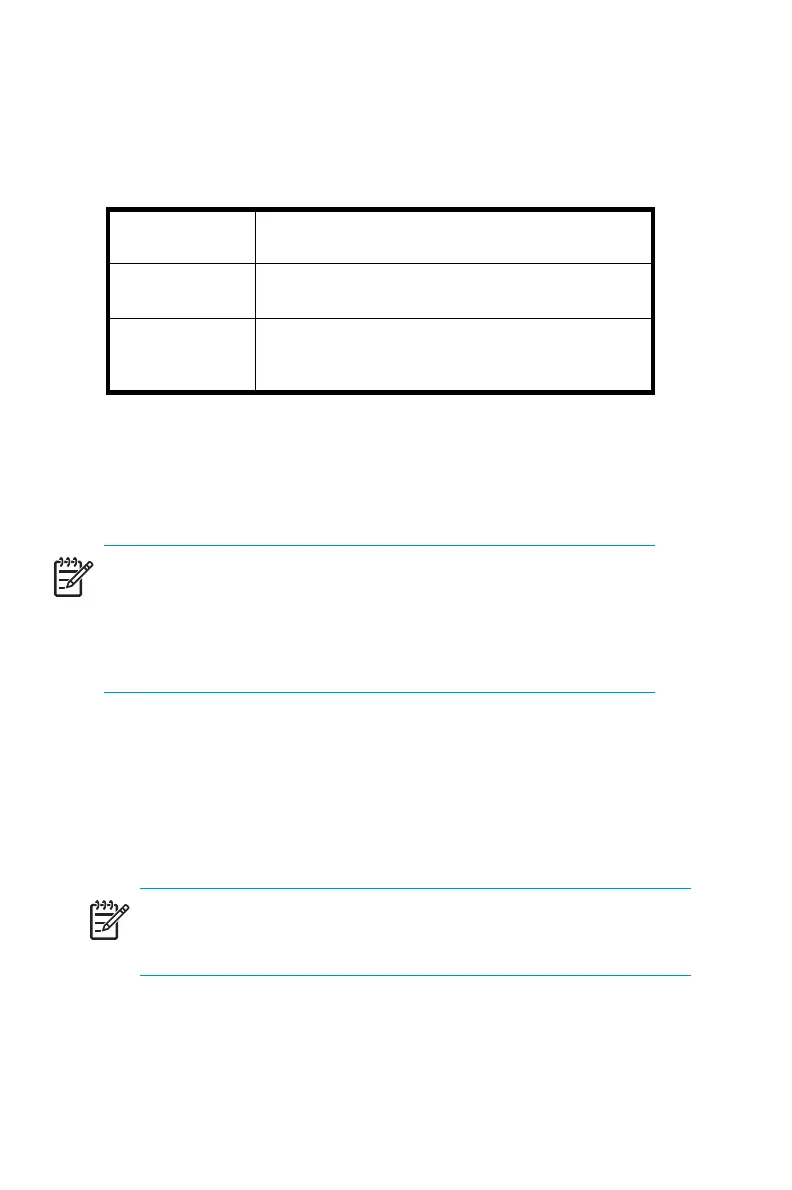
Table 9 RAID configuration by logical drives
Logical Drive 1
Partition C: 9GB Primary OS - RAID 1 Mirror
spanning physical drives 0 and 1
Logical Drive 2 Partition D: 9GB Secondary OS - RAID 1 Mirror
spanning physical drives 2 and 3
Logical Drive 3 Partition F: Data volume using remaining di sk
space-RAID5volumespanningphysicaldrives
0, 1, 2, and 3
NOTE:
In Adaptec Storage Manager, logical disks are labeled 1, 2, and 3.
In Disk Manager, logical disks are displayed as 0, 1, and 2. The
default configuration for the data volume can b e modified using the Disk
Management utility. Refer to the administration guide for additional
information.
The BIOS supports the following default boot sequence:
1. CD-RW/DVD-ROM
2. HDD 0, 1, 2
NOTE:
This is logical drive 1, 2, and 3 as presented by the SATA RA ID
controller.
3. PXE (net work boot)
44
Server Storage



 To Next Page