HP 19” Color Monitor User’s Guide
Adjusting Your Monitor
16 EnglishEnglish
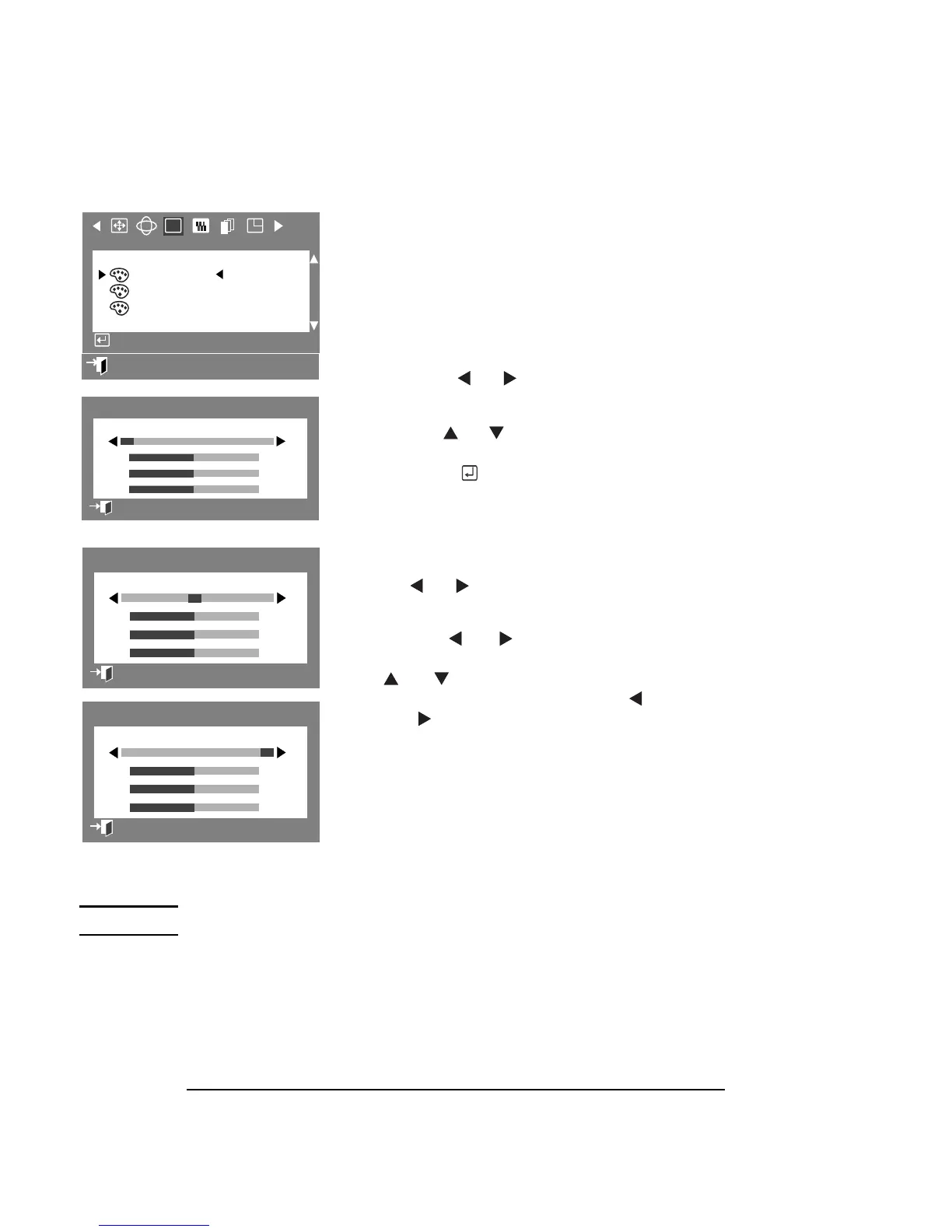
COLOR
The color temperature is a measure of the
“warmth” of the image colors. The available
range is from 5000 to 9300K.
This parameter allows you to adjust
individual R, G, B color control.
1 Press the Menu button.
2 Press the or buttons to display
the Color OSD.
3 Use the or button to highlight
either Color 1, Color 2, or Color 3, then
press the button to open the Color
1, Color 2, or Color 3 adjustment OSD.
4 The current color temperature is
displayed between 9300 and 5000, in
the center at the top of the OSD. Use
the or buttons to adjust the
color temperature.
5 Use the or to adjust to the
desired color temperature. Use the
or buttons to select R(ed),
G(reen), or B(lue) then use the
and for color adjustment.
NOTE Recall does not reset the color settings.
:
Exit
RGB
Color
Color1
Color2
Color3
Access Function
:
50
50
50
9300 9300K 5000
R
G
B
Color1
PreviousMenu
50
50
50
00 500 5000
Color2
Previous Menu
50
50
50
00 5000 5000
Color3
Previous Menu



 To Next Page