EnglishEnglish 17
HP 19” Color Monitor User’s Guide
Adjusting Your Monitor
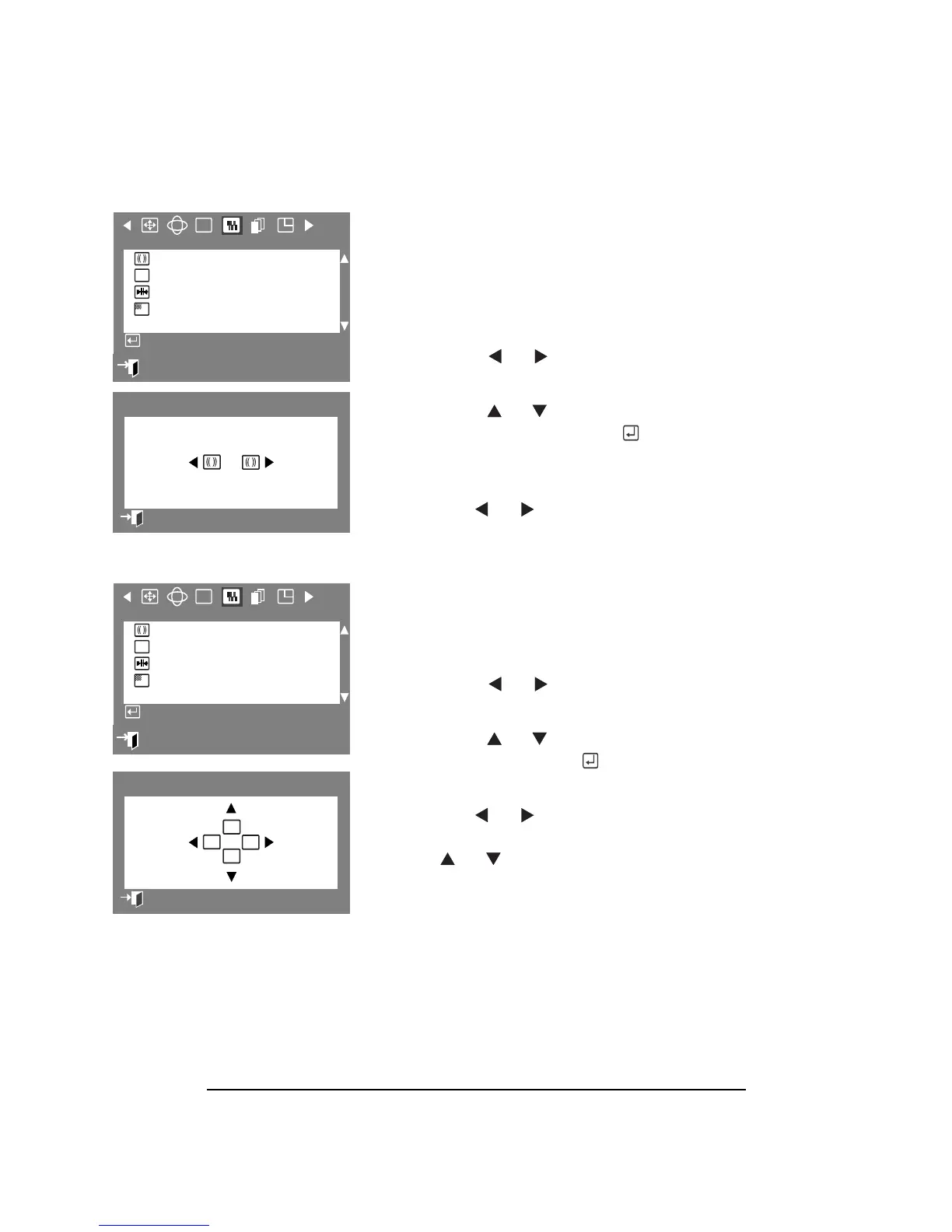
CLEAR MOIRÉ
A “moiré” pattern can appear on your OSD,
looking like a series of concentric circles or
arcs. The Clear Moiré parameter allows you
to remove the interference.
1 Press the Menu button.
2
Press the or button to display
the Screen OSD.
3 Press the or buttons to highlight
Clear Moiré, then press the button
display the Clear Moiré adjustment
OSD.
4 Use the or buttons to adjust
horizontal moiré.
FOCUS
The Focus parameter allows you to sharpen
the picture.
1
Press the Menu button.
2 Press the or buttons to display
the Screen OSD.
3 Press the or buttons to highlight
Focus, then press the button to
display the Focus adjustment OSD.
4 Use the or buttons to adjust the
left and right areas of the screen. Use
the or button to adjust the top
and bottom areas of the screen.
:
Exit
RGB
F
Screen
Clear Moiré
Focus
Convergence
Purity
Access Function
69
Clear Moiré
Previous Menu
:
Exit
RGB
F
Screen
Clear Moiré
Focus
Convergence
Purity
Access Function
1
Fv
Fh
Fh
Fv
Focus
Previous Menu



 To Next Page