EnglishEnglish 21
HP 19” Color Monitor User’s Guide
Adjusting Your Monitor
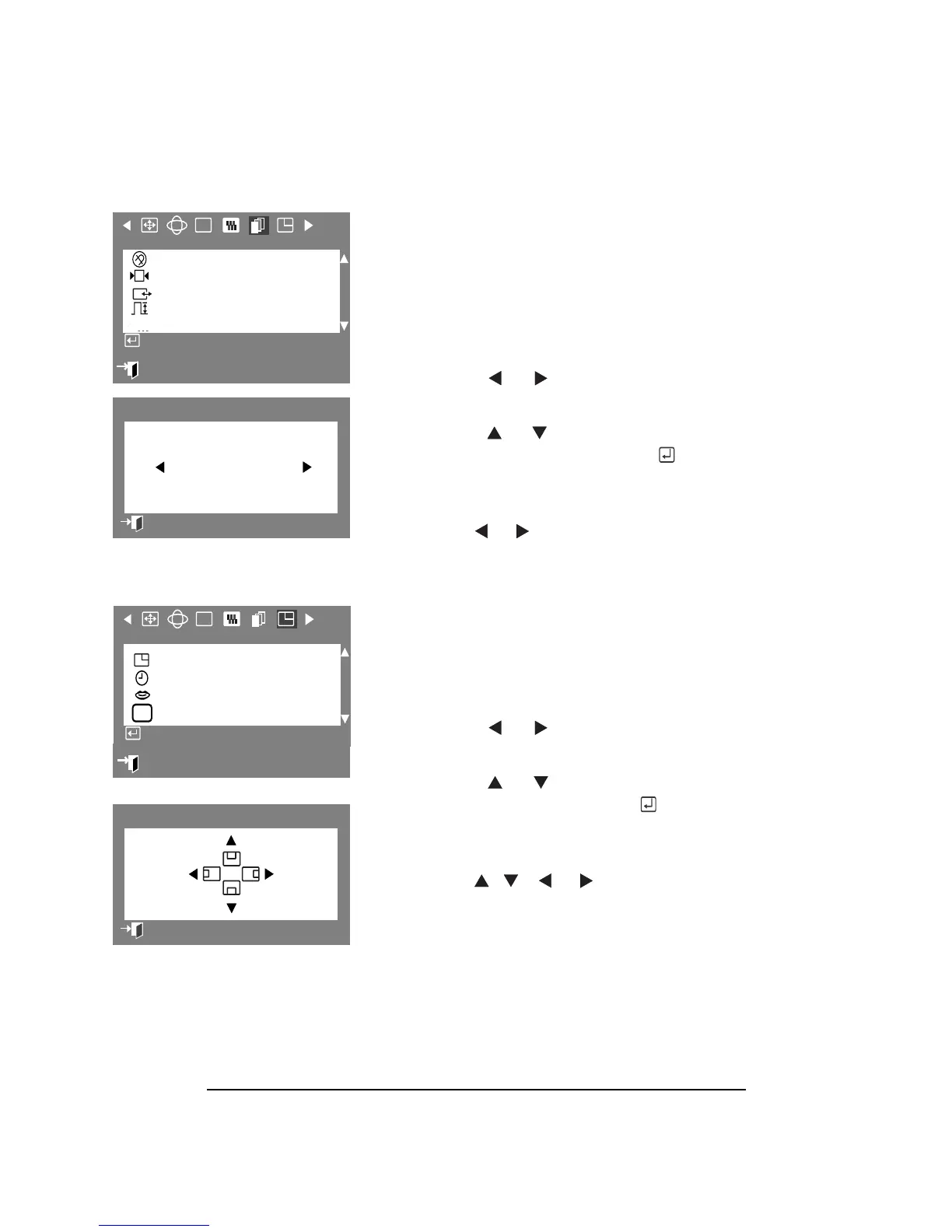
VIDEO INPUT LEVEL
Some video cards use video signals higher
than 1.0 V which causes the display to be
very bright. The Video Input Level parameter
allows you to select the level that is best
suited to your computer’s video card.
1 Press the Menu button.
2 Press the or buttons to display
the Advanced OSD.
3 Press the or buttons to highlight
Video Input Level, then press the
button to display the Video Input Level
selection OSD.
4 Use the or buttons to select 0.7 V
or 1.0 V.
MENU POSITION
The Menu Position parameter allows you to
change the place where the OSD menu
appears on your monitor.
1 Press the Menu button.
2 Press the or buttons to display
the Menu OSD.
3 Press the or button to select
Menu Position, then press the
button to display the Menu Position
adjustment OSD.
7 Use the , , or buttons to
place the menu where you prefer it.
:
Exit
RGB
Advanced
Degauss
Recall
Sync. Input Type
Video Input Level
D-SUB/BNC
Access Function
Video Input Level
0.7 V 1.0 V
Previous Menu
RGB
Menu Position
Menu Duration
Languages
Timing
H
Access Fonction
:
Exit
Information
Menu Position
Previous Menu



 To Next Page