Chapter 4 Procedures
34
2OG6W\OH
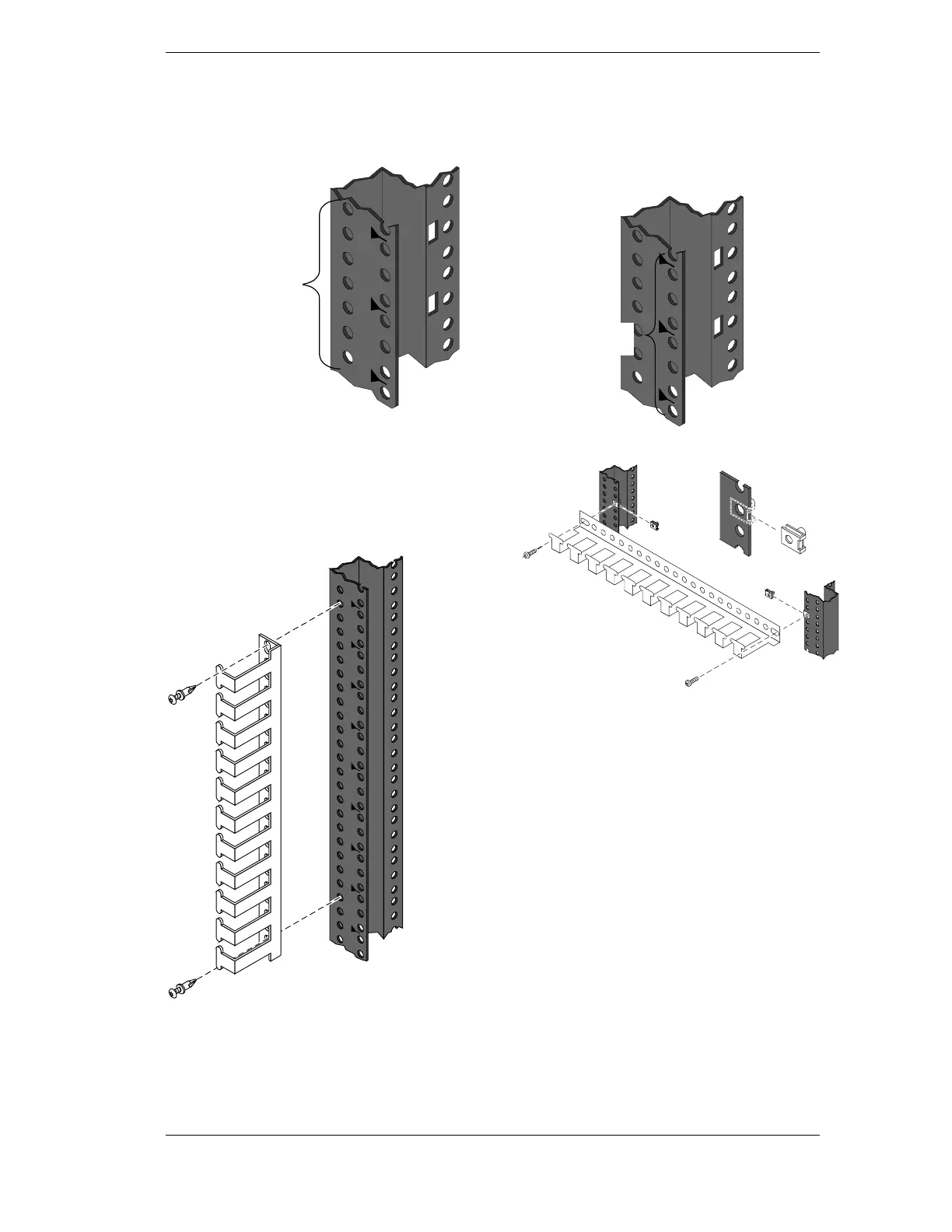
Use these instructions for attaching the Cable
Guide to the old style unnumbered column,
shown below.
Attach Cable Guide
to these holes
2SWLRQ$
Vertical attachment.
Align Cable Guide so the fasteners fit in the
holes at the outside of the column. Push plastic
fasteners through the Cable Guide into column
holes. If threaded inserts are positioned at
attachment points, secure the Cable Guide with
machine screws.
NOTE: If you push the screw into the
fastener before attaching to the rack
column, the fastener will expand, making it
difficult to attach the cable guide to the
rack.
2SWLRQ%
Horizontal attachment.
Install sheet metal nuts over desired holes in
both columns. Secure Cable Guide with
machine screws.
Attach Cable Guide
to these holes



 To Next Page