Chapter 4 Procedures
35
Installing Side Panels
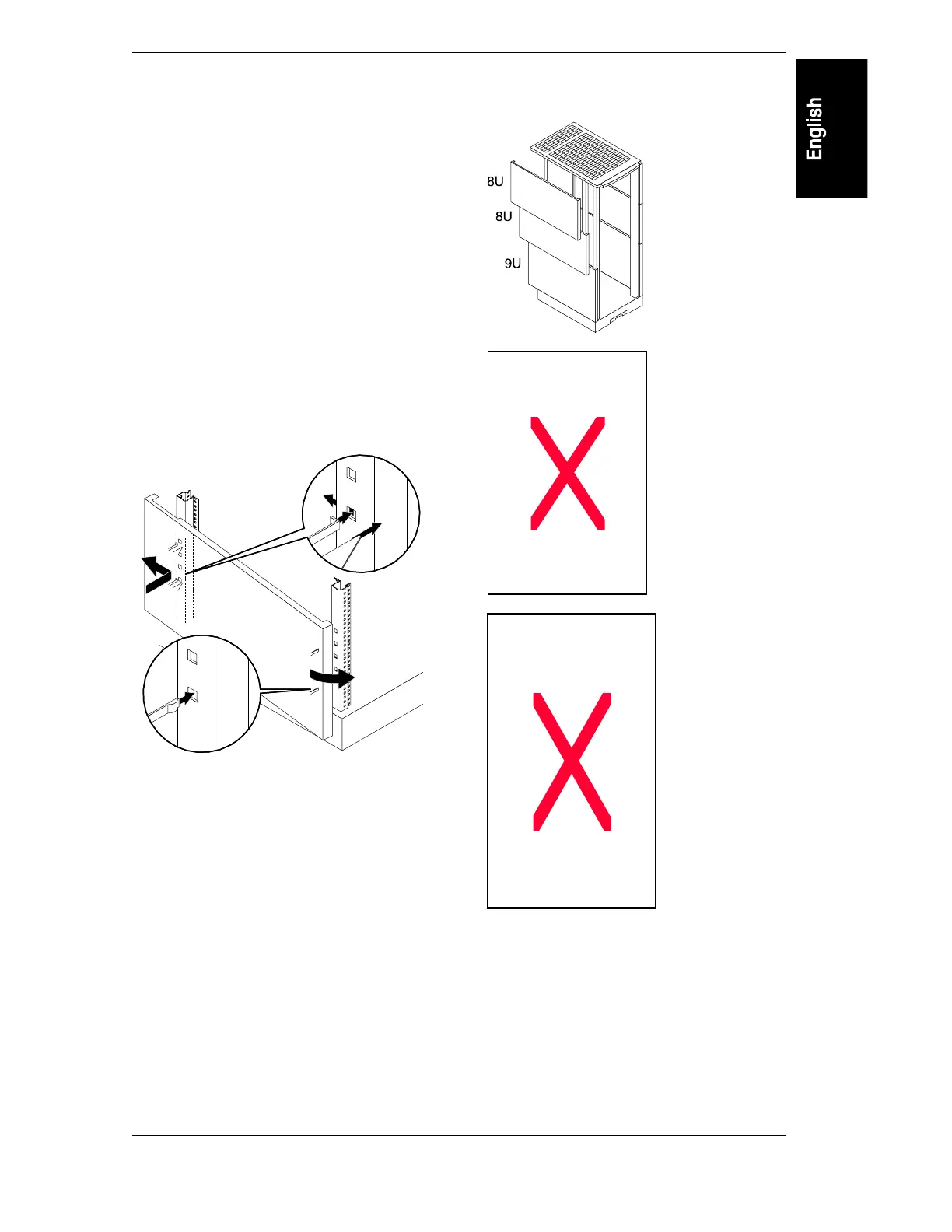
The side snap off and on. All side panels are
eight EIA units in height, except the bottom
panel – it is nine EIA units.
Contents
2 Side Panels (9 EIA) all kits
4 Side Panels (8 EIA) for 1.25 m
6 Side Panels (8 EIA) for 1.6 m
8 Side Panels (8 EIA) for 1.96 m
Tools Needed: None.
67(3
Position 9 EIA unit Side Panels at the
bottom of the rack.
Position the nine-EIA units so the tab fits into
the lowest column hole that will accept it.
67(3
Push.
The Side Panels snap into place with a small
push. Hook the rear of the Side Panel into
place, and press onto the front column.
67(3
Install all remaining Side Panels.
The Side Panels all install the same way. There
are no gaps between panels when properly
installed.
Hold front and back ends of a Side Panel and
give a firm and gentle tug to remove.



 To Next Page