Chapter 4 Procedures
33
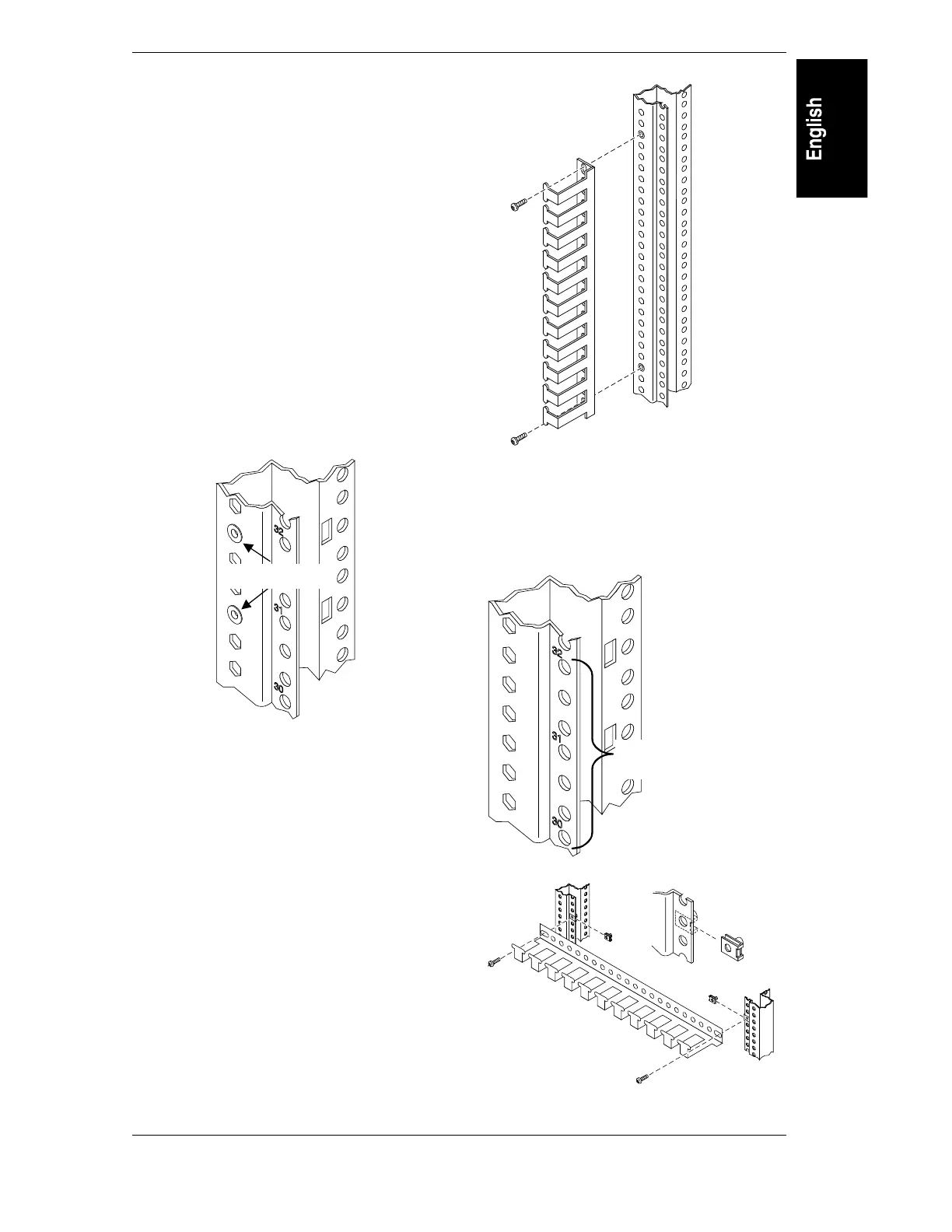
Installing Cable Guide
This instruction is for both old and new style
columns. The new style is presented first. This
instruction is for all rack sizes.
Contents
2 Cable Guide
10 Screw, Plastic Fastener
4 Screw, machine M5 x
4 Sheet Metal Nuts
Tools Needed: Torx 20 Driver (for plastic
fasteners)
Torx 25 Driver (for machine screws)
1HZ6W\OH
Use these instructions for attaching the Cable
Guide to the new style numbered columns,
shown below.
Threaded inserts
2SWLRQ$
Vertical attachment.
Align Cable Guide so the attachment points lie
over threaded inserts. Secure with machine
screws and Torx 25 driver.
2SWLRQ%
Horizontal attachment.
Install sheet metal nuts over desired holes in
both columns. Secure Cable Guide with
machine screws.
Use these holes
for horizontal



 To Next Page